RDM Freeze because of FreeRDP

Quite often, RDM freeze because of stuck FreeRDPSandboxed process, which drain Macbook batery really fast if I dont notice that. If I kill FreeRDPSandboxed from terminal, RDM works just fine without the need to restart it or anything.
Untitled.png
All Comments (4)
Hello,
If you head over to Remote Desktop Manager -> Preferences -> Types -> RDP, you can set the Activate Sandboxing option to False. Could you give it a try and tell us if the issue persist? 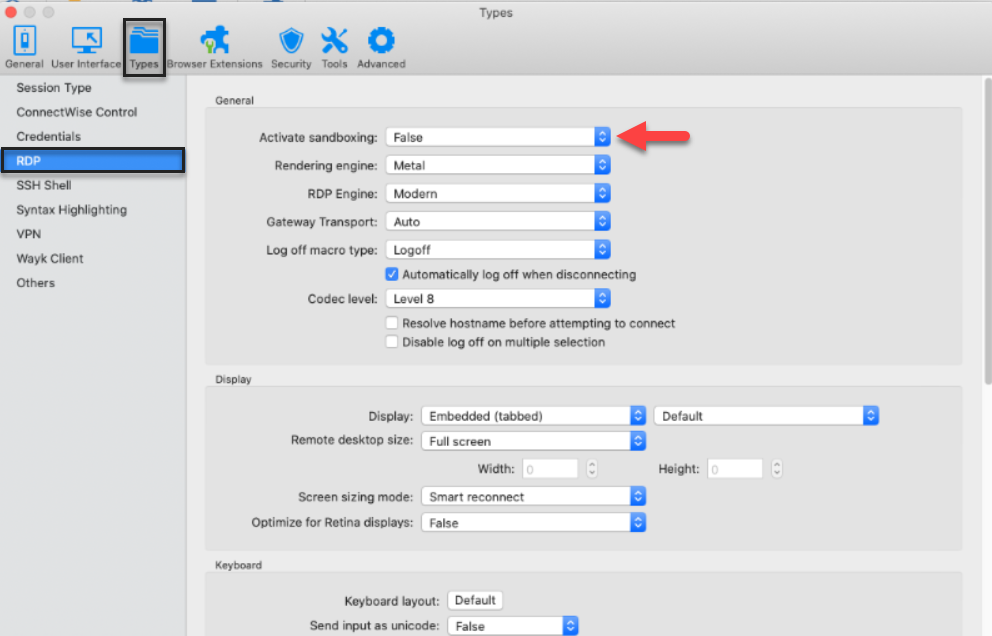
Best Regards,
Etienne Lord
Sandboxing.png
Hi Martin,
Being able to reproduce the issue would go a long way to help us fix this. Do you have any idea of what could cause the FreeRDPSandboxed to become unresponsive like this? Is it when losing the connection (i.e. VPN disconnecting, losing the network connection, etc.)? Is it when doing something specific?
Best regards,
Xavier Fortin
Hi, I was forced to change it back to sandboxed, because the whole RDM started to freeze at any RDP connection attempt.
Yes, I think it was related to network disconnects or VPN delays.
Its kind of random, didnt happen since Big Sur upgrade, but it was just 2 days so far...
Hi Martin,
I think it might be related to an opened issue. An issue in which the external process would start using to much CPU while "waiting" for the connection to be available. I'll add a mention in the ticket referring to this thread.
Best regards,
Xavier Fortin