Documentation - Multiple URL Options
0 vote

The "Confluence documentation url" feature is great, all my customer site folders are linked to that customers confluence home page. One feature I would love to see added is the option to have other URL sections which can be named and linked appropriately. For example, we use an IP Management tool and it would be great to have the ability to name a tab IPAM and have it point to the URL for that sites IP info. I could add another tab called RMM that links to a our RMM site. Linking multiple URLS opens up a lot of possibilities! I can think of so many use cases.
All Comments (8)
I agree, we have started to use the field as well, but we do not use Confluence. So the feature is great, but it does not really make sense for our users to press the "Confluence"-tab in order to get to our documentation tool. So it would be great if the tab could be renamed. And I also see a great potential if we where able to add more tabs.
Hello,
Thank you for contacting us on that matter!
After having a discussion with our Engineering Department they mentioned that they will add these requests to their to do list. In the meantime, you could use the "Home Page" section of your entries to store the URL leading to your different page: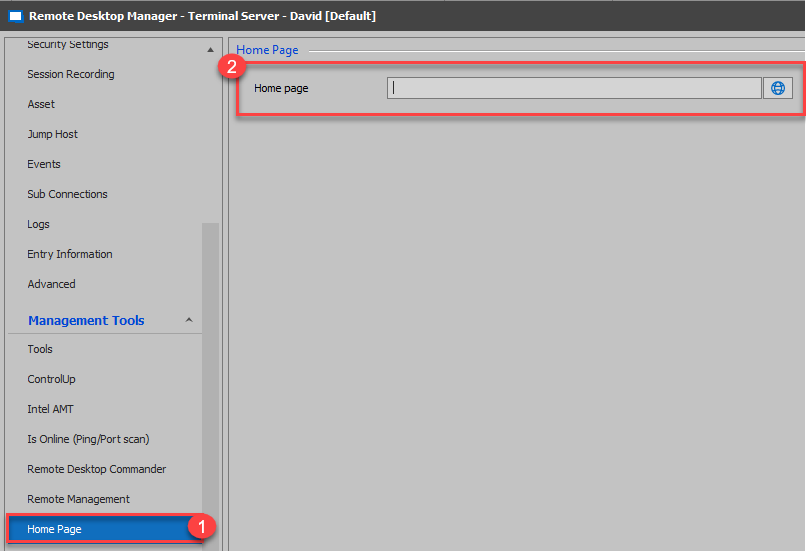
This option add the following section to your Dashboard: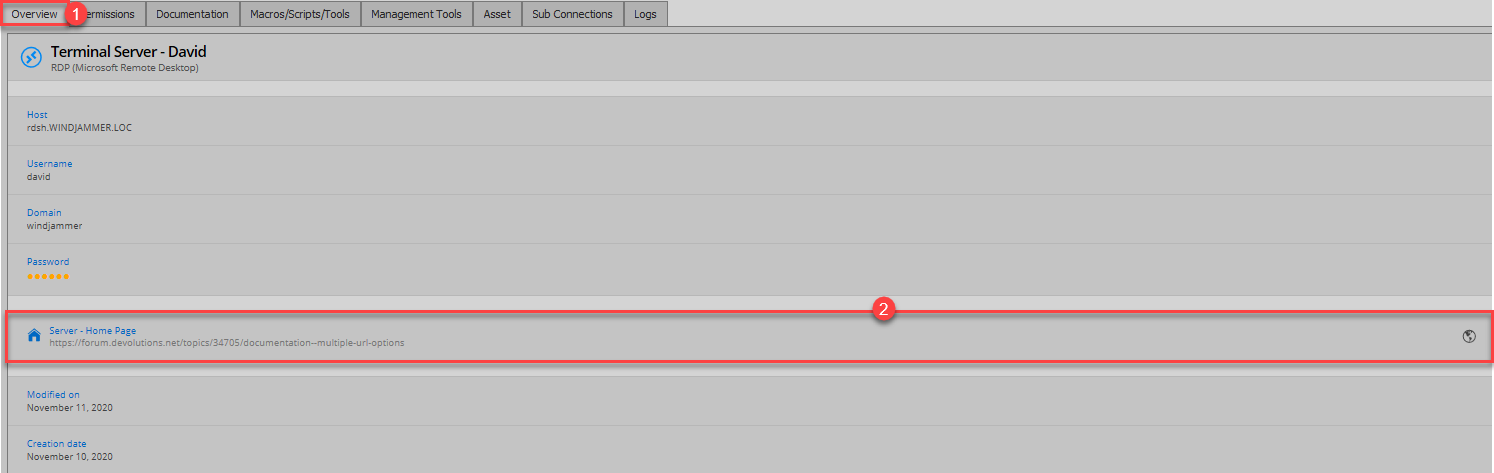
Through this section, your users will be able to use the "Globe" icon to navigate to the web page configured in the "Home Page" section of your entry.
Best regards,
James Lafleur
Server_Home_Page.png
HomePage.png
Hello,
I'm curious. What other documentation tool do you use?
Regards
David Hervieux
Thank you very much!
What we use is actually more of a monitoring system, we can get very good information about the hardware/software etc. It is developed in house.
We have been thinking about integrating the system more with RDM (fill in asset information daily in RDM using powershell). But when having a tab (now named "Confluence") we can see live data of the servers.We find that even more useful.
Hello again!
I saw that you have released the rename tab feature in 2020.3.18. Thank you!
I experimented a little bit with it, but I didn't get to work. I just did a dummy test but got this:
- Why is the URL not valid? I haven't succeeded with any valid URL really.
When I click "yes" the Documentation-tab disappears and a Confluence-tab appears. The tab shows the URL, but tab name remains "Confluence".
- Why did the Documentation-tab disappear?
- Wasn't the tab-name supposed to change name?
When I go back into properties the field "Documentation title" is blank again.
When I check entry history I cannot see that "Documentation title" was saved in the XML.
RDM 2020.3.18 ED
DVLS 2020.3.12.0
Database version 669
Hello,
I suspect that my change did not make the cut for DPS and it's not saved. I will check with the team
Regards
David Hervieux
Hello,
any updated when we will have this working in DPS as Data Source?
Regards
Andreas
Hello,
Thank you for your reply on this thread.
Are you still using DVLS 2020.3.12?
I have tested it in the latest DVLS version 2020.3.17 and RDM version 2020.3.29. RDM allows me to set a valid URL. And then going on the tab, it loads the web site properly.
We recommend following the instructions on this online help page to perform the upgrade
https://helpserver.devolutions.net/index.html?upgrade_rdms.htm
We also offer a free remote session to assist you during the upgrade process of your DPS instance. If you would like to book a session, please send an email to ticket@devolutions.net and we will send you a link to book the upgrade session.
Best regards,
Érica Poirier