RDM 2020.3.16.0 Broke OpenVPN "Use Auth" checkbox missing!

It seems the latest version of RDM broke OpenVPN. The "Use Auth" checkbox is missing and that's a bit of a problem when one is dependent upon it! I uninstalled the latest version, re-installed old version, the "Use Auth" checkbox is available again and I can VPN into my network, but this needs to get fixed ASAP.
All Comments (2)
Hello,
Could you see if you have the "enable automatic authentication" checked in the login tab?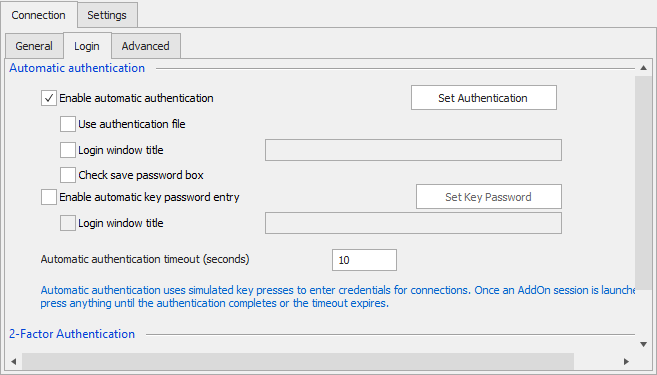
If "enable automatic authentication" isn't checked, RDM won't send the credentials to OpenVPN.
The reason why the "use auth" checkbox was removed is because it interacted illogically with the "enable automatic authentication" checkbox. The goal was to simplify the configuration of the entry. Before that you had to check both "use auth" and "enable automatic authentication" for the credentials to be sent properly, especially with 2FA.
It's possible we missed a use case that was only possible through having the two options, if so please let us know and we'll change it back.
Regards,
Hubert Mireault
2020-11-10_11-38-46.png
Hello,
I've been investigating and I suspect you were using OpenVPN without storing credentials in RDM, which would be the one scenario we must not have tested against. For that reason we'll roll back these changes and the option will come back in RDM 2020.3.17.0.
Instead, we will automatically check the "use auth" checkbox if the option for "enable automatic authentication" is checked, since they should be working hand in hand. This should allow you to have "use auth" checked while not using credentials stored in RDM.
Regards,
Hubert Mireault