SQL Query

Hi, i ran an SQL script on our azure database to batch update some Connection names.
However, RDM doesn't appear to be recognising the changes?
All Comments (13)
You must likely only changed the Name field. Note that the "real" name value is actually stored in the Data (& Meta) field(s) as an XML or encrypted-XML (if you are using the security provider).
I would recommend you use PowerShell to perform the name changes.
Changing the underlying SQL database via SQL statements is not officially support and done at your own risk.
Best regards,
Stéfane Lavergne
Ah i see. OK thank you.
Is it possible to batch change the name of RDP connections via the powershell?
Hello,
We have a video on https://help.remotedesktopmanager.com/commands_batchedit.html, let us know if you need further help after consulting it.
Best regards,
Maurice
Hi, the video dind't really help. The post above suggested i user the powershell, not batch edit.
I'm looking to either mass update the Name or (preferably) the Tab Page Title of my connections.
However, they will all be different - i need them to take their name from the folder/group that they're in (they are all in separate folders/groups).
Is this possible?
Hello,
It should be possible to accomplish something via PowerShell. Could you post a screenshot of what you would like to change exactly?
Best regards,
Jeff Dagenais
Hi,
So, here is an example of what our setup is like. Each of our clients have their own folder, with a couple of entries each: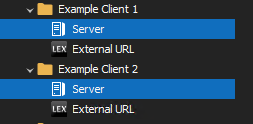
I would like to update the 'Tab Page Title' for all of the individual entries in the folders ('Server' and 'External URL' in the above example).
The 'tab page title' will need to be taken from the folder name ('Example Client 1' etc).
Is this possible?
field.PNG
folders.PNG
Hi,
Well, a full fledged PowerShell script may be the proverbial bazooka to kill a mosquito in your case.
Simply selecting the entries, then using the "Batch Actions - Custom Powershell Command" gives you all of the power of our powershell cmdlets, but without having to handle the connection context and the initial query/filter
Lets say you want to modify a bunch RDP files....
- Use the advanced search
- rather then searching by name, replace by the "Connection Type" option
- select "RDP" in the dropdown to the right
- click "search"
- click on "Select in navigation pane"
- Go in Edit - Batch Actions - Custom PowerShell command
- type the following (you need to escape dollar signs with the backtick) and press Ok
$connection.Name = "MyDesiredName - `$HOST`$";
$RDM.Save();
If you have used our specialized folder types, lets say CUSTOMER, you can use them as well
$connection.Name = "`$CUSTOMER_NAME`$ - `$HOST`$";
$RDM.Save();
As you can guess, this is a simple task to repeat at will and no need to bother with a complex set of operations prior to even getting the proper connections in context. My own library of scripts has become dusty over time, I replaced them with a simple wiki with my favorite custom PowerShell commands... much simpler for 99% of my use cases
Maurice
With your request, the command now becomes
$connection.TabTitle = "`$CUSTOMER_NAME`$ - `$HOST`$";
$RDM.Save();
Maurice
Thanks! This is looking promising, although i am struggling to get it to work.
Our folders aren't specialised, they are just standard folders. What would i need to use instead?
Hello,
in this case the command would be:
$connection.TabTitle = "`$GROUP`$ - $`HOST`$";
$RDM.Save();
Regards,
Min
This seems to have updated as follows??
Screen Shot 11-09-20 at 05.27 PM.PNG
Hello,
exactly - this variables will be resolved on execution. Did you opened a session and verified the new tab title?
Regards,
Min
Hi,
Sorry, my mistake! It's working perfectly.
Thanks for all of your help on this.