Cisco AnyConnect GUI instead of CLI?
0 vote

One of our main clients has changed from Cisco AnyConnect and DUO to now using Cisco AnyConnect and Microsoft MFA. The problem I'm running into is it doesn't seem that it will be possible to get this to work with the CLI. When I try I get the following message:
"The requested authentication type is not supported in AnyConnect CLI."
When I use the GUI, AnyConnect spawns a small web page window showing the Microsoft login page, where I put in my email address, then it loads the second page where it asks for my password, then after that it either sends me a text message code that I have to put in or I use a 6-digit 2FA/MFA token.
I don't mind sharing screen shots or even a short video if it helps to understand the changes we're facing, just let me know if and how I can help.
Thanks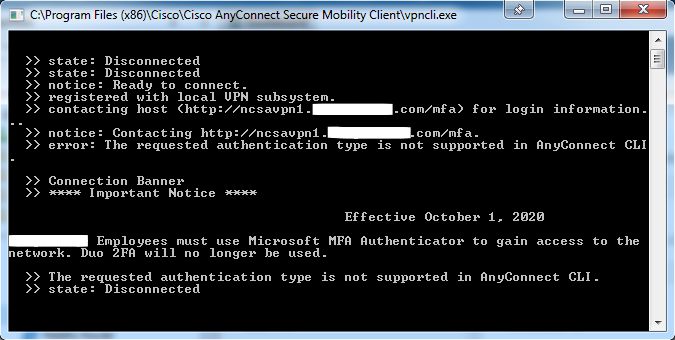
AnyConnect CLI error.jpg
All Comments (3)
Hello,
Does the Cisco AnyConnect GUI itself have a command line or something like that? In the past it didn't, which is why we integrated Cisco AnyConnect by using vpncli.exe. You also have to keep in mind that we don't have the environment to test this particular add-on, so it makes modifying it more difficult if we don't have much information.
Regards,
Hubert Mireault
@Hubert,
IDK anything about the GUI having a CLI, however are there some other mechanisms in RDM that we can use to achieve the login process for this authentication flow with MFA enabled for AnyConnect?
Hello,
It could be possible to use the Typing Macros to achieve the login process but we must keep in mind that if we switch the focus on another application, then the typing macro will run on that application instead.
Let us know if it's a viable workaround!
Best regards,
Érica Poirier