Missing buttons for user and password

Hello ,
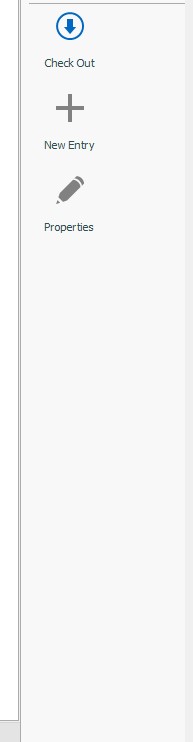
I have issue with missing buttons for user and passwords . ( Check the picture below ) .
Its a shared SQL database for passwords. I am using enterprise edition.
We are 3 people connected to this database , but only 1 can not see these buttons.
We are connecting to the SQL via AD accounts. We are 3 people in one OU - Organization unit with the same user rigths.
Other 2 can see these buttons , only I can not see them.
Could you please suggest what could fix this ?
Thank you in advance.
PS:
I have reinstalled the software ( +delete all the folders in users directory ) .
The user rights are checked and are set for all in the organization , but only I can not see the buttons from below pictures. 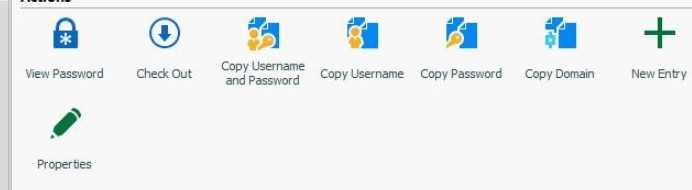
Should_have_thesse.jpg
MissingButtons.jpg
All Comments (7)
Hello,
What RDM version are you using?
Are the 2 user accounts administrator in RDM and not the other?
Best regards,
Érica Poirier
Hello ,
My version is : 2020.3.13.0
Yes other users are administrators in the program. Is administrator at my program is disabled.
Please suggest how to fix this .
Thank you.
Hello,
Thank you for the information.
The administrator privileges can be granted in the user account properties in Administration - Users. Please see this online help page about it.
https://help.remotedesktopmanager.com/administration_usermanagement.html
Best regards,
Érica Poirier
Hello ,
Yes we were missing the setting for Administrator in user rigths. Now it is ok when we adjust it.
Thank you very much for your time.
Hello,
Thank you for your feedback and glad that it's working as expected.
Best regards,
Érica Poirier
Hello ,
Just a quick question. If I was alone user and not an admin for the software. How can I manage to fix this ?
Thank you .
Hello,
You can set the permissions on folders/entries or grant access to vaults using the RBAC feature. Please see this page for more information.
https://help.remotedesktopmanager.com/securitysystem.html
Best regards,
Érica Poirier