Missing Credentials after moving folder

Hi,
currently I have the problem that after I moved a folder with entries. The login data, user name and password stored in the entries have disappeared.
I have already tried to move the entries back to their original location, but the credentials no longer appear.
The login data were permanently stored in the entries (http and ssh) and were not linked.
regards,
Steven
All Comments (15)
Hello,
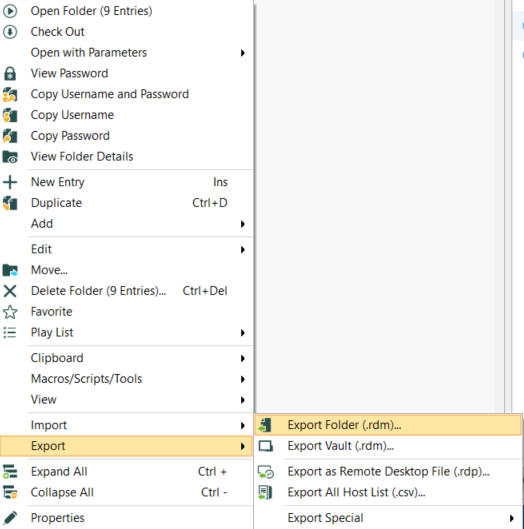
Which one of these method did you use to move your folder?
- Right-click -> Move
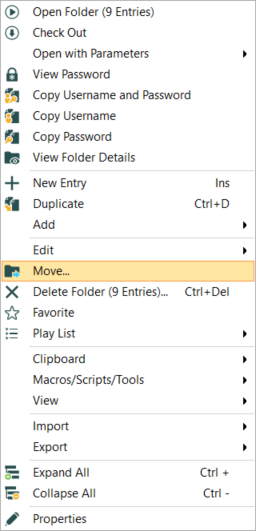
- Edit -> Move to Vault

- Export - Export Folder (.rdm)
Best Regards,
Etienne Lord
export.png
movetovault.png
move.png
Hi Etienne,
i just used drag and drop to move an folder within our folder structure. Folder and two entries witin this folder where moved succesfully. unfortunately the credentials which were stored in the entries have disappeared.
I was able to reproduce this error by restoring original entries and moved them by drag and drop again.
To solve the problem i restored old entries, exported the passwords and saved them within the moved entries.
Hello,
What is the Credential option set to on the session(s) that you move?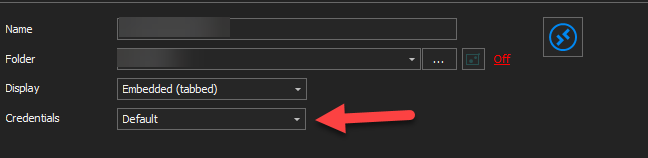
Best Regards,
Etienne Lord
credentials.png
Hi,
Credentials is set to default and credentials are stored in entry.
As i said i simply move the folder containing two entries by drag and drop which results in a los of credentials stored within the entries. I was able to reproduce this error by restoring entries to their orignal location and move them again.
After saving lost credentials within the entries when they were on their new location. I was able to move them by drag and drop without losing stored credentials.
With this fear we now have to check if credentials still saved after moving entries or folders containing entries.
Hello,
We will do some test in order to see if this is something that we can reproduce internally, will keep you updated!
Could you specify your Data Source type and Remote Desktop Manager version?
Best Regards,
Etienne Lord
Hi Etienne,
the problem just came back. I am now able to reproduce it and it always happens when you move entries while the RDM is in offline mode.
If I am in offline mode and move a folder, the credentials are still saved. When I go online and accept the changes, the credentials disappear.
Im using Version 2020.2.17 with Microsoft SQL as Data Source
regards,
Steven
Hello,
I tested this with the latest version (2020.3.14.0) and was unable to reproduce, I will test it with your version and come back to you.
Best Regards,
Etienne Lord
Hello,
I was able to reproduce the issue partially on 2020.3.16.0, I will open a ticket with the engineering department.
Best Regards,
Etienne Lord
Hello,
We found what has been causing this issue and made a fix internally. This will be available starting with RDM 2020.3.19.0.
Regards,
Hubert Mireault
Hi together,
we have the same issue ... with "some" entries.
When will the new version be downloadable?
Will the entries be visible again or will they be lost?
Best regards,
Daniel
Hello,
We're hoping to release version 2020.3.19.0 by the end of the week.
Regards,
Hubert Mireault
Seeing this same issue, updates made since reported don't appear to have made a difference. I just drag+dropped some creds from the root of my user vault to a "Creds" folder using RDM and now I can't see passwords for any of the root entries in my User Vault, even though some still seem to be working from the Password Hub extension. Very disappointing that reorganizing entries runs the risk of losing everything. Even restarting RDM, I still can't see the password entries for my User Vault.
Edit:
Was running 2020.3.28.0 or something similar so I figured, well that's still pretty old so upgrading might fix things. I'm on 20221.1.36.0 now and paying more attention, it seems that a bunch of Websites entries I moved in Password Hub from root to Website folder are not syncing on RDM. RDM still shows those websites as root entries. So there's a sync issue between the Hub and RDM.
Password Hub looks like this:
Websites
- Web1
- Web2
- Web3
- Web4
RDM looks like this:
Websites:
- Web1
- Web2
Web3
Web4
Hello,
To help us better identify your issues here's some questions:
- What's your Devolutions Web Login (browser extension) version?
- Are your user vault credentials still working with the web client (view password)?
- If they work, can you try to Ctrl+F5 in RDM or create a new data source to the same Password Hub?
- If they won't work, can you edit and see your password? If so, add a space in the password, remove it and re-save.
- If all that doesn't work, can you try to revert to a previous version?
- Can you try to export your Web3 or Web4 entry and let us know what the Group element of the Connection contains? You will have to edit the .rdm with a text editor of your choice.
Thank you, have a good day!
Maxime Morin
- Password Hub Extension is 2021.1.5.0
- User Vault passwords are still visible/working from the Browser Extension, not from RDM
- Ctrl+F5 didn't change anything. Created new datasource based on same Hub account, User Vault shows the same structure.
- So I've noticed that even though these entries are in the root, if I click on Properties, I can see that they are associated with the right folder (see images below). If I edit the password for Web1, it will move from Root to the Websites folder and update the password. Refreshing the Browser Extension, I see that Web1 has the value I entered through RDM. Based on that, I opened Web2, clicked OK without changing the password and that moved the entry from the Root to the Websites folder. However, the password entry remained blank. I created a new Web entry via Browser Extension "Youtube", placing it under the Websites folder. Ctrl+F5 in RDM, Youtube appears in the Root Folder
- Not sure when last it was working to be honest. The browser extension seems fine, it's just that RDM doesn't seem to be picking up changes made outside itself.
- See below
Here are the steps to reproduce, just test data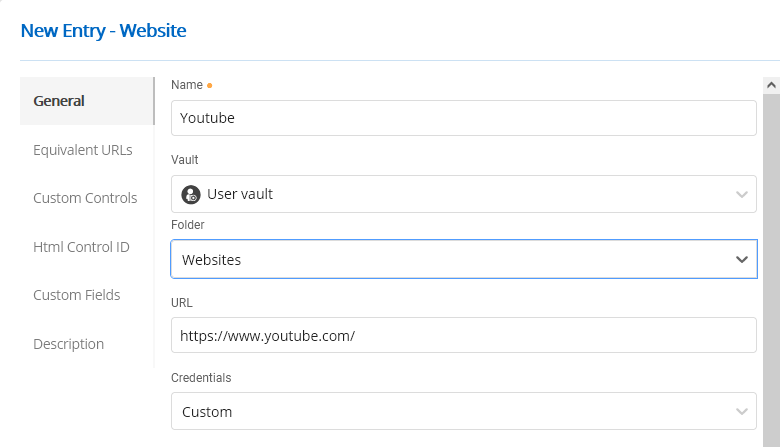
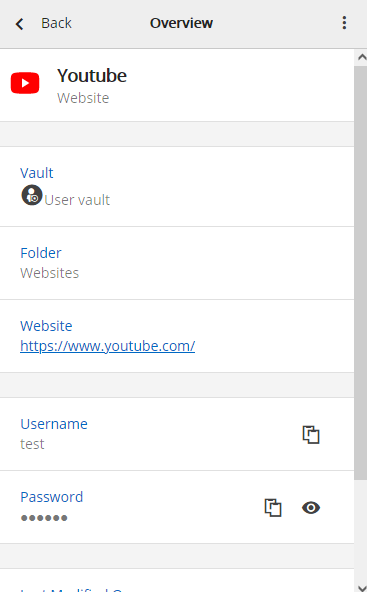
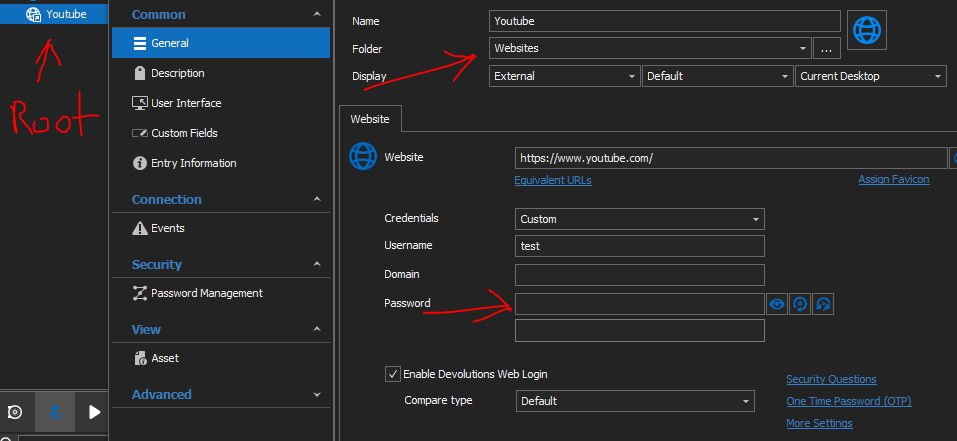
<Connection>
<ConnectionType>DataEntry</ConnectionType>
<Group>Websites</Group>
<ID></ID>
<Image />
<Name>Youtube</Name>
RDM_Youtube.PNG
PasswordHub_Youtube2.PNG
PasswordHub_Youtube.PNG
Hello,
Thank you for your response. Can you please try with the web client; not the web extension. In your browser, enter your Hub Business URL. It should look like https://<hub>.devolutions.app/.
For your first issue, it would be important to test with the web client to ensure it's not a caching issue on DWL nor RDM.
For your second issue, from what I can see, there might be an issue with the user vault tree in RDM since the properties shows a folder but not the tree.
Have a good day!
Maxime Morin