intermitent error in all kinds of sessions

While using RDM I constantly have these errors and my session closes. I just need to reopen them again but it is kind of annoying.
If its SSH I enabled keepalives
If its RDP I have not "enabled" anything
if it's a HTTP/s connection, nothing has also being "enabled". Default template values are ALWAYS used.
Thanks in advance for your comments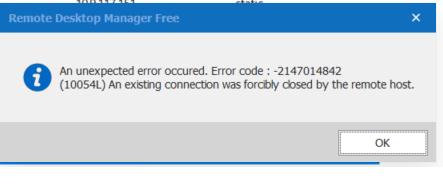
Data source type: SQLite
Running architecture: 64-bit
Culture: en-US
OS: Windows 10 Version 2004 (OS Build 19041.572) 64-bit
===============================================
<pre>
========== DIAGNOSTIC ==========
Windows 10 Version 2004 (OS Build 19041.572) 64-bit
.NET Version: Version 4.7.2 or better [Ok]
Support local password saving [Ok]
Is administrator [Ok]
Is system administrator [Ok]
Is database administrator [Ok]
Is elevated privilege [No]
Is running in Terminal Services [No]
FIPS mode disabled [Ok]
Application Communicator is running [Ok]
Workspace size [2113 / 1162]
Is Internet connected [Ok]
Internet Explorer [11.572.19041.0 - Internet Explorer 11]
Allow multiple instances [No]
Allow drag-and-drop [Ok]
Auto refresh [No]
Debug level [0]
Running since [Running since: 6 hours 18 min 34 sec]
Font scaling [125]
125% - Dpi aware: [True]
Is allowed by firewall [True]
RDP ActiveX version [10.0.19041.1 (WinBuild.160101.0800)]
Proxy [System default]
Online backup [False]
========== DATA SOURCE ==========
Data source ID: 82726286-c193-47d1-bec3-ae38a59ee96b
Repository ID: 00000000-0000-0000-0000-000000000000
Data source type: SQLite
Data source size: 6.1 KB
Data source settings size: 229 Bytes
User specific settings size: 0 Bytes
Connection protocol:
Offline: False
Allow connection states: True
Repositories: 0
Entries/Items: 14/14
Sessions: 14
Data entries: 0
Credentials: 0
Sub connections: 0
Documents: 0
Contacts: 0
-->Sub total: 14
Session tools: 0
Folders: 0
--> Total: 14
Virtual folders: 0
Custom images: 0
RTF notes: 0
Connection client version: 0x0000000000000000
========== POLICIES ==========
AlwaysPromptForPassphrase: False
ApplyForcedPasswordTemplateInPasswordGeneratorTool: False
CheckForServerCertificateRevocation: False
DisableAbout: False
DisableAddOn: False
DisableAddOnEntries: False
DisableAddOnManager: False
DisableAnalytics: False
DisableApplicationTools: False
DisableAutoUpdate: False
DisableAzureInteractivePersistentLogin: False
DisableCaching: False
DisableCustomImage: False
DisableDragAndDrop: False
DisableExecuteScriptsViaTerminal: False
DisableFileDataSources: False
DisableFileOptions: False
DisableHelp: False
DisableImportExportOptions: False
DisableImportInPrivateVault: False
DisableLocalDriveSharing: False
DisableMyAccountSettings: False
DisableMyPersonalCredentials: False
DisableMyPersonalPrivateKey: False
DisableOffline: False
DisableOnlineAccount: False
DisableOpenWithParameters: False
DisablePasswordGenerator: False
DisableQuickConnect: False
DisableRDPHardDrivesSpecificSettings: False
DisableReadWriteOffline: False
DisableRegisterProduct: False
DisableRevealPassword: False
DisableSendErrorReportDialog: False
DisableToolsAddOnManager: False
DisableToolsChocolateyConsole: False
DisableToolsDevolutionsServerConsole: False
DisableToolsExtensionManager: False
DisableToolsLocalRDPRemoteAppManager: False
DisableToolsMacroScriptToolManager: False
DisableToolsMenu: False
DisableToolsOpenNewRemoteDesktop: False
DisableToolsPowershellRDMCmdlet: False
DisableToolsRDMAgent: False
DisableToolsTranslationManager: False
DisableTopPane: False
DisableUpdate: False
DisableX64: False
DisableX86: False
EnableConnectionAfterExpiration: False
EnableMergeCredentialListWithSessions: False
EnableMergeSessionToolListWithSessions: False
ForceApplicationMFA: False
ForceDefaultConfigurationLoading: False
ForceDisableAllSessionEvents: False
ForceHidePasswordForAdministrators: False
ForceLogin: False
ForceRefreshBeforeEditEntry: False
ForceSystemProxy: False
ForceUpdatingAllUpdate: False
ForceUpdatingAllUpdateAndBeta: False
ForceUpdatingMajorUpdate: False
ForceUpdatingOnceAMonth: False
ForceWindowsCredentialsAndCurrentlyLoggedOnUsernameAndDomain: False
IgnoreApplicationCertificateErrors: False
OnlyAllowCredentialsInPrivateVault: False
========== ENTRY ANALYSIS ==========
========== ANTIVIRUS ==========
Name: Windows Defender
ProductState: 397568
Estimated info from product data:
May not be an antivirus
Running state: Not running or Unkown
Up-To-Date: True
</pre>
rdm.png
All Comments (6)
Hello,
What is your Remote Desktop Manager version?
Best Regards,
Etienne Lord
Hi! We´ve got the Same problem for some users in our company.
They are able to connect using an SSH Session and it works just fine.
After a certain time span (not sure how long it takes exactly), the session is killed with the same error message.
Re-connect works without any problem.
The issue started when we updated the Client and Server to Verison: 
Do you have any Advice? We have already enabled the "Keep Alive" in the Session settings, with no avail.
Thanks!
Fabian
Hello,
This is not an error that I've seen before, do you have more information about the error in Help - Application Logs?
Best Regards,
Etienne Lord
Version 2020.3.8.0 64bit
Hello,
What is your Remote Desktop Manager version?
Best Regards,
I am at Version 2020.3.8.0 64bit
So this is something not new.
Hi! We´ve got the Same problem for some users in our company.
They are able to connect using an SSH Session and it works just fine.
After a certain time span (not sure how long it takes exactly), the session is killed with the same error message.
Re-connect works without any problem.
The issue started when we updated the Client and Server to Verison:
Do you have any Advice? We have already enabled the "Keep Alive" in the Session settings, with no avail.
Thanks!
Fabian
i can provide all the logs you want and I can reproduce them each and every time/day.
Let me know where to send the logs. Not sure if the logs contain credentials in clear text.
Hello,
This is not an error that I've seen before, do you have more information about the error in Help - Application Logs?
Best Regards,