Is there a way to copy paste files from remote machines to my desktop?
Is there a way to copy paste files from remote machines to my desktop?

Just started using the free version. I really like it. One thing I do is copy and paste csv files a lot between different machines. I tried to do it but it doesn't seem to be working. Is there an option I need to enable somewhere?
All Comments (5)
Hello cjstewar,
you find the property in the General section of your RDP session => Local Resources.
However it is possible that the clipboard transfer is disabled on the remote host - so I would suggest to connect once with the native Remote Desktop (mstsc) to see if the clipboard function work as expected.
Regards,
Min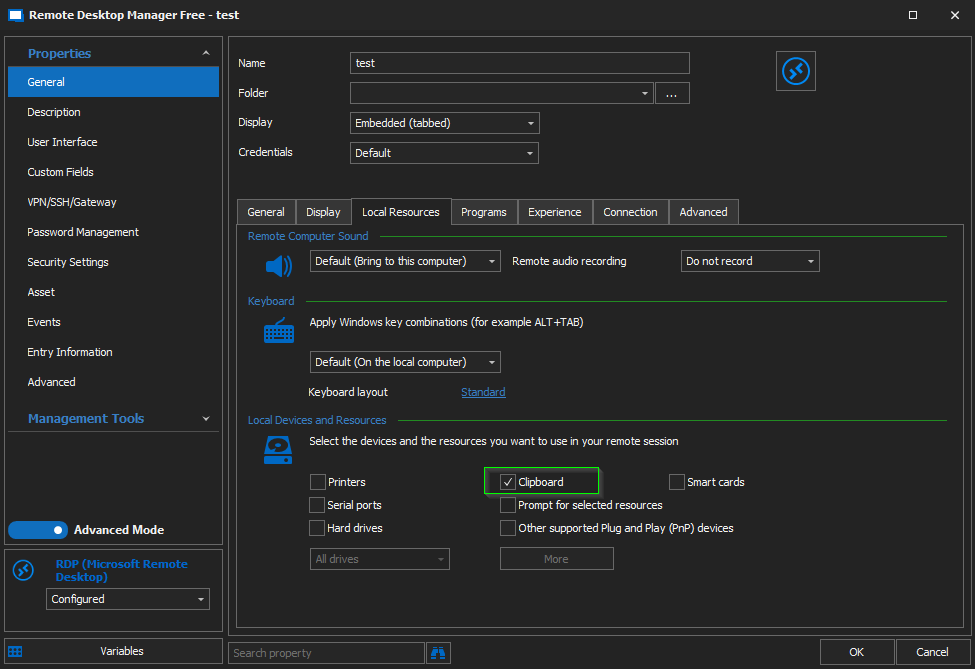
RDP-Clipboard.png
Thanks. I double checked and the clipboard was checked. I can RDP directly to the machine and copy files from it, but though this software when I paste back to my desktop nothing at all happens.
Edit: After some more testing the copy and paste function works fine for text. It is only when I am copying files. Is there a size limit or something?
Hello cjstewar,
thanks for the status update and your further tests! Could you try a different RDP-Engine? You find this option in the settings of your session => Tab Advanced
Btw - what RDM version do you use?
Regards,
Min
Hello!
I have a similar issue - file transfer doesn't' work between local machine and RDP vice versa
clipboard transfer is enabled as u advised above
Can u please help?
thanks
Hi vrasfocuse,
Unfortunately, copying and pasting file between the local and remote hosts is not support in RDM Mac RDP client.
Best regards,
Xavier Fortin