Perform shift tab with typing macro

I am trying to create a login option for the Office 365 portal.
Most of it works correctly, I start an private session of Firefox, open the page and perform the typing macro
$USERNAME${TAB}{TAB}{TAB}{TAB}{ENTER}{DELAY}{DELAY}$PASSWORD${TAB}{TAB}{ENTER}{+TAB}{ENTER}
The last dialog of the login is the question if I want t remain logged in, and I need to perform a shift tab to move to NO, but it doesn't work
I tried {+TAB} and +({TAB}) without success.
Any suggestions on how to fix this?
All Comments (5)
Hello,
As I understand, you would like to authenticate on office365 portal in embedded mode.
If it's the case, could you try the session attached to this thread?
https://forum.devolutions.net/topics/29056/new-portal-office365#143765
Best regards,
Jeff Dagenais
Hello Jeff,
I am not specifically looking for an embedded version, currently it is working almost perfect as external session on Firefox with private browsing.
When I start the session everything is filled in correctly, but it stops at the screen shown in the attachment.
This dialog is something like "Stay logged in" with the focus on "Ja" (yes)
My idea is to perform shift-tab to move to "Nee" (no) and press enter.
The session provided in the other topic indeed runs embedded but has the same issue with the last dialog.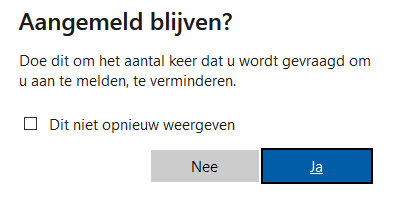
dialog.png
Hello,
Could you give this one a try :
$USERNAME${TAB}{TAB}{TAB}{TAB}{ENTER}{DELAY}{DELAY}$PASSWORD${TAB}{TAB}{ENTER}{DELAY}{SHIFT}{TAB}{DELAY}{ENTER}
Best Regards,
Etienne Lord
Hello Etienne,
I tried it, at first it didn't work but it helped me a lot solving this issue.
Below is the final typing macro that is working correctly.
$USERNAME${DELAY}{ENTER}{DELAY}{DELAY}$PASSWORD${ENTER}{DELAY}{SHIFT}{TAB}{ENTER}
As you can see I removed the first tabs in the user and password dialog as they are not needed, just {ENTER}
Also I increased the delay time a bit, it went from 300ms to 1000ms
When we use these settings a firefox private browsing window is opened and the user is logged on without any dialogs.
Attached is the RDM file for this setup.
Best regards,
John Hoogeveen
Office365 login.rdm
Hello,
Glad that you were able to make it work and thank you for lettings us know about the final solution :)
Best Regards,
Etienne Lord