AWS RDS as dataSource - Import\add session not possible (disabled) !
AWS RDS as dataSource - Import\add session not possible (disabled) !

 Hi!
Hi!
I have updated to latest versione of RDM Enterprise this morning (2020.2.20.0)
After that I tried to user a AWS RDS DB (Aurora or MariaDB both tested in my case)
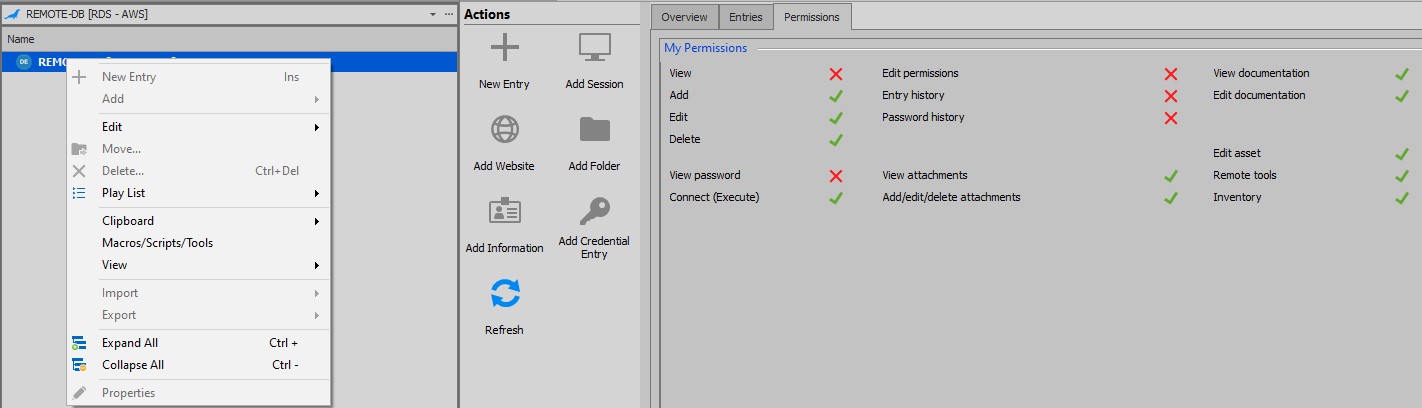
RDM recognize the DB - Can create schema on it, but after - when I try access to the Datasource most feature (like IMPORT) are disable and is not possible to import session (in .rdm format)
See above image
Screenshot_60.jpg
All Comments (10)
What user are you using to login? Does that user exist in Administration/Users? If not create it as an admin, it should resolve the issue.
Best regards,
Stéfane Lavergne
On AWS (RDS) Side - I'm using the admin user...
Do you mean into RDM (Admnistration area) that I need to create a new amin user ?
Why is this necessary only for this kind of database ?
Other Datasources do not give me this error....
Yes, please create the user in the RDM Administration area.
I believe it to be an authorization vs authentication issue. The database authenticates the user correctly but RDM can't find the user (in the admin/user section) and doesn't authorize the proper privileges in this user in the application.
Why is this necessary only for this kind of database ?
Well, in the case of say a local SQL Server, if you connect using "sa", we automatically create the user since it already has full admin rights to the underlying SQL Server. I know of an issue where we don't do it for an Azure SQL Server instance, for example. So I figured if could give it a try and see if it solves the issue in your case.
Best regards,
Stéfane Lavergne
But the Administration area depends on the datasource....
I do not have the Menu "Administration" for the AWS RDS Database....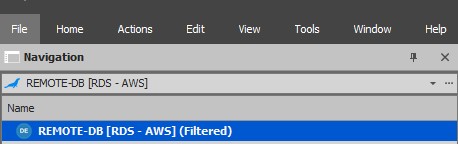
Screenshot_61.jpg
So your database is empty, you can't import and don't have the administration tab to be able to add a user. In other words, your hands are tied.
I will send you a script that you can execute manually on the MariaDB that will create the first admin.
We will investigate, this scenario should have worked out of the box, something must have changed recently.
Best regards,
Stéfane Lavergne
I've been investigating the issue. I don't have an RDS (AWS) instance to test on but I think I'm making progress.
- In RDM, File > Options > Advanced > Debug level, set it to 1
- restart RDM
- You should now get an error message like the following:
- Unable to find the integrated user, using default security (USER_NAME)
- RDM Should then create the user automatically as long as the user/login in the database has Super_priv = 'Y'
So my guess is that with RDS (AWS) the user/login that gets created on the MariaDB server is not quite "super" and that makes sense in a AWS environment.
Can you please check for Super? Is the user listed in this query? SELECT DISTINCT User FROM mysql.user WHERE Super_priv = 'Y'
Stéfane Lavergne
I've sent you via direct message the SQL you would need to run to resolve this issue.
P.S.: We've also fixed the issue within the application, it will be in the next beta release v2020.3.9
Best regards,
Stéfane Lavergne
Hi Stefane... I have updated the RDM to latest version, 2020.3.25 - but I still have problem ?
Can you write here, the step I neetd to perform for workaround ?
I do not found the SQL you give me in the past.
THX
For anyone else experiencing this issue, I was able to resolve it by doing the following:
- Create a fresh database instance in Amazon RDS. (I've tested and verified with Aurora (MySQL 5.7)
- When assigning the master account username, use root. This is the most critical step! Defining a username other than root doesn't appear to play nicely with RDM.
- Create a new parameter group by copying the existing definition that applies to your database. (In my case, this was "default.aurora-mysql5.7")
- Update your newly created custom parameter group, so that "log_bin_trust_function_creators=1".
- Save your changes. Amazon recommends waiting 5 minutes before assigning the parameter group to your DB.
- Modify your DB instance and assign the custom parameter group. Save your changes.
- When your changes finish saving, restart your DB instance.
At this point, you will be able to connect to your DB source in Remote Desktop Manager, create/update your schema, and create new entries without issue.
I've also noticed that when creating users with an administrative account other than root, I receive an error that I'm unable to execute the command FLUSH PRIVILEGES. So, as a standard, whenever I create users in my database I explicitly use the root account.
Hope this helps others out there...
-PC
Hi PC,
Amazing, thank you for sharing.
We will add this to our KB and see what can be done with respect to step #3, non-root named master accounts, to see if we can solve that.
Best regards,
Stéfane Lavergne