VNC - no scroll bars

Hi there. On one computer that I use, when I open a VNC connection, I have no scroll bars. The window is too big to fit, and I can only see a portion of it, but cannot scroll up or down to the rest of the window. This works fine, with the same remote computers on my other workstation.
I am using UVNC for server and client.
Thanks for any help with this.
All Comments (16)
Hello,
Thank you for contacting us on that matter!
Could you please look in your session's properties, under the Settings tab, if the "Scaled" option is enabled? If it isn't, checking it should resize your VNC session so it fits entirely in your screen.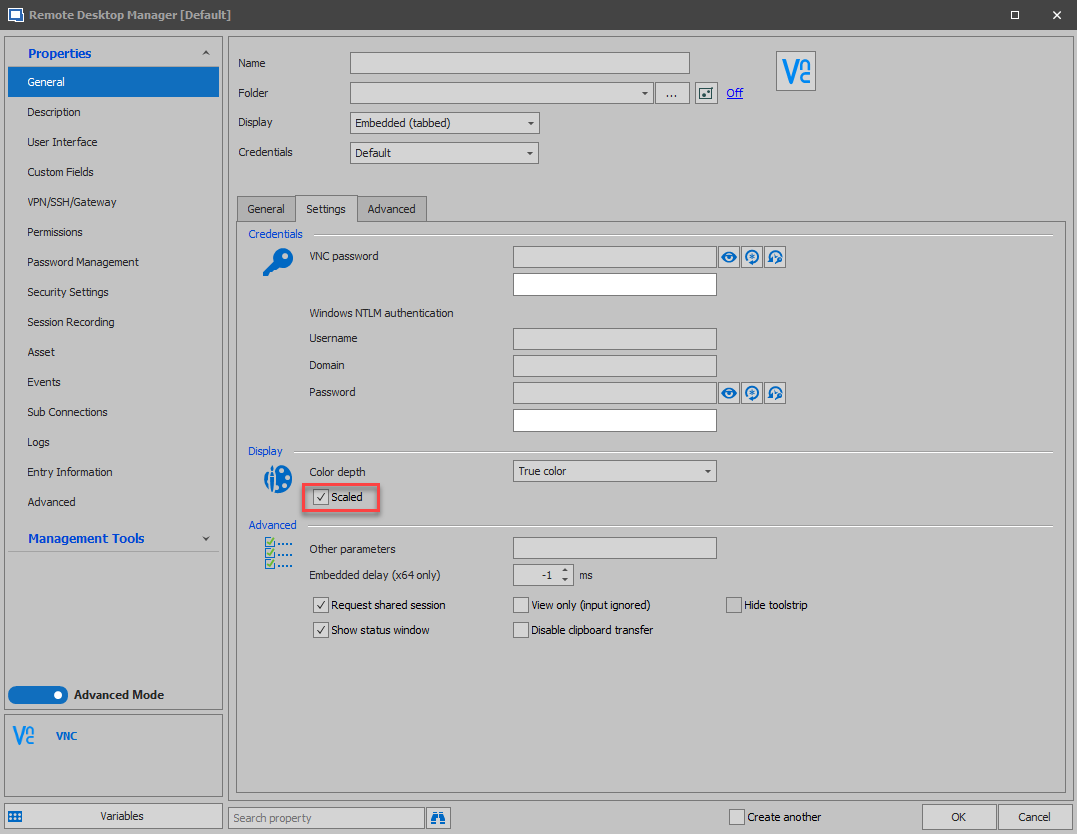
Best regards,
Gabriel Degrandpré
image.png
Yes, that is selected. The thing it, I need to be able to zoom in, because it is too small. I do this on my other workstation, and then I get scroll bars to navigate around the screen. On this workstation, I do not get the scroll bars.
Thanks,
Q
Hello,
Are you running the same version of RDM on both computers?
Are you using the same datasource on both computers?
Best regards,
Jeff Dagenais
Yes to both of your questions. Well, the data source is an export of a local data source, and imported onto the other computer. The computer not working properly is the one that the data source was imported to. So, same data source, but exported from a working computer.
Thanks.
Quintin
It also is weird how it displays the remote computer in the tab. It is off center...here is a screenshot attached. Notice how far over the screen is, and the fact that right and bottom there should be scroll bars, as the whole screen is not displayed there.
Thanks,
Quintin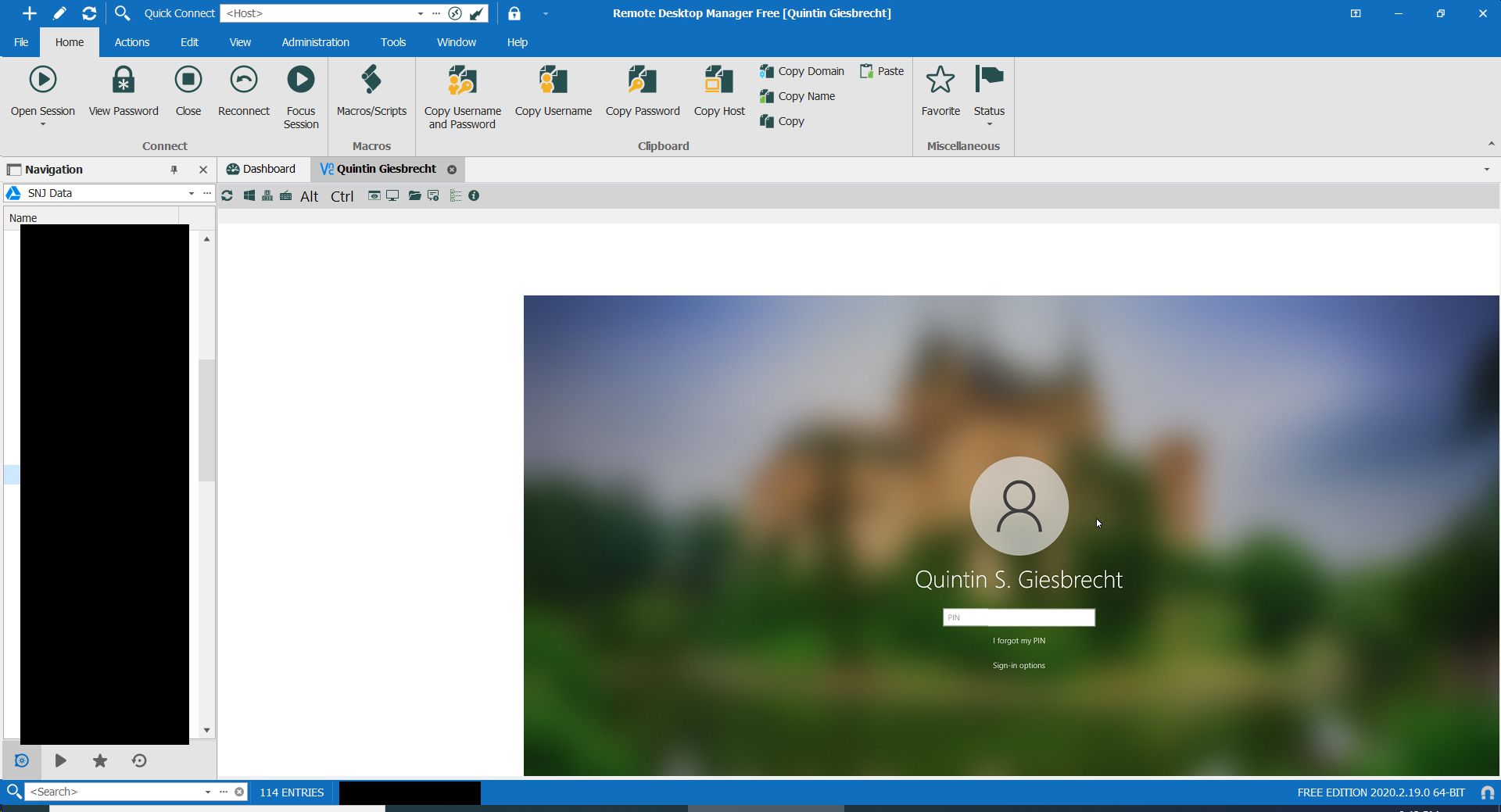
Clipboard01.jpg
Hello,
I am in the process of opening a ticket to my colleagues in engineering regarding the issue you are experiencing with UltraVNC in embedded mode. I would like to gather some information that I don't think we have asked you yet to make sure our ticket is complete.
- What version of RDM do you use?
- What are your scaling options in Windows on your local computer?
Best regards,
Gabriel Degrandpré
Hi there. This is on 2020.2.19.0. I have tried the latest version on this machine, but then realized I had 2020.2.19.0 on my other one that was working, so I downgraded to that one. With the same issue.
Scaling is set to 125% (which windows recommends on this notebook). I have tried 100 with the same results.
Thanks so much for looking into this.
Quintin
Hello,
Thank you for your reply! The ticket is now open in engineering. For reference, the ticket number for this case is RDMW-6197. We will keep you updated as more development is made on the ticket.
Best regards,
Gabriel Degrandpré
Hello Quintin,
Our engineering department would like to know if there are specific reasons you are using UltraVNC instead of the default VNC option.
Would you be interested in trying it out and letting us know if it suits your needs? You can change the VNC application used in your session's properties here :
Best regards,
Gabriel Degrandpré
Hi there. Yes, I am using UVNC, because I need to be able to zoom in, because most of our end users have 2 monitors, and everything gets very small if I can't zoom in, and then scroll back and forth and up and down.
Thanks.
Hello Quintin,
Thank you for this information, I will provide it to our engineers and get back to you once I have an update on that matter.
Best regards,
James Lafleur
I did just try changing it to "default", and this seems to just hang the RDM program. Have to force it closed with task manager. Just as an FYI, not sure if this would be related to the other issue.
Thanks,
Q
Hi there. I have 2 desktops that I use RDM on, one is my laptop, and that is where I initially had the problem (was working from home the past 3 weeks)...in any case, I had tried it on my desktop at the office, and the problem wasn't there when I first reported it. I am back at the office this week, and I have the same issue. The VNC screen is offset towards the bottom right, and there are no scroll bars.
Is there any progress made on this issue?
Thanks!
Quintin
Is it a problem with the version of UVNC that I am using maybe? I have not updated it on my desktop (as far as I know)...just a thought though....
Thanks,
Q
Hello,
I come bearing both good and bad news.
The bad news is that our engineering team has taken the decision to mark the embedded UltraVNC application. We are still investigating the UltraVNC issue where the session is skewed partly offscreen, but we have unfortunately not been able to replicate the issue to find its cause so far. For the time being, my recommendation would be to set your UltraVNC sessions to launch in External mode so that that they can use the regular UltraVNC application.
The good news is that all of our VNC efforts will now be focused on the Default VNC application, the one that is built in RDM. Since we have more control over it, it will be easier to fix issues and implement new features. An improvement ticket is currently open with our engineering team to implement the zooming and scrolling features in Default VNC, so that it can be as usable for you as UltraVNC was.
In both cases, we will keep you posted as progress is made.
Best regards,
Gabriel Degrandpré
That sounds excellent, because your built in VNC viewer is quite a bit faster in my experience. Also, on another note, I got my issue resolved. It seemed that in the file path settings, that RDM had "forgotten" where UVNC was (even though it seemed to still work, reported issue aside). I navigated to its location, and now it works. Not sure what happened there, but in any case, I have it working with UVNC, but also looking forward to the release that has a more complete toolbar for the built in one :)
Thanks, and have a great day!
Q