Console VMWare

After update to last version i can't open the vmware remote console of VM 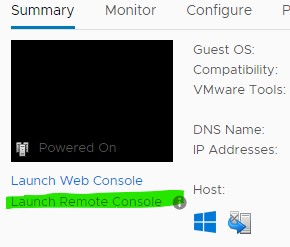 from the chrome web page open inside RDM; after clicking, i get a blank page
LaunchRemoteConsole.jpg
All Comments (16)
Hello,
Thank you for contacting us on that matter! In order to give us some more information about your RDM setup.
- What version of RDM do you currently use?
- What version of RDM were you using before upgrading?
- Would it be possible to provide us a screenshot of your VMWare session's properties? You can of course hide any sensitive information before sending it.
- I know you mentioned that you only get a white page when launching your session with the latest version, but out of curiosity, could you please send us a screenshot of what you see when launching the page?
Best regards,
Gabriel Degrandpré
Onestly, I don't remember the old version, but i suppose was the lasted available before because i do always update when prompted
Thanks for help; if you need more data let me know


the rest is set to default
I have the same problem if i create a new session
Hello,
Thank you for your reply! Since we have a session type dedicated to the VMWare console, I would be curious to know if this entry type gives you better results.
You can find the VMWare Remote Console entry type under the Session section of the "Add New Entry" window. Let me know if that works for you!
Best regards,
Gabriel Degrandpré
Can't get vmID error
Hello,
Because of the error message you get, I'd be curious to know if you enable the option "Always prompt for VM Name/ID", does the behavior change?
Best regards,
Gabriel Degrandpré
Always the same error
My vmware version
Hello,
Could you please try to configure your VMWare Console entry to use the Server IP/DNS directly instead of using the $NAME$ variable? I'd like to make sure that it's not the variable that is causing this error.
Best regards,
Gabriel Degrandpré
Always the same error
Hello,
I was thinking it might be simpler to configure a VMWare Remote Console but there might be some additional restrictions I was not aware of. If you don't mind, I'll instead troubleshoot the issue with the web entry that gives you a blank page if you don't mind. There are a few things I'd like to verify that might solve the issue.
- In your web entry's properties, if you change the Application parameter, does any of the other browsers give you better results?
- In your entry's properties again, with Chrome set as the application, if you go to the More Settings tab and enable "Disable autofill on new tab", does it change the behavior of the session?
Best regards,
Gabriel Degrandpré
with ie console open
with chrome i had this
Hello,
One of my colleagues in the QA department was able to reproduce the issue you are experiencing in your web sessions with the blank page. He has opened a ticket to our engineering team. For reference, the ticket number is RDMW-6206. We will inform you once more development is made on that front.
Since you have mentioned previously that you are able to open the page properly when using IE as the embedded browser, my advice for the moment would be to use it until the issue is solved.
Best regards,
Gabriel Degrandpré
Hello,
Sorry to contact you again so soon, I have two new questions for you to help us pinpoint the origin of the issue.
- If you set your web session to launch in External display mode, are you able to properly use the Launch Remote Console button?
- Since you mentioned that the issue started after upgrading to the latest version, I would be curious to know if you try out the version before that, RDM 2020.2.20.0, to see if the issue is present on that version as well. Here are the steps to install RDM 2020.2.20.0 without affecting your main installation :
1. Download the RDM zip folder from the link below :
https://cdn.devolutions.net/download/Devolutions.RemoteDesktopManagerFree.Bin.2020.2.20.0.zip
2. Extract this zip in an empty folder of your choice
3. Launch RemoteDesktopManager64.exe from this folder
4. Register your license
5. Establish your data source connection under File > Data Sources
Once that is done, please try out your web session and try to use the Launch Remote Console button to see if this results in a blank page with this version as well.
Best regards,
Gabriel Degrandpré
With the version downloaded it works; on startup RDM ask for an update (i don't do it) and when i launch VM's console, works correctly
Hello @Diego,
I might have misunderstood, the VMRC console entry in RDM is not working for you either way as I understand due to ticket problem.
But your initial issue is the web browser acess Embedded to a VMRC session is not working anymore since you updated RDM, am I correct ?
If so I might have an idea what the issue is and I had it all wrong.
regards,
Alexandre Roy
Reproduced!
Yes you are right, something happened possibly with our third party Chromium between 2020.2 and 2020.3, we will investigate.
Thanks for reporting this @Diego.
Regards,
Alexandre Roy
Hello,
The issue has been resolved internally, it should be available in 2020.3.9.0, which should be available in the next hour.
Regards
Alexandre Roy