Ctrl-F brings up Find dialog instead of passing it through as a Page Down key for VI and other text editors.
Ctrl-F brings up Find dialog instead of passing it through as a Page Down key for VI and other text editors.

VI and other text editors use CTRL-F in Unix/Linux Systems to mean 'go to next page'.
I use that a lot.
In this SSH window CTRL-F has been replaced by a Find dialog.
How do I get SSH session to pass it through, and maybe keep Find as another key, or not.
All Comments (2)
Hi,
By default, ⌘F (Command+F) is the shortcut to show the search panel. In my case, ⌃F (Ctrl+F) works properly as a Page Down in Vi. Have you changed system shortcuts? Otherwise, they can be changed in RDM under Preferences -> User Interface -> Shortcuts. In this case, the shortcut is Edit -> Find -> Find.
You can also see what it's currently set to in the main menu: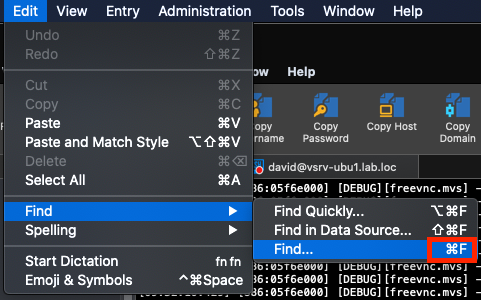
Best regards,
Xavier Fortin
Find.png
You're right. I do have the keyboard remapped due to not wanting 30 years of muscle memory re-learned when I switched to Mac. I'll update my stuff for it.
Thanks for the detailed answer.