Using HTTP only websites - keeps defaulting to HTTPS

Hello
We have a few old legacy websites that login via HTTP - e.g. http://192.168.0.xxxx
When I add this entry into RDM, and try to login it defaults to HTTPS.
I have checked the "More Settings" tab to make sure it is not ticked under "Force https".
I have also tried unchecking "Enable Devolutions Web Login" - but no difference either.
The only way I think I can make this work is by using Chrome and then ticking Proceed when it says not safe/trusted.
This is fine - but just wondering is there something I am missing?
All Comments (3)
Hello,
what RDM version and datasource do you use?
Furthermore with which session type do you get this issue? Web Browser (http/https) or Website ?
Regards,
Min
Hello
I am using Version 2020.2.19.0
Using a Local Data Source,
I create a folder, and then right click and choose Add Website
Hello,
Thank you for your quick reply!
Would it be possible for you to go under the Edit section of RDM's ribbon, use the "New entry" button and select "Add Session"?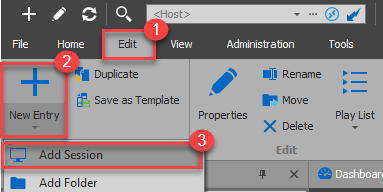
From the "Add New Entry" window, go under "Session" and select "Web Browser (http/https)":
This entry type should allow you to connect with HTTP.
Let me know if that helps!
Best regards,
James Lafleur
NewEntry.png