Unable to connect to VNC servers

Hello! Looking for manager in our enterprise environment.
Using latest RDM version downloaded from web today.
Added few VNC connections - VNC server is RealVNC 6.2.1 and authentication is VNC password, not AD.
When using Default option as client - it prompts for password, but default clients - Unable to connect to host x.x.x.x
I tried to change to TightVNC in Options -> Types -> Others - then im getting - no changes.
Changed manually - Right click on item -> Properties -> VNC application from Default to UltraVNC and then i'm getting - No authentication methods available.
Somehow, now when in Others -> TightVNC is selected, and i pressed connect, it prompted me to locate RealVNC viewer - this was very confusing.
Can you assist on this one?
Thanks
All Comments (3)
Hello,
You confirm that your Remote Desktop Manager version is 2020.2.19.0?
If so, could you try to replace both Devolutions.VncCustomControl.dll and Devolutions.ArdCustomControl.dll in your Remote Desktop Manager installation folder with these :
Best Regards,
Etienne Lord
Fixed CustomControls.zip
Hello!
Yes, confirming 2020.2.19.0 64bit.
With replaced DLL's and Tabbed UltraVNC i'm getting No supported authentication methods - as per RealVNC support they are using RFB6 protocol, maybe that's the issue.
I can get working, if i select Display -> External, then i can select RealVNC, but I cant pass passwords for example.
Also is it possible to import .vnc Connections from RealVNC?
Thanks.
Hello,
If you set "Config filename" you will be able to specify your RealVNC configuration file, let me know if this is what your were looking for! 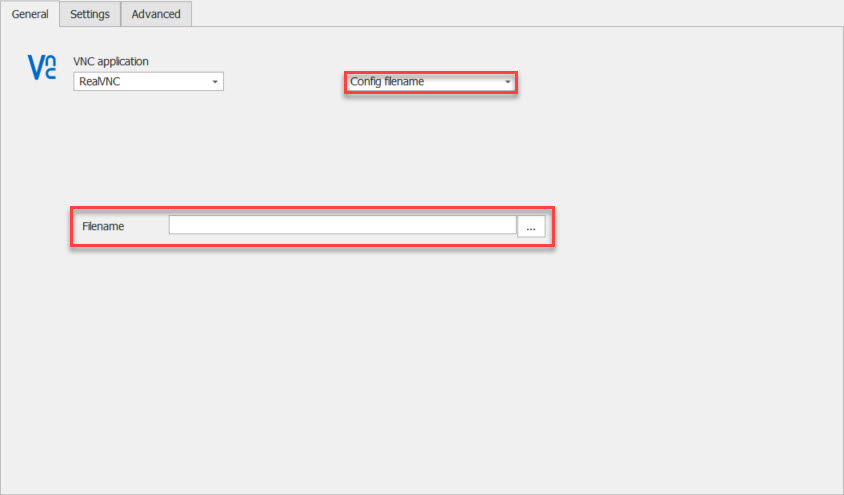 /
/
Best Regards,
Etienne Lord
config.jpg
