Logoff freeze RDM when using RD Gateway under Win 10

Hi all,
we have an problem with our Remote Desktop Manager 2020.2.19 and also with Versions before that under Windows 10 when we use for the connection RD Gateway.
It is not necessary for all connection to use RD Gateway but for many it is.
We set "Load plug-ins in embedded mode" already to false. Also in all the single connections, just to be sure.
We tryed also to set the registry key fClientDisableUDP to 1 but also this makes no differences
Under Windows 8.1 we didn't face this issue and I just test it as well again to be sure.
Really wondering if no one else facing this issue?
Cheers Michael
All Comments (25)
Hello,
It freezes for some times then you can continue to work or do you have to kill RDM?
Best Regards,
Etienne Lord
Hello Etienne,
it freezes for around 20sec and then it continue working. So RDM is not crashing it has just this long lag.
If I remove the RD Gateway for the same server (if possible) it works without any issues. But some connections need the rd gateway, so there is no other way.
Same conditions under Win8.1 .. no issues, no freeze with or without RD Gateway both VM's local not over VPN connected. Anyway VPN is not an issue as other test did show us.
Any Idea what else we could try?
Cheers Michael
Hello,
Could you head over to Help - Profiler - Debug Only and set the Debug Level to "1".
From there, keep the Profiler Window open and re-create the issue. When done, simply click "Send Trace to Support"
Tell me when it is done and I will look at it!
Best Regards,
Etienne Lord
Hi Etienne,
sorry for the late response as I was out of office.
I just send the Report and if you could have a look that would be great.
Cheers Michael
Hi,
I got exactly the same issue:
Everything works good without gateway.
But every time I got disconnected/logoff from a session with gateway. the whole RDM process will freeze for about 20~30 seconds,
then everything go back to normal.
Tried Profiler but nothing shows up in debug screen
Great that I'm not alone with that problem! But that is since Win 10, Win 8.1 we facing no issue ..
Hello,
It doesn't seem like the profiler helped, do you have any information in Help - Application Logs?
Best Regards,
Etienne Lord
Hi Etienne,
nope sorry nothing useful :-(
Can you try to reproduce this behavior in your lab?
Cheers Michael
Hello,
No problems.
If you head over to the Advanced Tab of your RDP session, what is the Logoff method set to?
If it's set to default, could you head over to File - Options - Types - RDP and send me a screenshot of that window? 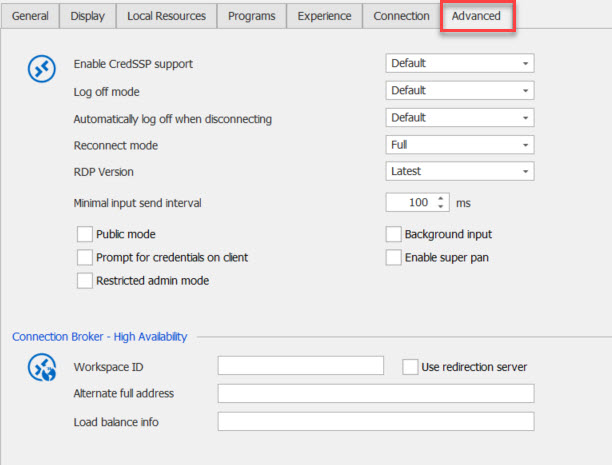
Best Regards,
Etienne Lord
rdpadvanced.jpg
Hi Etienne,
Here is the screenshot, I didn't change this so should be default settings.
BTW, I just changed my work. But I get this issue in both old and new company, on totally different two notebooks with two different RDG system.
On my old notebook I was using an old paid version of RDM, new notebook is using RDM Free.
Per systemsengineering1 seems OS matters, both notebook is Win10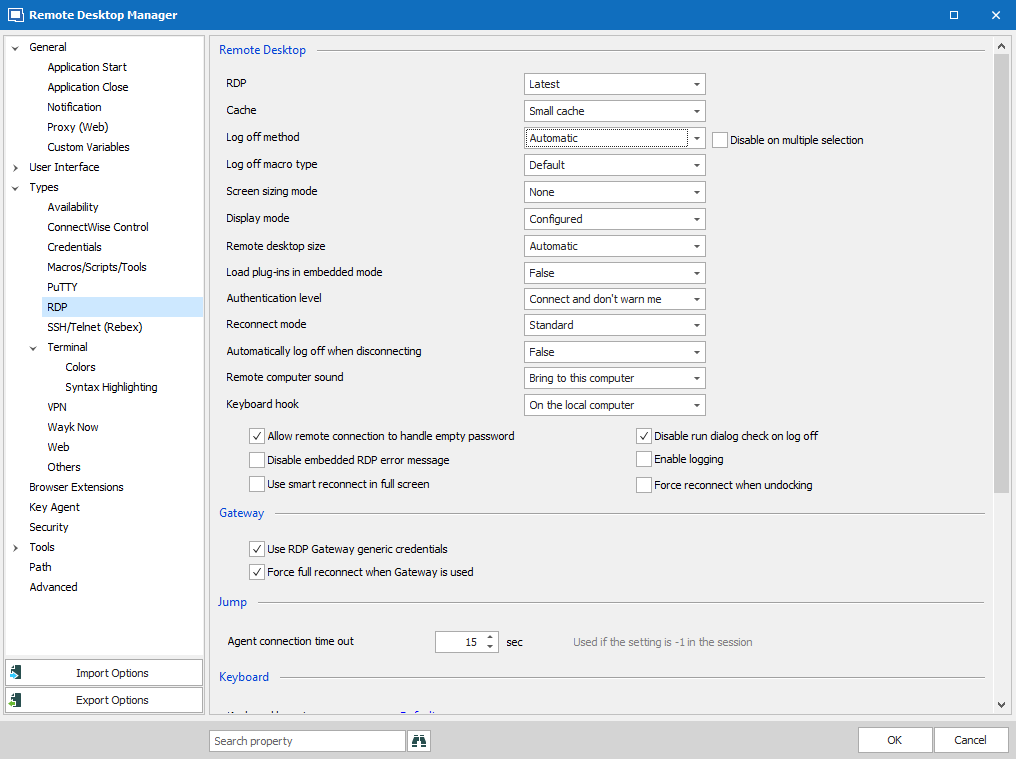
WeChat Screenshot_20200910102219.png
Hi Etienne,
yes I have default there and the exact same settings like zealyahweh in his screenshot.
Cheers Michael
@Zealyahweh
Would you also be able to send me your profiler results by following these steps :
Could you head over to Help - Profiler - Debug Only and set the Debug Level to "1".
From there, keep the Profiler Window open and re-create the issue. When done, simply click "Send Trace to Support"
Tell me when it is done and I will look at it!
Best Regards,
Etienne Lord
Hi Etienne,
any updates or hints what I could try?
Cheers Michael
Hello,
I am looking into it, will keep you updated.
Best Regards,
Etienne Lord
@Etienne Lord
I've uploaded the log
Hello,
Would you be able to head over to the Advanced tab of one of your RDP session with the issue, then change the RDP Version to RDP (FreeRDP Latest) then try again in order to see if the issue persist?
Best Regards,
Etienne Lord
With FreeRDP i got an error:
After about 10 second black screen
Then
I will paste detailed message here;
NullReferenceException - Object reference not set to an instance of an object.
at Devolutions.RemoteDesktopManager.Frames.Embedded.FreEmbeddedFreeRDP.c370f427b671b9c99ae1dd5fe9c57f87f(Object c19f185fd70cefc696ba148af1c4faf54, RunWorkerCompletedEventArgs cf1018bb83ec7debd818319fd3cb4844e)
at System.ComponentModel.BackgroundWorker.OnRunWorkerCompleted(RunWorkerCompletedEventArgs e)
BTW, tried FreeRDP 7.0 ,just got same error
Also, I just upgraded my RDM to enterprise version, but the issue still exists.
Hello,
Would you be able to give it a try with the Latest version? (2020.2.19.0)
https://remotedesktopmanager.com/home/downloadfree
Best Regards,
Etienne Lord
I'm using the latest version 2020.2.19.0 64-bit Enterprise Edition
Free edition 2020.2.13.0 64-bit
and My old notebook using an old version about 2 years ago.
all of the versions have the same issue
Hello,
This is quite strange since we are unable to reproduce on our side. Using the link I previously sent you in Private Message, could you make a right-click on one of your session that has the issue - Export - Export Selection (.rdm). Make sure that "Include Crendentials" is unchecked and send us the .RDM file?
Best Regards,
Etienne Lord
Hi Etienne,
I had holiday thats why I come up now with it again. I tried the new version 2020.2.20.0 but also did not solve the issue.
If I let the application open external, then we don't have that issue. But Embedded is still the delay of around 30sec.
Cheers Michael
Hello,
Did you give it a try with another RDP Engine? :
Would you be able to head over to the Advanced tab of one of your RDP session with the issue, then change the RDP Version to RDP (FreeRDP Latest) then try again in order to see if the issue persist?
Best Regards,
Etienne Lord
Hi,
If I choose FreeRDP I can't connect at all :-(
Cheers Michael
Hello,
Would you be able to give it a try with the Beta of Remote Desktop Manager Enterprise : https://remotedesktopmanager.com/home/downloadenterprise#Beta
Or the latest Free version : https://remotedesktopmanager.com/home/downloadfree
(With FreeRDP Enabled)
Best Regards,
Etienne Lord
