Print Client List
0 vote

Disabled
Hello,
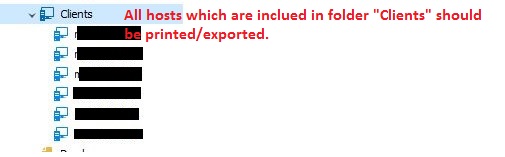
is it possible to print (or export) a client list (like in screenshot -> when i want to export "Clients", all included hosts should be exported too) including documentation and asset? I have to export them separately and I can only see the overview, not the relevant informations (documentation, asset...).
Best regards
All Comments (13)
Hello,
Thank you for contacting us on that matter!
If you'd like to export a specific folder as well as all of its content to a list that can be easily consulted, you can right-click the folder and navigate to Export > Export Special > Export Selection (.html) or Export > Export Special > Export Selection (.csv). I believe these are the two formats that are the easiest to read.
Unfortunately, this export feature does not include Assets or the Documentation tab. The number of fields in Assets and the formatting of the Documentation tab would make them impractical in a list of entries. I have asked my colleagues in engineering if there would be a way to generate a report or list that includes these. I will get back to you if we do have something to suggest that includes these sections.
Best regards,
Gabriel Degrandpré
Hi,
We too are searching for a way to export a human readable list of all entries including asset and documentation.
The XML is fine for a technician, but is nothing I can give to a non-technical person.
Is there any update on this?
Kind regards,
Mark
Hello,
The method that my colleague Gabriel mentioned would still be the best way to perform that kind of export!
Best regards,
Etienne Lord
Hey Etienne,
Unfortunately, as Gabriel mentioned, these exports are missing a lot of information (asset infos and so on).
It'd be great if there was an option to the HTML export to include all related fields so the user could choose between having a full or basic export.
Cheers,
Mark