Devolutions products vs Apple MAC Silicon

Hi,
As you know a new version of Apple computers (ARM/Silicon) are coming soon, so I just want to know if Devolutions products (e.g. Remote Desktop Manager) are going to be compatible with it.
Thanks in advanced.
All Comments (30)
Hello,
We have ordered the SDK from Apple and it should not be a problem. We don't expect any major issue since we already support ARM with iOS.
Regards
David Hervieux
Hi,
This is not something that we can confirm yet. While we did receive the Developer Transition Kit, we've not yet started testing for this. Our focus at the moment is more to ensure support with macOS Big Sur.
Best regards,
Xavier Fortin
Now Big Sur for Silicon M1 is here.
Can I use RDM with a macbook m1 silicon?
Best regards,
Marco Mantegna
Hi,
While RDM is still compiled for x86_64, it works just fine with Rosetta. There shouldn't be any issues.
Best regards,
Xavier Fortin
Hi Xavier,
any news on Apple Silicon Versions of RDM?
Regards
Kevin Sühl
Hi Kevin,
As mentioned earlier, RDM should work just fine on Apple M1 computers (thanks to Rosetta).
As for the ARM64 version of RDM, it has not been done yet. To do this, we will need Xamarin.Mac (the framework we use) to add support to compile ARM64 applications. We're tracking the ticket for this.
Best regards
Xavier Fortin
To do this, we will need Xamarin.Mac (the framework we use) to add support to compile ARM64 applications.
So this is why RDM runs so poorly, even on a new Intel Mac? RDM is so awesome, functionality-wise, but it's just so tough to use in MacOS. I'm not familiar with Xamarin...does it re-create all your C# into Objective-C? That would surely make it inefficient and would explain the sluggishness. Is the iOS version created this way as well? It seems to run pretty well on iOS. At this point, you could just allow your App Store app to be installed on M1 Macs and it would probably work better than it ever has.
Hi gabeo,
It's possible, but I'm not so sure. I don't think Rosetta is supposed to be that inefficient. iOS uses also uses Xamarin, but the entirety of the code is compiled natively which is not the case for RDM Mac. This could also account for some differences.
Were you having performance issue before using an Apple M1 device?
Could you describe the kind of issue you are having?
Best regards,
Xavier Fortin
Hi gabeo,
It's possible, but I'm not so sure. I don't think Rosetta is supposed to be that inefficient. iOS uses also uses Xamarin, but the entirety of the code is compiled natively which is not the case for RDM Mac. This could also account for some differences.
Were you having performance issue before using an Apple M1 device?
Could you describe the kind of issue you are having?
Best regards,
Yea ever since I discovered RDM, I have noticed it doesn't run the same as my other Mac apps. It's just not "snappy" I guess I would say. Long before M1 Macs even existed, I was trying using RDM and noticing this, and was even digging through the Mac binaries trying to see if I could find some hint of a legacy language being used (Carbon, for example, if that's even possible still) that could explain why it felt different than the rest of my apps. Now that I see you create it using Xamarin, it makes sense. If it's taking C# and creating Objective-C or Cocoa or Swift code for you, I would imagine it wouldn't run as well as something created from scratch using Apple's SDK directly itself. I get why you do it how you do it; RDM is a massive application in terms of functionality and recreating that from scratch would be a huge undertaking. It's the only thing that keeps me from ditching RoyalTSX entirely. I like the cross-platform nature of RDM (access to all the same features and connections directly within RDM on my iPad Pro especially), but I keep going back to Royal because it just runs more smoothly on the Mac. Just some feedback from a fan.
Thanks,
Gabe
Hi gabeo,
Yes, performances can often be an issue. And the sheer size of the application, coupled with the usage of an intermediate framework (Xamarin), does affects performances, often in noticeable way. If you have specific cases in mind, do not hesitate to open a support ticket, we do try to find solution for different performance issue.
Best regards,
Xavier Fortin
I have been using RDM on Windows forever, and since 2018 also on Mac. On Intel Mac i am satisfied with performance, except that occasionally a restart is required to solve high CPU usage.
My worries about Rosetta/RDM performance and compatibility is the only thing stopping me from moving to M1. I wish someone would post real life experience on that :)
Hi Oletho,
The next release of RDM Mac (2021.2.0.0) will run natively in ARM64 and therefore will not uses the Rosetta Translation Environment. This version should release in the coming weeks.
Best regards,
Xavier Fortin
Thanks Xavier. Really looking forward to this. Hoping it runs smoothly. I had to stop using RDM entirely since switching to M1 and there is just nothing else out there to replace it.
Great!
Perfect timing for the MacBook Pro M1x soon to be released.
Thanks.
Hi Oletho,
Please, do give us your feedback when the version is available. We'd like to get your impressions so we can make any necessary adjustments.
Best regards,
Xavier Fortin
Sure!
Hi,
The latest version of RDM (2021.2.2.0) runs natively in ARM64 on Apple M1. There is one known issue if you use the Classic User interface mode, in which case I recommend not updating until the fix is available later today.
Best regards,
Xavier Fortin
Happy Face Emoji
Thank you!
EDIT: Ok if you go in RoyalTSx and re-save the file as the legacy version, it works. yeeeee!
aaannnnnddd it's still unusable. If it's not one thing, it's another.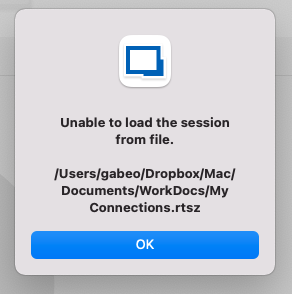
Screen Shot 2021-10-05 at 8.44.56 AM.png
Hi gabeo,
There seems to be a problem with our decryption method for RoyalTSX files. I've opened a ticket and will work on a fix as soon as possible.
Best regards,
Xavier Fortin
In the meantime, you can revert back to the previous version: https://cdn.devolutions.net/download/Mac/Devolutions.RemoteDesktopManager.Mac.2021.1.10.0.dmg
Best regards,
Xavier Fortin
Thanks Xavier. I'm actually not using RDM until it fully works for my needs, so no need to revert.
I was able to work around that issue by re-saving the RoyalTSX file as a legacy format.
However, a previous issue I had with the Intel version of RDM on Monterey still persists. When using RDP, my Mac freezes solid. Then the fans ramp up to a million. This is an M1 MacBook Pro. I'm looking for crash dumps but it literally freezes so instantly that I don't think anything is generated. I'm hoping you have folks working on RDM with Monterey to find/fix these issues. Let me know if there's anything I can send you that you might find useful.
Hi,
We already have a ticket for this, but so far, we've only reproduce a similar issues with one specific entries on one specific devices and have, unfortunately, not found the issue yet.
We'll post back when some progress is made.
Best regards,
Xavier Fortin
Hi,
The latest version of RDM (2021.2.2.0) runs natively in ARM64 on Apple M1. There is one known issue if you use the Classic User interface mode, in which case I recommend not updating until the fix is available later today.
Best regards,
Hi Xavier,
I'm curious about this.
Does it mean RDM is already running without R2-Translation or does it still use it?
Because from a security perspective I really don't like to run my password-management through a translation-layer where anyone could modify the code as R2 gives a damn about developer certs.....
Thanks,
Hi,
RDM 2021.2.2.0 and the following versions now runs natively on Apple M1, i.e. they are built both for x86_64 (for backward compatibility with previous Mac) and ARM64. This indeed means that they do not need to pass through the Rosetta 2 translation layer. Any version prior to RDM 2021.2.2.0 are not built for ARM64 and therefore do uses Rosetta 2 if ran on an Apple M1 device.
You can confirm this with RDM (and any other applications for that matter) by launching RDM on an Apple M1 device and check the value displayed in the "Kind" column of the Activity Monitor. If the value displayed is "Apple", then the application is running natively, if the value is "Intel", then it is running via the translation layer.
I hope this answer your question. And do not hesitate if you have any further questions.
Best regards,
Xavier Fortin
Hi Xavier,
thank you for your explanation and clarification!
Kr
Markus
Hello gabeo
When using RDP, my Mac freezes solid. Then the fans ramp up to a million.
We're able to reproduce the crash but we're still trying to nail down the specific cause.
Can you try adjusting the "Codec level" of a problematic connection (in the advanced tab) to "6" and tell us if you still experience an issue?
Thanks and kind regards,
Richard Markievicz
Please, do give us your feedback when the version is available. We'd like to get your impressions so we can make any necessary adjustments.
I have now been using the ARM version of RDM for a week, and it´s been pure joy. Blazing speed and no problems so far. Performance and CPU utilization is better than any Intel Mac or Windows PC i have experienced.
Disclaimer: I almost solely use it for rdp connections to customer servers.
Hi,
I'm glad to hear it! Do not hesitate if you find any issues or have any requests.
Best regards,
Xavier Fortin
Hi,
For those who were having system freeze (kernel panic) when launching RDP sessions. A new version of RDM (2021.2.7.0) should be available to download with a fix for this issue.
Best regards,
Xavier Fortin