Closing WinSCP session loses Location Profiles changes

This is actually a WinSCP bug which I have reported to them a long time ago but has not been fixed, but RDM makes it rather more serious.
I have a WinSCP session open with many sites open within it. I tend to keep the session open typically for days on end. During use I will add entries to Location Profiles.
The WinSCP bug is that it does not save these additions until the site is closed. If WinSCP crashes or I re-boot my PC the changes are lost.
The work-round is to always close WinSCP normally and then it saves the changes.
In RDM I do not see any option to actually close the WinSCP application before closing the RDM session (via the X in the tab at the top). If I close the RDM session all my changes are lost. I have to remember to close each site I have open, one by one, and then the changes are saved.
It seems that closing the session just kills the WinSCP application. It should first close the app in a controlled manner or at least provide an option to close the App.
All Comments (9)
Hello,
I will check what we can do but I don't think we have a way to close the application in a controlled manner. There is no API we can invoke and this is the kind of integration we try to replace with our own implementation. Which features are missing from RDM to use our native SCP/FTP?
Regards
David Hervieux
I did not see your native version when I first looked. I'd be happy to use that.
- Is there an option for the folder tree and file list to share the same window - like WinSCP. It would eliminate loads of scrolling in the folder window.
- Is there an option to save frequently used paths? Win SCP has a 'local' one attached to the session and a global one.
.3. When an SCP session is closed, all the customisation seems to get lost - when it is reopened everything seems to revert to default settings.
Without the above options, for me at least, it is not a substitute for WinSCP. Its fine for occasional use but for me it is not usable on a regular basis.
Thank you for the information. I will add 3 enhancement requests to improve our integration. It's harder for us to improve WinSCP since we have less control over the code.
Regards
David Hervieux
Hello,
For point #1 in your improvements, you should be able to check "show files in tree view" in your SCP/FTP entry. This will make it so the "tree" has the files listed as well as the folders. Can you let me know if this works for you?
For point #3, could you describe which "customizations" you mean exactly?
Regards,
Hubert Mireault
I'm afraid that in tree view it is still very laborious to find something. In WinSCP it is not a tree view where the whole tree is open in front of you, but rather you are drilling down.
The whole window shows the folders in the root and shows last change date and owner. A double-click on a folder now shows the contents of that folder - both folders and files. For files the size is also shown.
Your tree view is still very laborious to use and involves lots of scrolling. As I said before, its OK for occasional use - like for occasional remote support - but not as a tool to be used every day for a specific collection of servers.
Also, tree view does not show any of the attributes of the files. I usually want the files sort-able in reverse date order - that is not possible.
By customisation I mean:
a. The way I have configured the screen: The folder I'm in, the sort order, the columns I have selected .... Those should all be saved for next time I go to that site.
b. My point #2 above. WinSCP has a very useful facility called Location Profiles which are saved per site. The user manually saves a list of paths associated with each site that he wants to reference quickly without having to browse. A bit like the drop-down list you have at the top, but it is site specific and is saved. 
There is also a global saved list which is available on all sites.
Hello,
For your first point, is this the part of the UI that would interest you then?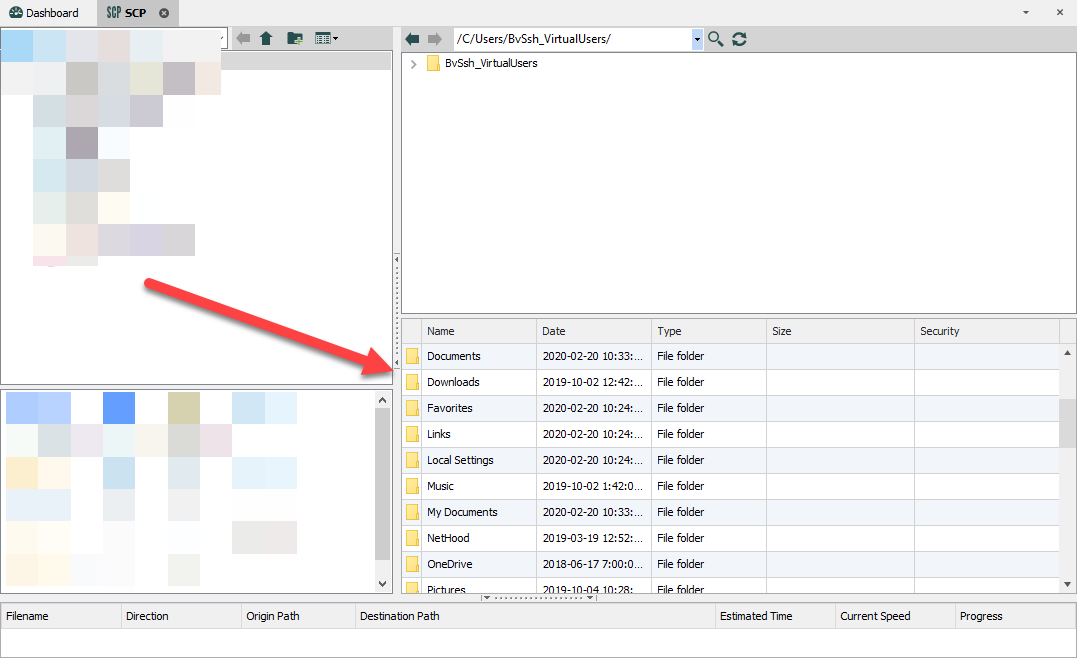
You could make that part of the window bigger and not use the tree.
Regarding the other point, I understand what you mean. We'll see how we can implement these ideas to have a better workflow.
Regards,
Hubert Mireault
2020-08-18_13-35-37.png
I have tried dragging up the bottom window and ellimination the tree. It may well work, but I have hit what looks like a bug.
The bottom pane, now filling the whole right hand side ends with
while WinSCP shows at the end only .autorelabel and not the last 4 lines.
So I decided to double click on one of them. The result was that RDM has totally hung. It does not respond to anything. I cannot access any of the open sessions.
It is alive in some way as if it is overlaid with other windows and they are then closed, RDM re-appears.
It is doing something - Task Manager shows
Killed it off and re-opened and everything re-opened!
Tried some more things. It hung a 2nd time.
There seems to be issues with double-clicking.
Double-clicking the two dots should take me up a level - doing nothing at the moment. (I did d-c before on logrotate).
Ditto for logrotate. - nothing happens on d-c. I would expect it to open the editor.
Eventually it hung again showing
The border you see resulted from a right-click trying to select Edit from the resultant menu that did not appear.
I have to leave it for today - report back further tomorrow.
Thank you for the information, we'll add this to the ticket as well, it does seem to be a bug. We're planning to do a rework of our file explorers so we'll keep these issues in mind when performing these changes.
Regards,
Hubert Mireault