Get rid of the delay when creating a SSH Tunnel
0 vote

If you setup an SSH Tunnel to tunnel your connection to a Linux box so you can access devices in another network.
You will get a delay of 5 sec.
That takes a long time.
We are coming from RoyalTS(X) and there it works so freaking fast and good.
RDM should be able to do it.
Just make it faster and an option to hide the pop-ups all at once.
They just release an option to hide the SSH connection tab once connected so that is nice. But now the delay is still in the way.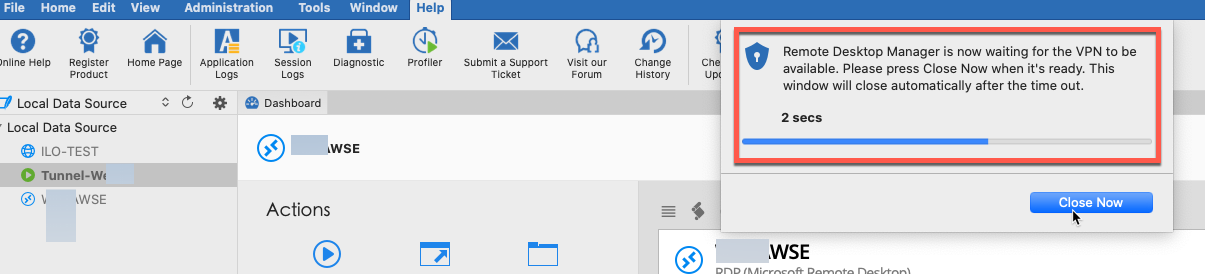
2020-08-06_18-05-22.png
All Comments (33)
Hi,
The delay is not the time it takes to connect to the VPN, it is just an arbitrary delay to make sure the VPN is connected before launching the session. If your VPN connects quickly, you can close it anytime.
There is a setting in the entry configuration to adjust the time: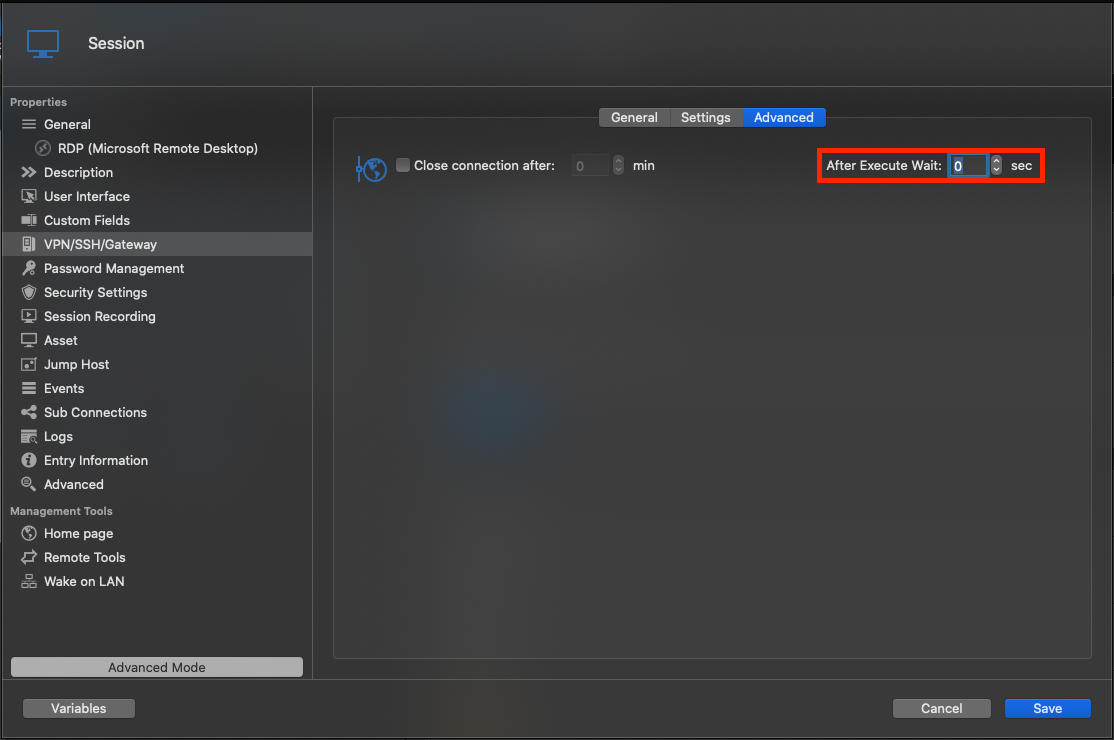
If you set it to 0, the progress window won't be shown at all. Note that this doesn't work for now if you use the "Use over secure gateway" feature.
There is also a global setting for this (to affect all sessions with a VPN/SSH/Gateway that kept the default value), but it is not exposed in the UI. You can still set it by adding the following line in RDM config file:
<VPNExistingSessionWaitTime>0</VPNExistingSessionWaitTime>
You can find the config file for RDM: ~/Library/Application Support/com.devolutions.remotedesktopmanager/RemoteDesktopManager.cfg
And for RDM Free: ~/Library/Application Support/com.devolutions.remotedesktopmanager.free/RemoteDesktopManagerFree.cfg
All that being said, we will also investigate making session connect immediately after the SSH Tunnel successfully connects (not for other types of VPN) without showing any wait window.
Best regards,
Xavier Fortin
AfterExecuteWait.png
Going to test that asap.
Would be great if the speed can get improved.
We have been waiting for the Dynamic ssh tunnel feature in RDM like RoyalTS(X) has for years.
Its about 90% now so we can almost switch for day to day use and migrate over 2000 connections.
Hi,
Is this (the delay on connect) the last thing missing? If not, can you report the rest of what you need?
Best regards,
Xavier Fortin
Yes, in connect.
So rdp connection with ssh tunnel to get to the network ssh tunnel is setup to an edgerouter from there we go to the host.
so rdp connection has the ssh tunnel as “gateway”. So when we click the rdp connection the tunnel starts first and that takes 5sec like you see in the image.
Alright, as I mentioned we will investigate to remove this timer window on SSH Tunnel.
Best regards,
Xavier Fortin
Hi,
I've set the option in the config file that works great.
A bit faster would have been nice, but hope you guys can tweak it some more.
Also if we open 2 connections that use the same tunnel we get this error.
So it will make an attempt to create a second tunnel (Fine) but that fails.
Maybe you can look into this.
After we click OK Both connections are up and running, so that is good but we need to get rid of the error still.
Hi,
Can you try setting the VPN Group value of all sessions linking to the same Tunnel to the same value: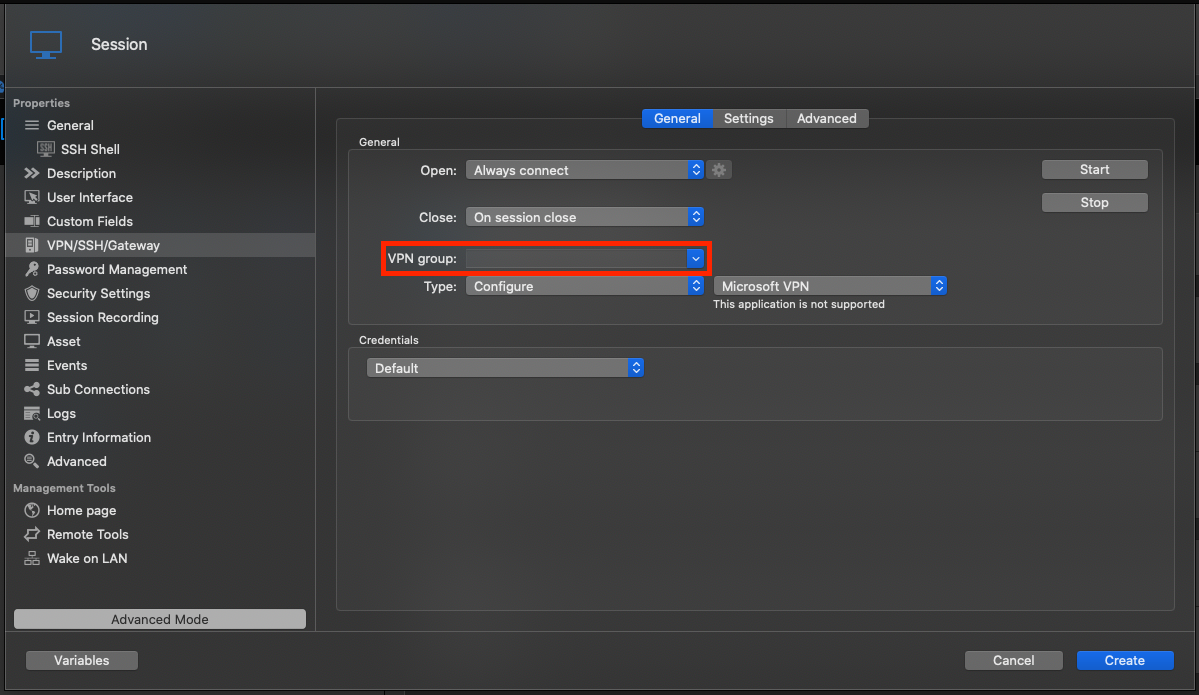
This should prevent the tunnel from being opened multiple times (and will close it automatically only when all sessions using it are closed).
Best regards,
Xavier Fortin
VPNGroup.png
I don't have anything in that dropdown so i assume that i need to just fill something in and keep it the same in both test connections.
Done that now, but same error.
Also if i Use the same tunnel for a SSH or Web connection in the same manner of RDP it does not work;

Do you still see the tunnel being launched twice? Is it the exact same entry?
We are already aware that "Use over secure gateway" does not work with Web Browser entries. There is no native way to set a proxy on the WebKit.WebView component. As for SSH session, it should work. We'll have to check this when we get a chance.
Best regards,
Xavier Fortin
Hmm, its not working for me.
Please look into it and keep us posted.
Also the web and any other connections should be able to work over the tunnel.
Again comparing to Royal TS(x) it can do it with all connections even vCenter etc.
1) If I set the same value in VPN Group for two sessions that references the same SSH Tunnel session, said SSH Tunnel session is launched only once (even when launching the two sessions that link to it) and is closed only once. Is this not the behaviour your are observing? If not, I might need screenshot of the VPN/SSH/Gateway of the two sessions.
2) I can grant you that any connections should work properly through a tunnel, although I would add except a web page as it is very different than most other sessions. In an RDP, SSH, VNC, etc. you provide an address to the service and it uses it to make any subsequent call. For a web page, things are a little different. While in RDM, you can provide the initial URL of a Web Browser session, any other links, resources, etc. inside of the page would still remain unchanged. Firefox and Chrome supports configuring Proxy settings and the module themselves will handle everything else (the whole tunnelling of all requests thing). The IE (for RDM Windows) and Safari (for RDM Mac) modules do not support any such Proxy settings. They are bound to the system configuration (System Preferences -> Network -> Advanced -> Proxies).
To do what you are requesting, we have to take into our own hands the handling of all requests from the WebView. This is non-trivial and will require, at best, a fair amount of investigation. Admittedly, I've looked at the RoyalTSX uservoice issue relating to this, and this appears to be what they are doing. But as was mentioned on their side, this will most likely not cover all cases.
3) I am unable to reproduce your issue with SSH. An SSH configured with Secure Gateway works properly on my side. As with point 1, I will probably need screenshots of your configuration to better understand. Do you happen to also use RDM Windows? If so, do you reproduce the same issue with the same SSH entries? Can you provide logs of both the Tunnel and SSH Shell entries? You can enable session logs in the Help -> Session Logs window.
Best regards,
Xavier Fortin
1) If I set the same value in VPN Group for two sessions that references the same SSH Tunnel session, said SSH Tunnel session is launched only once (even when launching the two sessions that link to it) and is closed only once. Is this not the behaviour your are observing? If not, I might need screenshot of the VPN/SSH/Gateway of the two sessions.
I've tested the VPN group with just the RDP Connections. Also if I do one RDP and 1 SSH and the VPN group is set like i send above it does not work. The Pop-Up with Fail still appears. And SSH connection is not made over the (Tunnel)
2) I can grant you that any connections should work properly through a tunnel, although I would add except a web page as it is very different than most other sessions. In an RDP, SSH, VNC, etc. you provide an address to the service and it uses it to make any subsequent call. For a web page, things are a little different. While in RDM, you can provide the initial URL of a Web Browser session, any other links, resources, etc. inside of the page would still remain unchanged. Firefox and Chrome supports configuring Proxy settings and the module themselves will handle everything else (the whole tunnelling of all requests thing). The IE (for RDM Windows) and Safari (for RDM Mac) modules do not support any such Proxy settings. They are bound to the system configuration (System Preferences -> Network -> Advanced -> Proxies).
To do what you are requesting, we have to take into our own hands the handling of all requests from the WebView. This is non-trivial and will require, at best, a fair amount of investigation. Admittedly, I've looked at the RoyalTSX uservoice issue relating to this, and this appears to be what they are doing. But as was mentioned on their side, this will most likely not cover all cases.
Correct, it does not work in all cases but it works great for opening NAS pages, Printers, ILO / iDRAC etc. those kind of things. And I think there must be a way to use Chromium as an extension somehow.
3) I am unable to reproduce your issue with SSH. An SSH configured with Secure Gateway works properly on my side. As with point 1, I will probably need screenshots of your configuration to better understand. Do you happen to also use RDM Windows? If so, do you reproduce the same issue with the same SSH entries? Can you provide logs of both the Tunnel and SSH Shell entries? You can enable session logs in the Help -> Session Logs window.
If you would like we can do a Remote session so I can show you what happens. Maybe you can see it than and report.
You can send me an email if you want, you should be able to see my details in the profile.
Hello,
I took the liberty to open a ticket regarding the VPN Group issue on RDM Mac in our ticketing system so that we can work together to understand properly the issue and to find a solution. The ticket number is DEVO-25008.
I've sent you a message via this ticket so that we can start the analysis on this.
Best regards,
Jeff Dagenais
Thanks, just uploaded some video. If we are able to fix it let's post the solution here.
I've also observed the SSH tunnel + VPN group issue when both VPN groups are set to the same string
The VPN Group must be set in the VPN/SSH/Gateway tab of the entries that links to the SSH Tunnel, not the SSH Tunnel itself. Is this what you did?
Xavier Fortin
Hi Xavier,
That's correct. The VPN group was set on sessions which use the tunnel, and not on the tunnel iself
I think @ryan has the same problem as we do.
We have an open support case about this and we have provided a "Video" showing the issue.
So I hope its a work in progress :-D
Hi keyvanaarssen,
This version contains an experimental support for Web Browser via Secure Gateway. I'll give a short description of how it works at the moment.
In this version, when you launch a Web Browser entry configured with a Secure Gateway, the host and port of the URL request are registered to our proxying mechanism (with the proxy being the SSH Tunnel entry configured as the session VPN/Tunnel/Gateway). From then on, until the session is closed, every requests sent to this host and port pair are intercepted and configured with the SSH Tunnel host and port as a SOCKS proxy. This works similarly to the Chrome and Firefox module in RDM Windows. The differences being that we only proxy request to the original host and port.
Could you try it and see if it works?
Best regards,
Xavier Fortin
No Cannot get it to work we already had a Web Connection Setup in the file that we uploaded to you.
Maybe you can edit it and send a file to me that we can test?
p.s. the delay in the connections is also gone in this version more snappy :-D
But still multiple connections with same tunnel result in fail -1 like we talked about before.
Hi kayvanaarssen,
I've used the ILO-TEST as a template and filled it's host and port, and the host, port and credentials of Tunnel-Wega with our own values and it connected properly: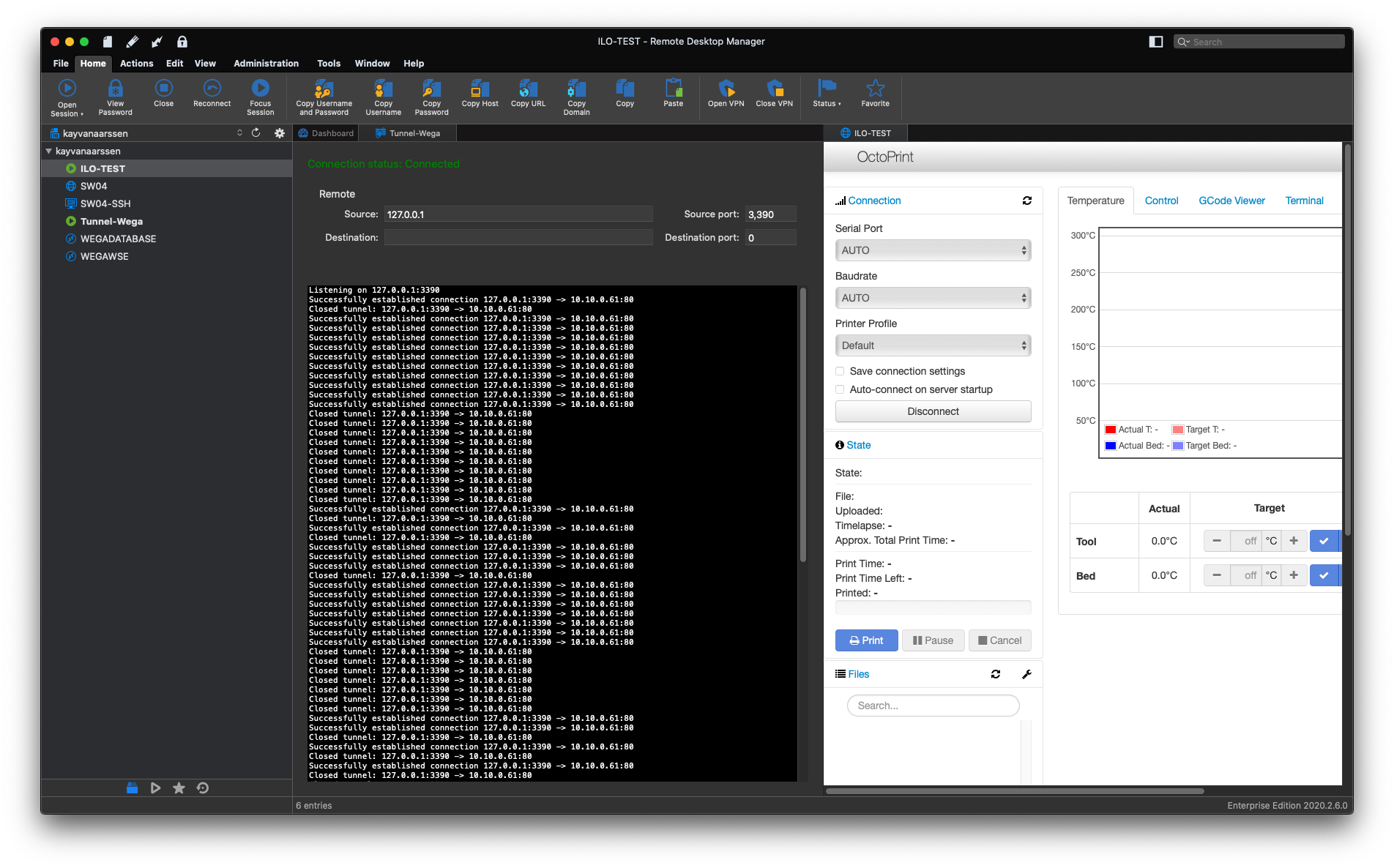
That being said, I've checked "Show logs" and unchecked "Hide when connection successful" in Tunnel-Wega so I could observe the traffic through the tunnel. But neither of those options should affect the behaviour of the feature.
Could you also make those changes and share what appears in the logs view?
Best regards,
Xavier Fortin
TestWebBrowserSecureGateway.png
I think i found the problem.
You are using an HTTP site in your screenshot right?
What i'm accessing is HTTPS -> ILO or Switch
Both do not work.
IF i Access an HTTP system it works...
So think there is a bug somewhere that limits HTTPS.
Also Checking / Unchecking Ignore certificate errors makes no difference
I've thought this too, but I'm not aware of anything that could explain why this does not work with https server. Anyway, I'll follow this trail.
Best regards,
Xavier Fortin
Hi kayvanaarssen,
We were indeed missing the code to handle HTTPS challenge. Could you try this version and tell me if it works?
Best regards,
Xavier Fortin
Yes it works!
Now only the issue with 2+ connections and same tunnel (Fail -1)
It connects and works but still gives the error;
Error is also still there when we set the VPN Goup
So far, I've been unable to reproduce this issue (except by checking the 'Force "allow multiple instances" of VPN' checkbox that is, as of the latest version, not visible in RDM Mac).
As a test, could you try recreating a set of your sessions and tunnel (two sessions connecting through the same tunnel) and closely keeping track of what fields you are setting and see if you reproduce with those?
Best regards,
Xavier Fortin
I’ve just shutdown. Will try that tomorrow.
its not that we do 2 entries (connections) to the same destination.
But
2 or more connections that use one tunnel connection because otherwise we need to make a tunnel connection. For each entry.
if we than have 10 switches at a site we have 10 entries for the switches and 10 tunnel connections one for each switch. That could not be right.
i’m still using the same file as that I send you.
Just duplicated the ILO connection and changed the ip thats it.
You can’t reproduce it that way either?
Interesting, I can reproduce with ILO-TEST and SW04. I'll have to see the difference between your sessions and mine.
Best regards,
Xavier Fortin
Good, let me know if you have an idea💪
This seems to be caused by the "Allow open multiple connections" being set to true in Tunnel-Wega. Turning this setting off makes the whole thing work as it should (i.e. the tunnel being opened only once, and closed once all dependent entries are disconnected).
I'm not sure if this is intended behaviour, the settings is called "Allow open multiple connections" not "Always open multiple connections". I have the feeling that the VPN Group should take precedence. I'll have to check this up.
Best regards,
Xavier Fortin
Thanks! Were are those settings located again?
Than i'll test it tomorrow.
Nevermind-- Found it -> Works like you're telling! Could not resist to pull out the laptop :-D
I'll do some more testing tomorrow. Looks very good already!
Awesome!
That's a weird oversight on my part no to attach a screenshot of the setting in my previous post. Sorry for that. Glad you found it!
Best regards,
Xavier Fortin