Apple Remote Desktop

Your Apple Remote Desktop implementation seems to be the only one out there that actually works, but there are a few minor issues:
- It does not show the remote cursor shape (eg CMD-SHIFT-4 doesn't change the cursor and none of the "Mouse Cursor" options changes that)
- It can not enter full screen
- It doesn't seem to have an option to maximize quality at the expense of bandwidth
These aren't significant issues, especially compared to the horrible quality provided by all VNC only clients... but is the source for that part or what it is based on available so I could try to help fix some of those things? Or are any of these things being considered to be worked on?
All Comments (16)
Hello,
For the cursor issue, we've opened a ticket. We will have to see if we can fix this easily, but it's possible it might be more complex than anticipated.
For fullscreen, currently you could put the entry in 'undocked' mode and maximize the window, but it's not possible to do a 'real' full screen at the moment, unlike something like RDP. It would be interesting to have something like this available in the future though, so we'll keep it in mind.
As for quality/performance, do you experience issues at the moment, or would it be more of a 'nice to have'? We'll also keep this in mind as we improve the ARD client in the future.
As a note, our ARD client is closed source, but we maintain and improve it, so if there are any other features the Mac ARD client supports that we don't, or bugs you've noticed, please let us know so we can consider the best course of action. 🙂
Regards,
Hubert Mireault
As for quality/performance, do you experience issues at the moment, or would it be more of a 'nice to have'? We'll also keep this in mind as we improve the ARD client in the future.
It's mostly a nice to have but I see jpeg artifacting sometimes that when I change the quality on the OSX Screen Sharing client goes away. I found one other windows client that also has a quality slider and increasing it higher than "Adaptive" also clears up the jpeg artifacting. It's not really a big deal generally, but being able to change it when on local LAN is a nice to have.
Thanks for the feedback, we'll keep this in mind as we improve our ARD client.
Regards,
Hubert Mireault
As for quality/performance, do you experience issues at the moment, or would it be more of a 'nice to have'? We'll also keep this in mind as we improve the ARD client in the future.
It's mostly a nice to have but I see jpeg artifacting sometimes that when I change the quality on the OSX Screen Sharing client goes away. I found one other windows client that also has a quality slider and increasing it higher than "Adaptive" also clears up the jpeg artifacting. It's not really a big deal generally, but being able to change it when on local LAN is a nice to have.
Can you tell me more about that? From your response, I understand that you've observed the JPEG artifacts with another product that supports ARD (Remotix? Screens?) and that changing the quality mode made it go away. I've been looking into the JPEG artifact bug, but at this point, I thought the bug affected only our implementation. If it turns out that another third-party has a similar bug, it could indicate that the protocol was slightly changed by Apple in recent years, which would help orient my research.
Marc-André Moreau
I don’t really think the artifacting ever existing is a bug, IIRC I even see it with apple’s client unless I change it to full quality too. The issue is just that you have no way to change it from adaptive quality to full quality... the other software was remotix, yes.
Do you have an easy way of reproducing the graphical artifacts with Remotix or the official Apple client? I can easily reproduce it with our own implementation, but I did try to get the issue with Remotix today without success. Can you post a screenshot? I want to make sure this is the same issue we've seen with other customers. As for the workaround of changing the quality mode, we will definitely open a ticket and get that done.
Marc-André Moreau
Here's a small shot with artifacting, I can get more artifacting by slowly dragging the window and watching it but as soon as I let go and try to hit the screenshot button it clears up to at least this level. 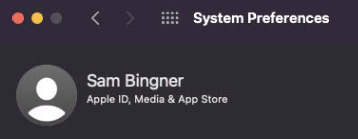
Here's one with no artifacting after turning the quality up to max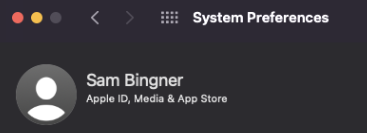
No Artifacting.png
Artifacting.png
Ok, this definitely isn't the same type of artifact I've been chasing, as it would result in severe graphical artifacts that cause decoding errors and a partially updated screen. I actually have a hard time seeing the difference between the two, unless the difference you see is very subtle. Would the artifacts behave as if you sometimes had the equivalent of a JPEG image that was too heavily compressed, creating visible pixelization and square artifacts? If so, I believe it may be working as intended.
The Apple Adaptive Codec (internally called MVS for Multi Variant Stream) always sends graphical updates in two progressive passes. The primary update is the first one you always get, and will usually look like a heavily compressed JPEG with the usual graphical artifacts associated with JPEG compression. The secondary update is usually sent after a brief period of time with no graphical updates. When there is a lot of activity on the screen, you will normally get a lot of primary updates without the secondary updates to reduce usage of bandwidth. The image looks objectively good after the secondary update, but the primary update with its corresponding secondary update doesn't look so good by most people's standards. I don't know the exact logic used by the server for sending secondary updates, but it doesn't always send them, even after a period of inactivity.
Of course, this can be worked around by increasing the quality level to high, which uses less compression, even for the primary update. However, I believe that when you see graphical artifacts, you are looking at a primary update that didn't get increased quality through a secondary update.
Marc-André Moreau
Yes, I believe your assessment is correct, it's working as intended for the adaptive - the issue was just that there was no option to change to the high quality mode where the artifacting doesn't happen because it just sends full updates all the time or something...
The artifacting doesn't completely disappear on the normal setting either, what you see in the top screenshot is as good as it gets... but if you drag the window slowly you should see the artifacting sort of sparkle around the text and get works which is the most obvious manifestation. I don't think it's a bug it's simply a result of not supporting the full quality mode.
Here's a video showing it better... I had to use your software since remotix didn't support recording the video. I'm sorry if you got the impression I meant there was a problem with how you were handling it vs wishing it supported the full quality setting :)
artifacting.mp4
From your video, it is obvious to me that what you are getting while dragging the window is a series of primary updates. When you stop dragging it, I can see the secondary update coming in, it is easier to see with the text clarity. This is MVS at work :)
I've been recently getting back into ARD, so I had to do a bit of research to confirm a few things. The quality levels from the ARD client are as follows:
Adaptive quality: MVS
Full Quality: zlib (full colors)
High quality: zlib thousands
Medium quality: zlib 16-bit
low: zlib half-tone
In other words, as soon as you disable the adaptive quality, you no longer get the MVS codec, but a zlib-compressed image at a given color depth. This is why changing the quality level makes it work: it disables MVS and the artifacts altogether. The major downside is that zlib will likely use a lot more bandwidth than MVS, but if this is not a problem, then definitely use it.
While you cannot change the quality level once connected yet, you can still change the desired encoding prior to the connection. I attached a screenshot to show the option. "default" selects the MVS codec, but if you select one of the zlib codecs, it will effectively disable MVS. We will look into improving those options by making them available post-connection as well, but in the meantime just changing the desired codec prior to connecting should do it.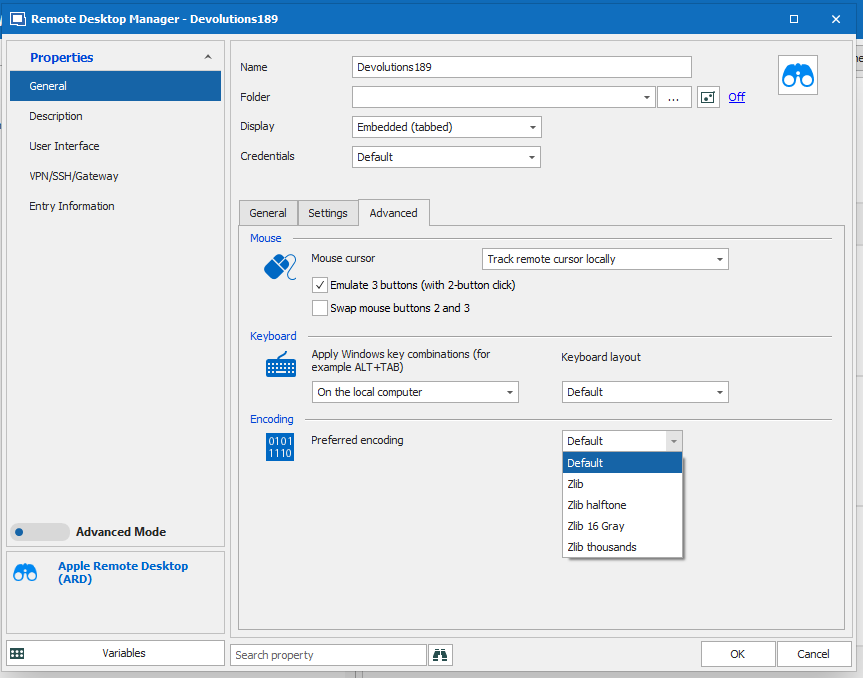
Marc-André Moreau
ard_encoding.png
Oh I'd seen that option but that they related to *compression* vs something like text encoding never occurred to me, I suppose I should have looked at the drop down. Changing it to Zlib does in fact make the behavior seem to be the same as "Full Quality" - as you said at the expense of bandwidth, but I'm actually doing this from one virtual machine to another with vmxnet3 so that's negligible to my use case :)
Thank you - perhaps it would be good to make that "Encoding" tag a little more obvious that it relates to the video compression and quality. Perhaps something like "Video Compression / Encoding" : "Default (Adaptive)", "Zlib (full color)" or something like that would help people not make the mistake I did?
I guess the only thing I'm missing from being ideal is copy/paste including files/pictures and full screen - not sure if that's even possible, Remotix had some sort of drag and drop hack but it would be amazing if it could copy something that makes windows request the file when it's pasted similar to how it works with RDP.
Thank you for looking at this, I'm impressed with how much interest you had in my problem.
Oh ok... as I was typing this I found a strange issue.... I'm NOT on the Remote Desktop Manager screen but it's getting my typing into both Chrome for this, and the remote session to my OSX system.... for some reason it did not release the keyboard. Clicking in the window then coming back fixed it, and I can't figure out how to duplicate that. If I figure out how I'll let you know.
Hi,
We have reviewed the internal structure of the original settings, and came up with this updated list for the dropdown:
- Adaptive quality (Apple MVS codec)
- Full quality (zlib full colors)
- High quality (zlib thousand colors)
- Medium quality (zlib grayscale)
- Low quality (zlib black & white)
"Default" will remain there, and will default to "Adaptive quality (Apple MVS codec)" like it currently does. I changed the wording and description for each of the codecs to make them easier to understand. The current wording is close to the internal codec names, but those tend to be obscure.
We will also consider moving that dropdown outside of the Advanced tab and make it more obvious.
As for text compression, there is no codec-specific encoding of the text in Apple Remote Desktop, but text is usually something very sensible to image compression in general. The vast majority of image codecs work like JPEG and lose a lot of information in the compression process, while zlib is actually a lossless generic data compression codec. In this case, the data loss is done prior to the compression, by reducing the color format to something containing a smaller number of color bits. In other words, using zlib like this is an oddity by today's image compression standards, but it should work very well in your case (localhost access).
The only part you need to remember is that if you want to look for compression "damage" in your image, always look for text, they are the first victim. You would be surprised how much a natural image like a photo can be compressed before it starts bothering you, and that threshold is usually much beyond the acceptable threshold for images containing text.
Best regards,
Marc-André Moreau
Hi, One more questions, How to configure to lock screen when remote by ARD on Remote Desktop Manager?Looking forward to your help, Best RegardsBao Nguyen
Hi,
The option is available, but it may not be very easy to find in the current UI. It is the lock icon in the toolbar, as shown in the screenshot:
I've checked how this is implemented with the original ARD client, and while there is an icon in a toolbar, there are also textual menu entries "lock screen" and "unlock screen". I'll see how we could improve it such that people who search for the feature, find it, because this small lock icon in the toolbar is easy to miss.
Another possible improvement would be to specify the lock message sent to the mac, is this something you need?
Best regards,
Marc-André Moreau
Hi Moreau,
I tried and do like your guide and it was completed but How to make RDP maximize go to full screen for Mac and Windows?
Best Regards,
Bao Nguyen
Hello,
In order to have your RDP entries open in fullscreen mode, you will need to do the following:
1- In RDM Windows, go in the properties of your RDP entry, under the "Display" tab and set the "Remote Desktop Size" to "Fulls screen":
2- In RDM Mac, the same option can be found in the properties of your RDP entry, under RDP (Microsoft Remote Desktop) - > Display -> Remote Desktop Size -> Full screen:
Best regards,
James Lafleur