Add in root does not work if custom role is given permission
Add in root does not work if custom role is given permission

Hello,
I noticed an issue with allowing specific roles to add items in the root of a vault. I assigned my user to a specific role, and then changed the permission to "custom" and allowing members of that role to add in root, but this doesn't seem to work: my user is not able to add or edit folders in the root of the vault.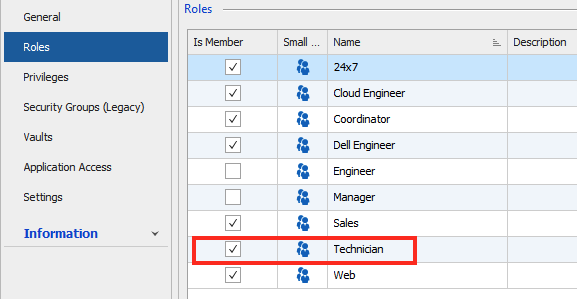
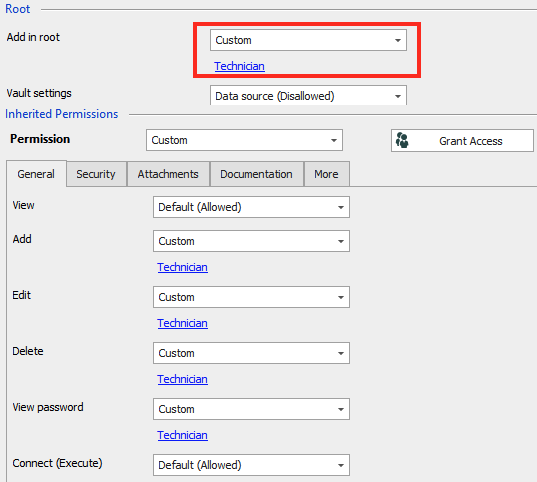
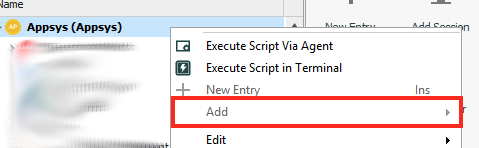
Attached the screenshots of the role assignment, the permissions of the vault and the resulting UI change. I'm using 2020.2.16.0.
Best regards,
Jelle Hillen
Role assignment.png
Permissions.png
Cannot add in root.png
All Comments (14)
Hello,
What data source type are you connected to? If it's Devolutions Password Server, what version are you using?
Best regards,
Érica Poirier
Hello,
What data source type are you connected to? If it's Devolutions Password Server, what version are you using?
Best regards,
Hello,
- RDM version: 2020.2.16.0
- Datasource type: MySQL
Best regards,
Jelle Hillen
Hello,
Thank you for the information.
I have been able to reproduce it in RDM 2020.2.16. In RDM 2020.2.17, it works as it should.
Could you please try the latest version 2020.2.17? You can download it here.
Best regards,
Érica Poirier
Hello,
I've updated to 2020.2.17 as requested, but I still seem to have the same issue.
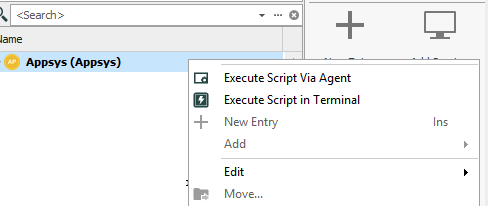
I did notice that if I set "add to root" back to allowed for everyone, I still see "Add" grayed out, so it may be another permission that is causing the issue. I did set the Add/Edit/Delete permissions to the custom role (Technician) as well, so it may be that what's causing the issue. Still, I would expect RDM to adhere to the roles assigned to specific permissions. 
Best regards,
Jelle Hillen
Permissions 2.png
Add in root 2.png
Hello,
Thank you for the information.
Could you please verify if the Use legacy security in Administration - System Settings - Security is disabled?
And what value is set for the Add in root permission in Administration - System Permissions - Entries?
Best regards,
Érica Poirier
Hello,
Legacy security was indeed enabled, so I turned it off.
Add in root setting was already set to Default (allowed).
The result stays the same, though.
Best regards,
Jelle Hillen
Hello,
Thank you for the information.
That is quite strange. Is the User type property is set to User in the user account properties?
Best regards,
Érica Poirier
Hi,
Yes, they are all regular users with the "Technician" role assigned to them.
Best regards,
Jelle Hillen
Hello,
I think it would be easier to do remote session to troubleshoot this behaviour. Please send an email to ticket@devolutions.net and we will send you a link to our online reservation system to book the session. Please add a reference to this topic in your message.
Best regards,
Érica Poirier
Hi,
Thank you. As I will be on leave for the next two weeks, it will be something for the second half of August. I'll make a note in my calendar.
Best regards,
Jelle Hillen
Hello,
Finally we have been able to reproduce your issue and a ticket has been sent to the engineering team. For your information, the internal ticket number is RDMW-5751.
Once a fix will be available, we will keep you posted.
Best regards,
Érica Poirier
Hi, we have the same issue (atm using 2020.2.14)
Is this the issue RDMW-5751 solved with the newest version?
Hi, we have the same issue (atm using 2020.2.14)
Is this the issue RDMW-5751 solved with the newest version?
Hello,
I can confirm the issue was resolved with the latest version (2020.2.19).
Best regards,
Jelle Hillen
Hello,
Thank you for your feedback @Jelle Hillen and glad that it's now working. Indeed the fix is available in RDM 2020.2.19 as stated in the RDM Release Notes.
Best regards,
Érica Poirier