Clipboard stopps working on local machine

Hi,
As soon as I open a RDP session via Remote Desktop Manager my local clipboard seems to stop working. The clipboard in the RDP session works fine.
If I open the RDP session with Windows mstsc the local clipboard work just fine, as well as the RDP session clipboard.
Any ideas how to solve this? I've been using this software for months and I really like it.
All Comments (8)
Hello,
Do you launch your RDP in External or Embedded mode?
Best Regards,
Etienne Lord
Hello,
Do you launch your RDP in External or Embedded mode?
Best Regards,
It doesn't matter if I use external or embedded mode. The issue occurs as soon as I open a RDP session from the client.
I tried to remove the check box "clipboard" here just to see what happen and when did the result was that clipboard was working locally and on the RDP session.. but you couldn't copy paste back and forth from the rdp session to the local machine and vise-versa. 
Hello,
Could you head over to File - Options - User Interface - Clipboard - Advanced and set the Clipboard Copy Method to "Legacy"
Best Regards,
Etienne Lord
Hello,
Could you head over to File - Options - User Interface - Clipboard - Advanced and set the Clipboard Copy Method to "Legacy"
Best Regards,
Hi again,
It's already set to "Legacy". I even tried to switch from Legacy to "Paste once" and then back again to see if the issue was gone, but it's still there.
Hello,
In File - Options - Types - RDP, what is your RDP engine set to? 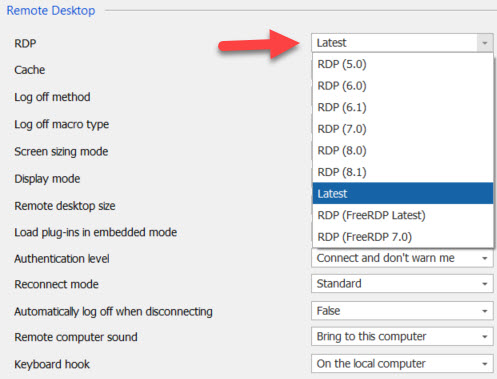
Just to confirm, did you try to leave the Clipboard to "Secure" ?
Best Regards,
Etienne Lord
rdp.jpg
Hi,
It's set to "Latest".
Where i the "Secure" option you are referring to ?
FYI my colleague who just returned from vacation is experience the exact same issue.
Hello,
File - Options - User Interface - Clipboard - Advanced. Clipboard copy method set to "Copy Once (Secure)"
Best Regards,
Etienne Lord