VNC - Multiple Monitors - View 1 at a time

Hi there, I am new to Remote Desktop Manager, and I have a question.
We have 2 monitors on most of our workstations, and I am wondering if it is possible to view 1 monitor at a time, rather than both, from the tabbed VNC viewer. When both are shown side-by-side, the image gets a little small, even on a 24" monitor. I would prefer to toggle between monitor 1 and monitor 2. Does anyone know if this is possible?
Thanks!
All Comments (3)
Hello,
Thank you for contacting us with your question!
Using UltraVNC as your VNC application will allow you to adjust the zoom of your session. This can be done, while the session is active, by clicking on the Preferences button and changing the Viewer Scale. While it won't exactly allow you to switch between monitors, you will be able to use the scrollbar to go from one to the other.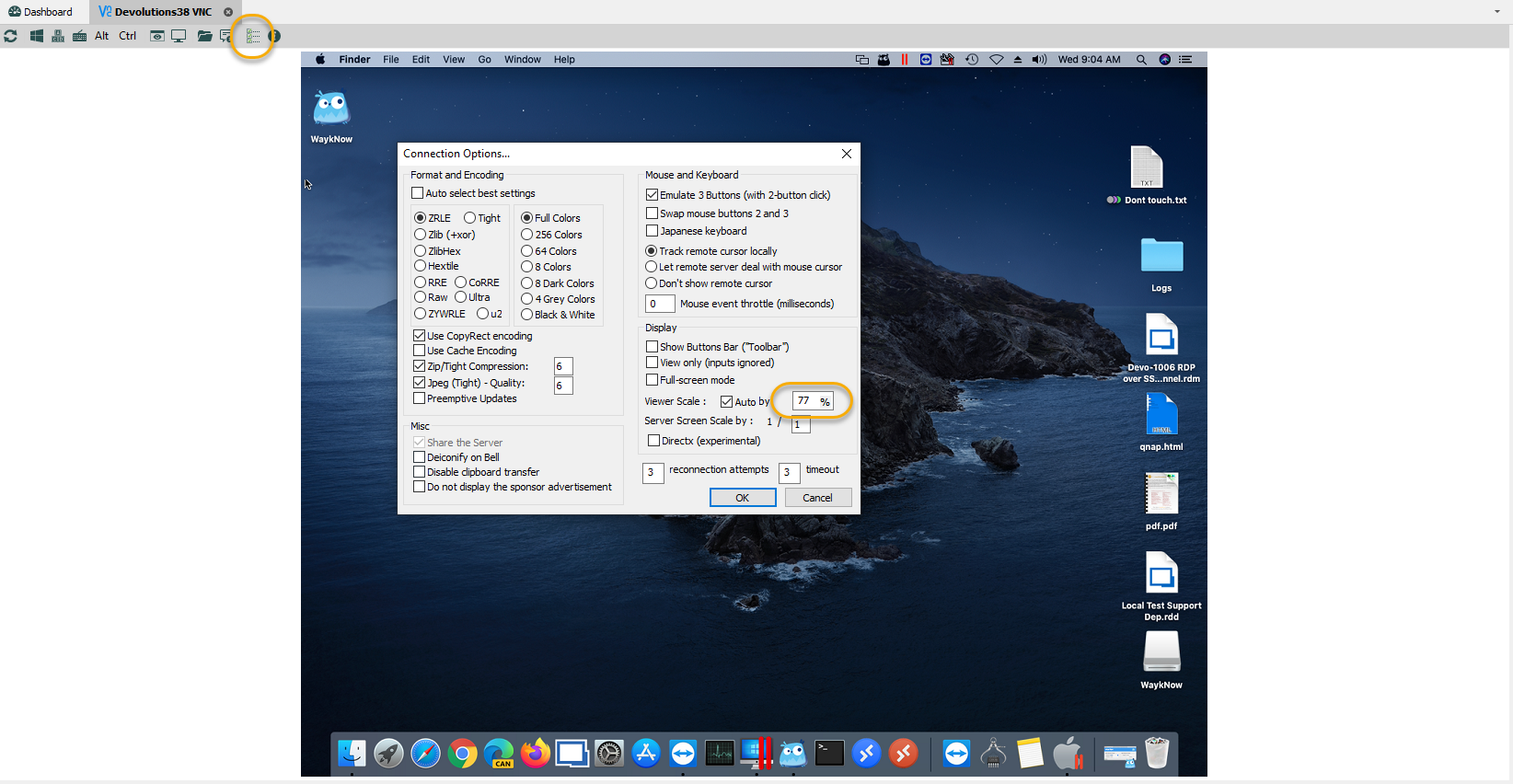
Best regards,
Gabriel Degrandpré
ForumVNC.png
Thank you for your reply. I take it then that this cannot be done with the tabbed VNC viewer then?
Thanks,
Quintin
I think I figured it out. I assumed that under the embedded (tabbed) settings, that the 2 choices between default and UVNC, that default was the same as UVNC...so not sure what VNC program default is using, but in any case, figured out how to do this in a tabbed environment.
Thanks!
