Not saving passwords

First time user. Just installed the free version and testing it out.
I have create a connection and entered the password and selected to save it.
The connection is made but it asks for the password.
Selecting: View Password shows blank.
I have skimmed the beginning of the manual but can't see what I have failed to do to get it to save passwords.
All Comments (11)
I've been doing some reading and now I understand that Local Storage is the registry, but that does not answer why the password is not saved.
In any event, I would like to create a new Data source. According to the web help "Open the Data Source Configuration window by clicking the ellipsis button at the top of the Navigation Pane."
I don't have any such thing at the top of my Navigation Pane. All I have is 'Navigation' at the top, 'Name' below that and 'Local Data Source' below that.
I can't see any way to create a new entry.
Is there some intro guide for new recruits who have a lot to learn?
Hello,
- Could you send a screenshot of the entry you created, you can remove/hide any sensitive information.
- You can create a new data source in File - Data Sources.
- I would advise heading over to Window - Reset Layout. From there, you should be able to create a new entry with 3 different methods.
- In the Dashboard, under actions - New Entry
- In Edit - New Entry
- Make a right-click in the Navigation Pane -> New Entry
Best Regards,
Etienne Lord
Thank you.
I have deleted the original entry but can re-create it if you wish and test it again.
I have created an XML data source 
and even created the empty file, but I get Not Connected
and can't get past that - can't create any connections.
Can't see what to 'connect'.
I went on to create a data source Google Drive connection with the same result.
Then tried SQLite and that is working.
Can't find anywhere instructions on how to 'connect' to the other two sources.
Hello,
If you are using 2020.2.17.0, there seems to be an issue with the .XML datasource (XML & Google Drive). I will have a ticket open for that.
I could recommend our Free Devolutions Online Drive datasource, you would only need a Devolutions Account for that.
Best Regards,
Etienne Lord
I have moved over from Terminals and it was wonderful to find an import for that - worked perfectly.
So basically I'm sorted bar a few questions (sorry for going off-topic).
-- Terminals has what looks just like the Quick Connect at the top, but it is for selecting an existing connection. Is there something similar available? At the moment I have to open the Navigation bar to open a connection. The site opens in the remaining space on the screen. If I then close the Navigation bar it seems the screen disconnects and reconnects so that it can re-size.
-- If I copy the SQLite file to an other PC or laptop, will I be able use it - or is it somehow locked to my PC?
Many thanks.
Hello,
Not 100% sure I understand your first question, but we do have a feature that will re-connect the session in order to resize (Smart Reconnect), here are the display settings that I use : 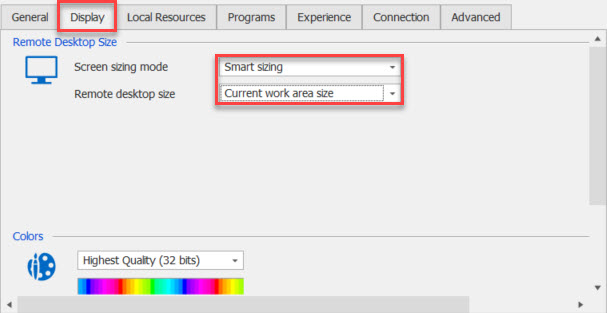
For your second question, you can indeed use the SQLite file (Connection.db) on multiple computers, but note that the data won't be synced between your computers. If you want synced data, Online Drive can be an alternative to SQLite
Best Regards,
Etienne Lord
display.jpg
Hi,
The issue regarding google drive and XML datasources will be resolved in the next version of RDM, 2020.2.18.0.
Thank you for reporting this :).
Regards,
Alexandre Roy
Thank you for the prompt responses.
I think I now have this working as well as Terminals did and I'm sure I will discover many more goodies.
I have discovered the filter in the bottom left corner. This solves my problem with having to open the Navigation panel each time I want to open a connection.
The filter pops-up a matching list from which the connection can be opened.
Suggestion:
The filter also shows up folders - which is very good. But the folders do not show their contents. Nor do they allow opening of all the connections within the folder, while on the Navigation panel both those actions work. (I have a folder that contains all the connections I want to open when I first start up)
It would be lovely if that filter box would allow that - i.e. the pop-up functioned exactly like the Navigation panel list.
Correction:
I've now discovered that I can actually open all connections within a folder in one go.
Wonderful!
Glad that you were able to find what you were looking for, do not hesitate if you have any other questions :)
Best Regards,
Etienne Lord