RDP and Import work differently

Hi
I have an RDP shortcut which works perfectly but when I import it ans try and use with Embedded display it shows different actions.
I get a prompt or some credentials at this point.
I don't see this if I run the session with External display or as a stand alone RDP session.
What is sing the difference in operation when the difference is the display mode.
thanks
All Comments (4)
Hello Peter,
Thank you for contacting us on that matter!
The behavior of both display modes is different because we are not using the same protocol to launch the connections.
RDM uses Microsoft ActiveX to open RDP sessions in embedded mode and uses MSTSC.exe to launch RDP sessions in external mode.
In order to be able to open your RDP connections using the embedded display without having to enter your credentials manually, you will need to do one of the following:
1- Go in the Properties of your RDP entry and enter your credentials under this section: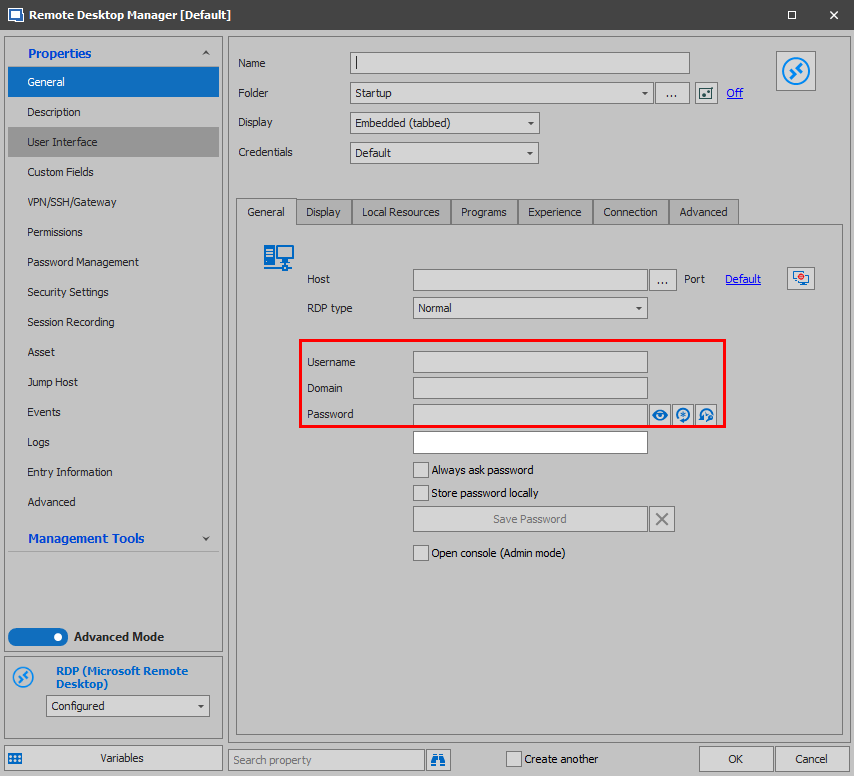
2- Use the "Credential Repository" feature to have your RDP entry use the credentials stored in a credential entry: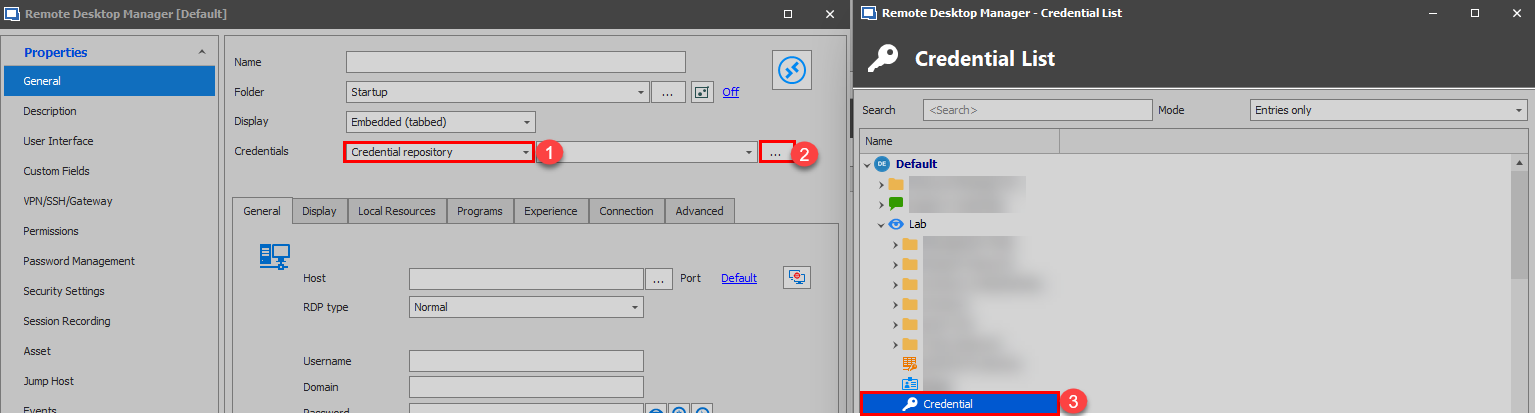
For more information on that matter, please refer to this link: https://help.remotedesktopmanager.com/credentials_redirection.html
Best regards,
James Lafleur
RDP2.png
RDP1.png
James
Thanks for the tips.
I got a little further and now I get this message, which I don't get when I use any other method.
Any setting which launches outside of RDM works OK, linked or embedded RDP connect. Just not embedded tab display.
Thanks
Hello Peter,
You are more than welcome!
As for this new issue, unfortunately, this message is not from RDM. The title of the error message is "Remote Desktop Connection", this means that this error is thrown by the remote host itself, RDM simply shows what is received when the connection fails. A good way to see this would be to try to establish a connection to the same remote host through RDCManager from Microsoft. Since RDM uses the same ActiveX to launch RDP connection in embedded mode, the result should be the same.
If you wish to do this test, you can download RDCManager using this link:
rdcman.msi
Best regards,
James Lafleur
James
I do get the same issues with RDC, which I have been using for a few years and have always had to have this particular RDP connection as a shortcut on the desktop.
I was starting to move away from RDC as it has been removed from Microsoft due to some security issues.
I thought I would try once more to get this problem RDP link into a manager.
I just found it very puzzling that it would behave so differently between desktop and any of the Managers.
Appreciate the assistance, but will go back to the desktop shortcut for this particular connection, but I think I may move all the rest over to RDM.
many thanks