Getting message “Migrating data content to version x.x” every time, I change between Vaults
Getting message “Migrating data content to version x.x” every time, I change between Vaults

Hi
After upgrading to Version 2020.2.15.0 I am getting message “Migrating
data content to version x.x” when changing
between Vaults, this is not a one time thing, It dos not matter if you have bin
in the Vault and got the message one time you are e getting it again when you
change to it again.
Remote Desktop Manager VERSION 2020.2.15.0
Windows 10 Version 1909(OS Build 18363.838) 64-bit
Data source type:
Microsoft SQL Azure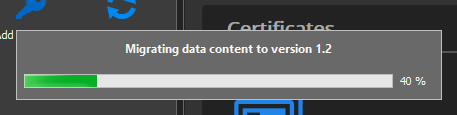
RDM 2020-06-24 081908.png
All Comments (10)
Hello,
Do you know if this user is able to save the data? Perhaps you could ask your administrator to open the vault. Usually the migration is done once and the content is saved. For a reason it does not seem to save the migrated data. You could ask what is migrated? We simply the change the Xml format to improve the performance and the content structure.
Regards
David Hervieux
I am an Administrator, I can create and delete entries.
we haven’t migrated anything only upgraded Remote desktop Manager to an new version.
Hello,
Could you go in Help -> Profiler, drag the window on another screen and reproduce the message.
Do you see something in the profiler?
Best regards,
Jeff Dagenais
Main thread (UI)
----------------------------------------
LoadConnections [Microsoft SQL Azure : xxxxxxx] - 64-bit...
OfflineManager.GetDataSourceSettings : 0 ms
ClearConnections - dispose : 0 ms
reload: True hasSecurityChanged: True hasChanged: True
HasOfflineChanges...
LoadConnectionsFromOfflineFile...
DeserializeData : 26 ms - Count : 77
ReadFromOffline : 24 ms
LoadConnectionsFromOfflineFile : 50 ms
HasOfflineSessionChanges : 0 ms
HasOfflineChanges : 51 ms
ClearConnections - dispose : 0 ms
LoadConnectionsFromDataSource...
LoadDataSourceSettingsFromDataSource...
GetDataSourceSettings : 32 ms
LoadDataSourceSettingsFromDataSource : 32 ms
GetConnections...
Database.GetConnections...
Reading connections from database : 63 ms
DecryptData : 0 ms - Count : 99
DeserializeData : 23 ms - Count : 99
Database.GetConnections : 119 ms
GetConnections : 119 ms
DoMergeConnections...
PrepareConnectionList : 0 ms
Loop...
Initialize : 0 ms
Migrate Connection : 0 ms
OfflineManager.Merge : 0 ms
Merge With List - Contains : 0 ms
Merge With List : 0 ms
Loop : 0 ms
Merge Full List...
Offline : 0 ms
Connections : 0 ms
Merge Full List : 0 ms
Filter : 0 ms
ClearConnections : 0 ms
DoMergeConnections : 0 ms
LoadConnectionsFromDataSource : 205 ms
ClearConnections : 0 ms
LoadConnections [Microsoft SQL Azure : xxxxxxx] - 64-bit : 509 ms
MigrateDataSource: ver.0...
Database.SaveConnection : 164 ms
Database.SaveConnection : 177 ms
Database.SaveConnection : 163 ms
Database.SaveConnection : 159 ms
Database.SaveConnection : 163 ms
Database.SaveConnection : 165 ms
MigrateDataSource: ver.0 : 1403 ms
Connection States: Refresh...
ClearClosedRunning : 0 ms
GetAllConnectionStates : 67 ms
HasChanges : 0 ms
Connection States: Refresh : 67 ms
TreeView.LoadConnectionList...
GetGroupInfos : 0 ms
BeginUpdate...
LoadConnectionInTreeNode : 0 ms
PreCreateGroups : 0 ms - Count : 1
BeginUpdate : 59 ms
TreeView.LoadConnectionList : 59 ms
SelectionChanged...
LoadConnectionList : 0 ms
SelectionChanged : 107 ms
Thread : 4
----------------------------------------
4 - Sync to Offline...
4 - Offline.AddOrUpdateConnection : 0 ms
4 - Sync to Offline : 4 ms - Count : 77
4 - Sync to Offline...
4 - Offline.AddOrUpdateConnection : 0 ms
4 - Sync to Offline : 4 ms - Count : 1
Thread : 5
----------------------------------------
5 - OfflineManager.SaveMeta...
5 - SaveSecurityInfo...
5 - 8bc05ab2-a74c-486f-947b-xxxxxxx
5 - SaveSecurityInfo : 32 ms
5 - Repository : 1 ms
5 - Expiration : 0 ms
5 - DataSourceSettings : 0 ms
5 - PrivateConnectionManager.Saving : 30 ms
5 - ConnectionOverrideManager.Saving : 0 ms
5 - OfflineManager.SaveMeta : 67 ms
Thread : 24
----------------------------------------
24 - OfflineManager.SaveMeta...
24 - SaveSecurityInfo...
24 - 8bc05ab2-a74c-486f-947b-xxxxxxx
24 - SaveSecurityInfo : 0 ms
24 - Repository : 0 ms
24 - Expiration : 1 ms
24 - DataSourceSettings : 0 ms
24 - PrivateConnectionManager.Saving : 30 ms
24 - ConnectionOverrideManager.Saving : 0 ms
24 - OfflineManager.SaveMeta : 34 ms
Thread : 26
----------------------------------------
26 - OfflineManager.SaveMeta...
26 - SaveSecurityInfo...
26 - 8bc05ab2-a74c-486f-947b-xxxxxxx
26 - SaveSecurityInfo : 71 ms
26 - Repository : 0 ms
26 - Expiration : 0 ms
26 - DataSourceSettings : 0 ms
26 - PrivateConnectionManager.Saving : 33 ms
26 - ConnectionOverrideManager.Saving : 0 ms
26 - OfflineManager.SaveMeta : 10
Hello,
I have added more logs and made a potential fix. This will be in the next minor update.
Regards
David Hervieux
This is still a problem in version 2020.2.17.0.
It looks like the problem disappeared when I change caching
mode to disable and back to Intelligent.
The problem came back.
Hello,
Could you try the steps below:
- Close RDM
- Navigate to %localappdata%\Devolutions
- Move the RemoteDesktopManager folder on your desktop
- Restart RDM
This will create you a completely new configuration folder for RDM.
Let us know if that help.
Best regards,
Jeff Dagenais
The problem was solved, by running without caching and
scripting opening all the vaults, then it worked wen enabling caching.
Thanks for your help.