Scroll cursor in terminal/ssh
With RoyalTSX (on my Mac) I can scroll through text files in Terminal/SSH with my mouse wheel. The cursor moves when scrolling.
I think this worked in RDM on my Windows machine before but it's not working atm.
Can someone enlighten?
All Comments (13)
Hi,
I assume you mean: scroll through text files with a text editor like vi or nano. At one point, RDM's terminal was allowing scrolling within those application using the scroll-wheel. This was changed at the request of a user to match the behaviour of Putty. Could you tell me which text editor application you are using? Maybe I can find a fix for this app to suit your needs also.
Regards,
Denis Vincent
Hi Denis,
Indeed that is what I'm talking about! Sorry for not being that clean. :-)
I'm mostly using nano, but vi and vim also.
Good to hear it was in RDM before, I though I was losing my mind. ;-)
Thanks for the info, I will look into it and we will add an option to control scroll wheel behavior. It surely won't be next week, as I am already working on another issue, but as soon as possible.
Regards,
Denis Vincent
Thanks a lot! Appreciated.
Hello,
We've added a new option, located in File > Options > Types > Terminal. It's called "force scrolling history when using mouse wheel". By default, it will be set to true, which is the current behavior. To achieve your expected behavior, you will need to set it to false.
This will be available in RDM 2020.2.17.0.
Regards,
Hubert Mireault
Wicked!
Thanks a lot @Hubert.
I'l be looking forward to the new release.

Hi @Hubert. I cannot find where is located settings regarding "force scrolling history when using mouse wheel". Can you give me more details please. I use RDM 2021.2.11.0 on my MacBook. Thanks in advance
Hello,
From what I understand you are using RDM on Mac, so I will let our Mac team leader confirm if this is implemented.
Regards,
Hubert Mireault
Hi andreifer20,
This has not been implemented for Mac yet. The ticket is opened, and we will post back when it is done.
Best regards,
Xavier Fortin
Hi andreifer20,
As of RDM Mac 2022.1.3.0 (which is available now), the "Force scrolling history when using mouse wheel" option is available. You can find it in the Preferences here: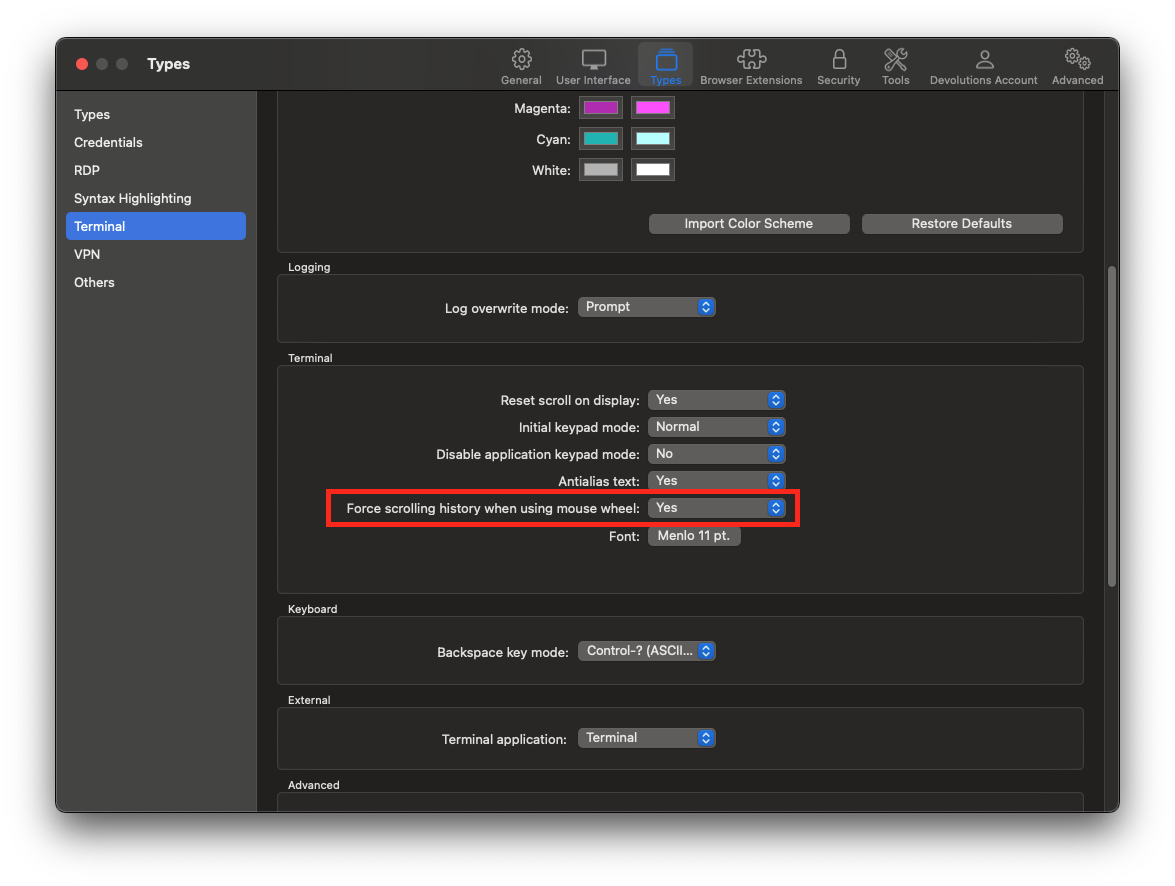
Please, do tell us if you have any issue with it, or with anything else.
Best regards,
Xavier Fortin
ForceScrollingHistory.png
Thank you for your fast answer. Really appreciate. Any suggestion how can adjust text size (as shortcut command) in RDM? In OSX terminal I used "command +" or "command -" and the size of the text change bigger or smaller.
Thanks in advance
Hi andreifer,
This is not possible at the moment. We've opened an improvement ticket.
We'll keep you posted.
Best regards,
Xavier Fortin
Hi andreifer20,
As of RDM 2022.1.13.0, it's now possible to dynamically adjust the font size in SSH Shell and Telnet terminals with the ⌘+ and ⌘- shortcuts.
Best regards,
Xavier Fortin