Add website that only supports Chrome or Firefox

I am very new to Devolution RDM, and got assigned to manage it now......
We have a request to add a page into RDM. It is a management portal of a IP phone system. It does not support IE.
If I add it as URL, it does not load at all. If I add it as browser session, using Chrome, it also does not load.
I am quite lost as to how to troubleshoot this. Can some kind soul here help?
How can I check that the Chrome support in my RDM is set up correctly?
All Comments (3)
Hello,
Is the session started in embedded mode (inside RDM) or you are starting the session in the local browser and them try to fill up the credentials with our Devolutions Web Login tools?
Also, could you please tell us the version of RDM that you are using (available under Help -- About -- Version)
Regards,
David Grandolfo
Hi David,
I have tried all 3 mode, embedded, undocked and external, all not working. However, when I tried again today, External works! I can actually see the portal now with an external browser. However, username and password auto fillin does not work, even with the Chrome extension installed.
Our version is 2020.1.20.0, 64bit.
Thanks.
Regards,
CS
Hi,
Auto fill can be used in embedded mode (including undocked) or in external mode.
If you would like to use it in embedded/undocked mode please look at our help topic which will explain how to configure it ( https://help.remotedesktopmanager.com/troubleshooting_webauthentication.html?q=web+authentication )
However, for the external mode you only need to check Enable Devolutions Web login in the Web Browser or Website entry.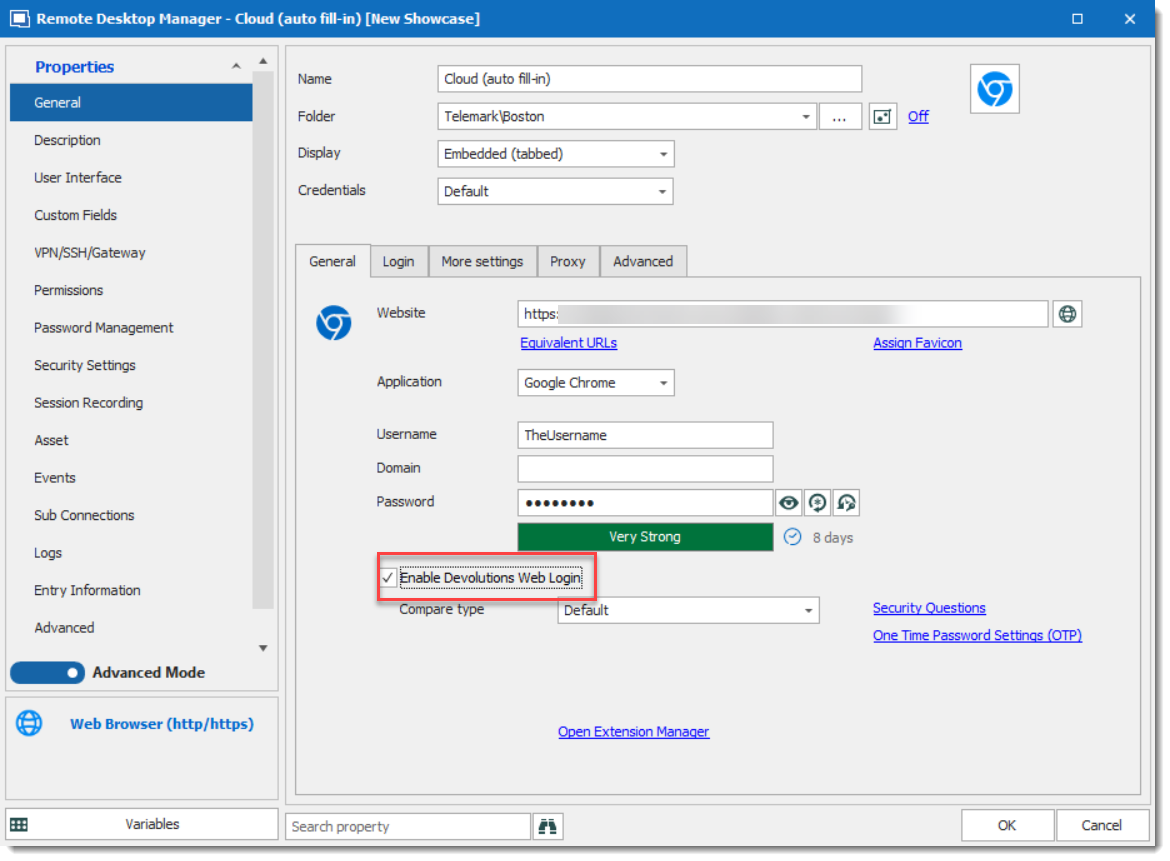
Regards,
David Grandolfo
DWL_enable.png