Backup, restore, install.

- Is there a way to backup all the settings in "File -> Options"?
- Is there a way to restore from a backup after a fresh install (instead of typing in all the registration details first)?
- Is there a way to backup ALL the settings in RDM and restore on another machine?
Regards, Sasha
All Comments (2)
Hello,
Thank you for contacting us on that matter!
Please find my answers to your questions below:
1- Is there a way to backup all the settings in "File -> Options"?
Indeed, to do so, you will need to go under File -> Options and use the "Export Options" button at the bottom left corner of the screen: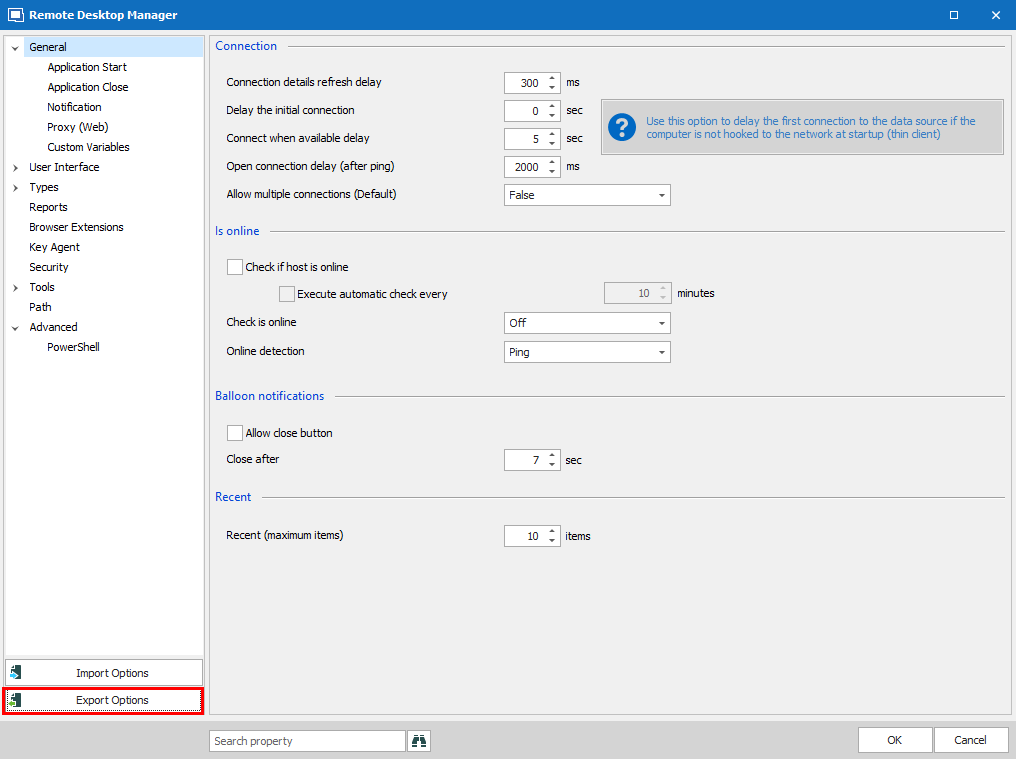
Using this feature, will allow you to export your setting into a "RemoteDesktopManager.cfg" file. For more information, please consult this link: https://help.remotedesktopmanager.com/file_options_export_options.html
2- Is there a way to restore from a backup after a fresh install (instead of typing in all the registration details first)?
Once your configuration is exported using the steps mentioned above, you could move this "RemoteDesktopManager.cfg" into the %LocalAppData% -> Devolutions - > RemoteDesktopManager folder prior to launching the application for the first time. In doing so, the application will fetch this configuration when you start it and you won't have to configure this fresh instance of RDM.
Another way would be to created a Custom Installer with the desired settings and to use this package to install new instances of the application. For more information, please consult this link: https://help.remotedesktopmanager.com/installation_custominstallermanager.html
3- Is there a way to backup ALL the settings in RDM and restore on another machine?
This can be achieved by using any of the methods mentioned in both #1 and #2.
I hope that helps!
Best regards,
James Lafleur
exportoptions.png
Hi James,
Percect, this helps.
Thank you very much!
Regards, Sasha