Lastpass credentials: Advanced tab disappeared

After upgrading to the latest RDM version our logon behaviour has changed dramatically.
Beforehand we woul only need to enter the lastpass master pw once per RDM session for credentials existing in Lastpass thanks to the checkbox "Trust this device if two factor authentication is used".
In the latest RDM version, this entire tab "Advanced" is gone, any explanation? 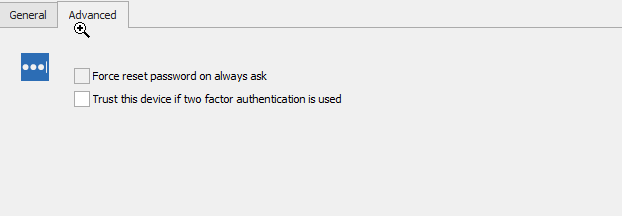
2020-06-08 09_46_13-Slack _ netscaler _ Blubird.png
All Comments (7)
Hello,
You can find the option in File > Options > Types > Credentials now, in the Lastpass section under "two factor authentication mode".
Regards,
Hubert Mireault
Hi Hubert, thanks for your reply. Unfortunately the behavior is not the same.
In the old version:
- We needed to enter the Lastpass Master password once per RDM session.
- MFA did not have to be entered, although we enforce it in Lastpass administration.
- Every future connection using the same Lastpass username in RDM did not require the Lastpass master password.
In the new version:
- When setting to "Trust this device", you indeed don't have to enter the Lastpass MFA
- But you have to enter the Lastpass master Password everytime at every connection, which is inconvenient.
- The checkbox "Use legacy connection mode (mobile)" does not make a difference.
Ideally there would be a situation:
- To ask for Lastpass master password + MFA once per RDM session, when opening the first connection.
- But not for consecutive connections.
Thanks in advance
Hello,
Thank you for the detailed explanation. We'll open a ticket to add an option for this in the options as well so the old behavior can still work.
Regards,
Hubert Mireault
Thanks Hubert, where can I follow-up on the status of this?
Regards
We'll let you know in this thread when the change has been done, if you need an update you can post here and we'll let you know our progress on it as well. 🙂
I'm hoping we can get this done either this week or the next.
Regards,
Hubert Mireault
Just to let you know, we've made the change. It will be a new checkbox that is accessible in the same place as the other options (so File > Options > Credentials, under the LastPass section). Just a note, it's only available to enable if you have the 2FA mode on either "Trust this device" or "Trust this device (clear on application close)".
This will be available with RDM 2020.2.13.0. If you encounter any other issue, please let us know.
Regards,
Hubert Mireault
Thanks!