RDP on MacBook Pro and discrete video card

When I connect to a RDP session, my MacBook Pro 16" switches to the discrete video card
And even after RDP disconnect Macbook can't switch back to Intel integrated GPU as RDM doesn't release it. I have to close RDM and only after that Macbook switches to Intel GPU. It's quite uncomfortable as I have to always remember to close the app or sometimes I have a lot of opened linux ssh console tabs (none of them RDP) and I just don't need to close the app but Macbook still using discrete video card and as consequense I have much higher battery drain.
All Comments (22)
Hi,
Sadly, I do not believe there is not much we can do. As far as I know, this is how macOS handles graphics switching. By default, we use Metal to render RDP sessions. When macOS see the Metal graphics context be created, it switches to the discrete graphics card. I'm not aware of any means to manually notify macOS that the discrete GPU is "no longer necessary" even after the graphic context has been released.
Are you aware of an application that does that? This could be avenue of investigation.
Best regards,
Xavier Fortin
gfxCardStatus
https://gfx.io
features:
Growl or Notification Center notifications when the GPU changes.
The Dependencies list: open the gfxCardStatus menu when your discrete GPU is active to see what is turning it on.
Manually switch to Integrated Only or Discrete Only mode to force one GPU on or the other.
Hi,
Thanks for this, I'll open an issue to investigate this.
Best regards,
Xavier Fortin
Hi
Three years later and this issue still persists.
Drains the battery and burns your lap for absolutely no reason (the Intel UHD GPU is more than enough)
MS RDP app does not have this issue. Even entire VMs are running without discrete GPU - happily.
Please advise on the roadmap, or we'll have to start looking for alternatives.
Thank you
Hi,
Unfortunately, this never got to the top of our list. I've increased the priority and we'll see about scheduling investigating this in the coming months. With an issue like this, it's difficult to give an ETA though.
Best regards,
Xavier Fortin
Hi rishalm,
I didn't have the time to investigate the gfxCardStatus trail, but I did take the time to add a new option in the app Settings -> Advanced -> Advanced -> "Favor low power GPU" option that should prevent the switch altogether. I'm betting here on the integrated graphics being more than enough for the rendering needs of our entries. I'd like you to confirm if, after checking this, the GPU stopped from switching from the integrated to the discrete and if so, if you see any noticeable impact on performances.
I'm asking you this because we no longer have MacBook with discrete GPU in our team (since we've switched to M2 processors MacBook).
RDM Mac 2023.3.8.0 is available with this option.
Best regards,
Xavier Fortin
Oh! Also, here's a screenshot of the new option location:
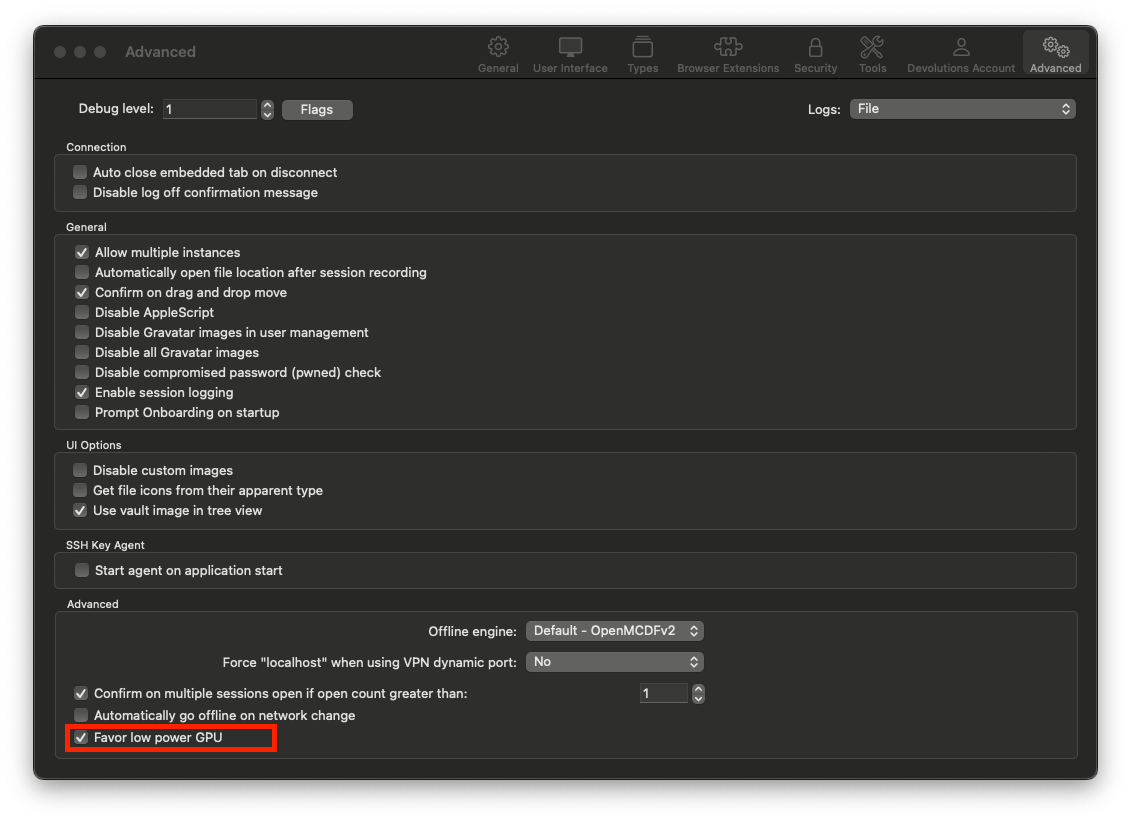
Best regards,
Xavier Fortin
I managed to solve the issue the same way - just switched to M Pro CPU and forgot about power draining almost in any software.
WOW! What an unexpected pleasant surprise! Great Community!
Unfortunately, I can't simply migrate my workflow from x86 to arm.
New update seems to be working great!
Thanks a lot.
Hi ciperw0lf,
Glad to hear it!
Do not hesitate if you have any other issues (especially if you notice performance issue with the RDP sessions).
Best regards,
Xavier Fortin