Overriding quickconnect host with host in template

I am trying to create a template to simplify connecting to our routers via SSH using cyberark. What I want to do is create a template that I can use with the quick connect feature that takes the router hostname entered in the quick connect field and append it to the username of the template while connecting to the static host in the template.
I have created the template, but whenever I try to go to a router using quick connect with the template I created, it is connecting directly to the device entered into the quick connect field rather than connecting to the host specified in the template.
I am wanting the computer to connect to the static host in the template and then take whatever was entered into the quick connect field and append it to the end of the username field in the template using the $QUICK_CONNECT$ variable.
Maybe I am approaching this the wrong way. Any help is greatly appreciated. Thank you.
All Comments (6)
Hello,
Thank you for contacting us on that matter!
I would recommend not to use the Quick Connect feature to do what you are trying to achieve. The reason for this is that the main goal of using a Template with this feature is to give all the necessary information but the host.
For this reason, I would recommend that you create an "Host" entry instead and that you use the "Open with parameter" -> "Open with templates" feature to launch it with the parameters configured in your Template. For more information on that matter, please refer to this link: please refer to these links:
Open with parameters: https://help.remotedesktopmanager.com/gettingstarted_connectingtosession.html#open-with-parameters
Host entry type: https://help.remotedesktopmanager.com/sessions_host.html?q=host
Best regards,
James Lafleur
Thanks for the reply, James. I was hoping to mimic what some of my colleagues do with the RoyalTS quick connect feature, but I guess I will just have to build host entries for all our nodes. I appreciate your looking into it. Cheers.
Dear devolutions team,
I'm having the same issue trying to integrate with CyberArk.
Currently I'm creating one entry per host that I want to access, also when it's only one time access.
I use a variable in the connection String to make things easier (see attached screens).
But it would be a very nice feature, if the Quick Connect would not override the Host in the template.
I mean when the host in the template is empty, it should use the one from Quick Connect, but when it's filled, it should use the one from the template.
Or simply a checkbox in template near the Host textbox which is called like "Overwrite Quick Connect Host".
That would make at least my life easier and is maybe a cool benefit for all CyberArk customers.
Maybe it's worth thinking of this in the development team.
So thanks in advance for taking this in consideration.

It's pretty ok like this, but I get a blown up TMP folder which I need to delete after a while I think.
Hello,
We have overhauled our CyberArk entries in the last two releases, and the day to day workflows of our users are emerging.
Indeed, RDM is the tool of choice (the only one IMHO) that bridges the gap between the needs of the security team that are ACCOUNT CENTRIC (the PAM), vs the needs of the IT department that are ENDPOINT CENTRIC.
That being said, I want to push this really further because, until we have a full fledged dashboard to my liking, we have to find a way to make your day-to-day experience better.
In RDM, we have a few well established patterns to choose from :
- Host & Templates
- Session - Open with Parameters (now hidden in the Advanced workflows...)
- Sub-Connections
I have my personal preference, but need to talk with the RDM team and agree on something. We just released v2020.3 and will need a few weeks to stabilize everything, but I hope we can build on what we have right now and add a layer to smooth things over. Nothing concrete yet, but just good will on our part to improve our product. I must say that CyberArk is used by a lot of our users and we work with their team regularly. We've just upgraded our local install to 11.7 to look at supporting SAML authentication....
I will most likely publish a blog when we deliver a solution, keep watching our various channels for further news.
Best regards,
Maurice
Hi,
this tread is already older, but I would like to thank you Maurice! It was pretty fast that a new feature was introduced (don't know exactly in which version) which made it possible to use quick connect together with CyberArk PSM to jump to the servers. I'm referring to this: 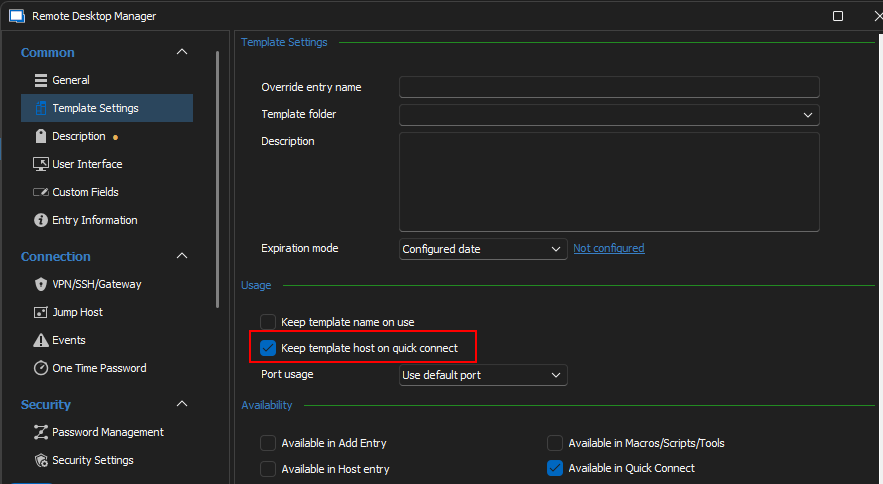
So I was able to create nice templates to connect with SSH or RDP to backend servers via CyberArk PSM.

And in addition you hold your word by posting a nice blog entry how to integrate RDM with CyberArk!
Going Passwordless with Remote Desktop Manager and CyberArk - The Devolutions Blog
3d4e4370-c4e3-43ea-929a-08ceca54111b.png
download.png
Hello Gordon,
Happy to see that everything is working well on your end, and that you can use AIM with it.
Let us know if you run into any issues. For your awareness, we also support SAML authentication with CyberArk now (RDM 2022.3.31+).
Best regards,
Richard Boisvert