Use SSH sessions with Secure Gateway
0 vote

We're migrating away from Royal TX to RDM (On OS X), and we make extensive use of the secure gateway feature in Royal TX to access customer systems. We've noticed that secure gateway only supports RDP and web sessions in RDM and would like it to support SSH too. Ideally most sessions would be able to go via secure gateway.
It would be great if the secure gateway didn't show the secure gateway as a separate tab, and then the SSH tunnel as a tab, as it gets cluttered very quickly.
All Comments (17)
Hello,
Just a quick message to let you know that you thread has been moved under the RDM Mac feature request section.
Best regards,
Jeff Dagenais
Hi Ryan,
We will add the Secure Gateway feature for the SSH, but doing that for every other session is currently not on our to-do list. As Secure Gateway is a new feature, we are looking at our customer's idea and needs. I have opened a ticket for RDM Mac and Windows.
Regards,
David Grandolfo
Hi David,
Thanks for confirming, we look forward to using this feature.
Best,
Ryan
Hi Ryan,
In the current beta version of RDM Windows, Secure Gateway is available for SSH. We will also inform you when the MAC version will include this feature.
Regards,
David Grandolfo
Hi David,
Is there a beta channel for OS X/ MAC where we can test this?
I'm in the process of migrating our company away from Royal TX and it's a bit of a blocker for us.
Best,
Ryan
Hi ryan,
It has not been done in RDM Mac yet, so it's not available in any versions yet. I've increased the priority though.
Best regards,
Xavier Fortin
Hi Xavier,
Much appreciated, thanks.
Best,
Ryan
Hi Ryan,
I believe I've made a mistake previously. This should be supported in RDM Mac 2020.2.1.0 (the latest release). Could you try it and confirm if it works?
Best regards,
Xavier Fortin
Hi Xavier,
I can confirm that this does work in the latest release, thanks!
Do you know when the option to hide successful tunnel connections will be brought to the OS X app? I saw it's in the advanced menu on the Win client, however not in the OS X client.
At the moment we have 3 sessions open just to connect to a single RDP session (Tunnel, Gateway, RDP session). The SSH sessions only have two (Tunnel, SSH session).
Many thanks,
Ryan
Hi Ryan,
I'm working live on the automatic hiding of embedded session tabs (and all the relevant options: Visibility, Override Visibility and "Hide when connection successful). This should be available in RDM 2020.2.3.0. Note that RDM 2020.2.2.0 that releases next week will already supports manually hiding tab (i.e. right-clicking it's tab -> Hide).
Best regards,
Xavier Fortin
Hi Xavier,
That's great, many thanks.
Ryan
Hi all,
Given that SCP and SSH are quite closely related, is there a chance that we could connect to an SCP session via secure gateway too? It would be fantastic if you could just right-click a SSH session and start a SCP session from it (like royalTX). At the moment i've tried adding an SCP session as a sub-connection of the SSH session, however connecting does not seem possible via a gateway.
Hi Ryan,
We're adding it to the TODO list. We'll get back in touch with you when it is done.
Best regards,
Xavier Fortin
Hi Xavier,
Could SFTP be added to the todo as well?
Hi Ryan,
It is already included in the SCP ticket.
Best regards,
Xavier Fortin
Hi Ryan,
RDM Mac 2020.3.0.0 (which releases on October 20) will supports SCP and SFTP with Secure Gateway.
Best regards,
Xavier Fortin
Hi,
The official release of RDM 2020.3 has been pushed back for coordination between our products. That being said, the version (2020.3.0.0) that was scheduled to release on October 20 will still be released, but as a beta. To download beta versions of RDM Mac, you need to choose "All updates including beta" in the RDM Preferences: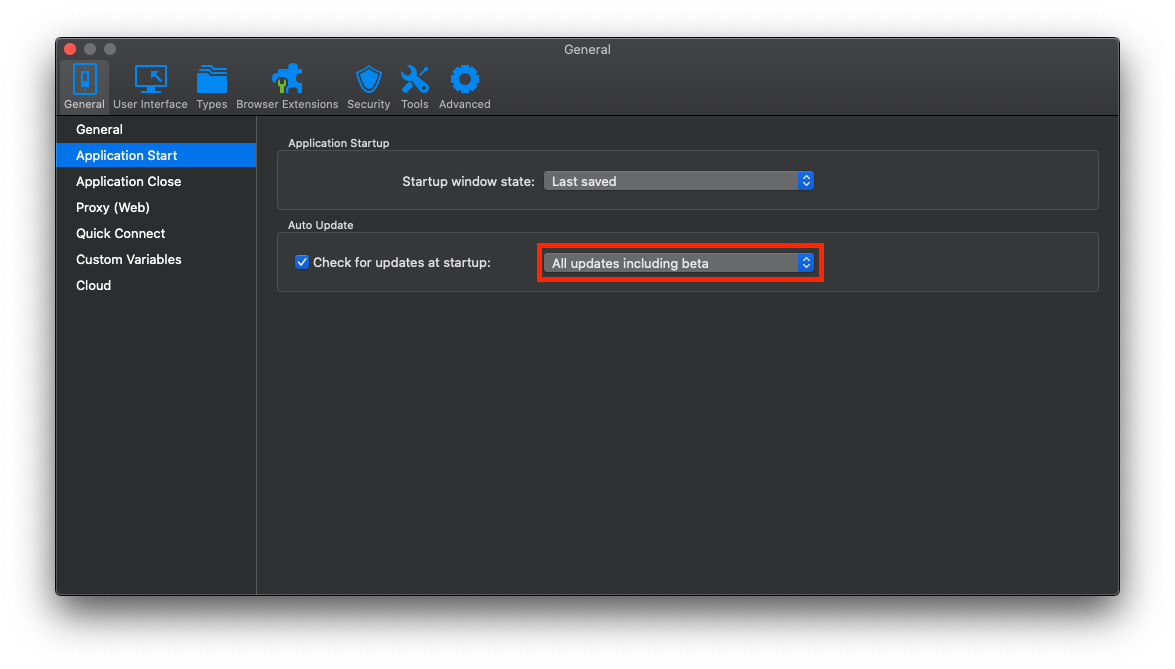
Alternatively, you will have to wait a few days (1-2 weeks) before the official release.
Best regards,
Xavier Fortin
CheckUpdate.png