Embedded browser debug

I have a shared connection item that connects to a access server web console. It uses an embedded chrome browser.
The connection works on one windows 10 64 pc and not on another
both PCs are running the same version of RDM, have the same version of chrome installed, are logged in as the same AD user and logged into RDM with the same user.
The log on the access server shows both machines make a successful login
On the failing machine after auto logon it goes back to the logon page. Manual logon behaves the same
Is it possible to enable some debug on the failing machine's RDM to find out what the browser is doing.??
All Comments (3)
Hello,
Under File -- Options -- Types -- Web , could you compare the two computers and see if the configuration is similar.
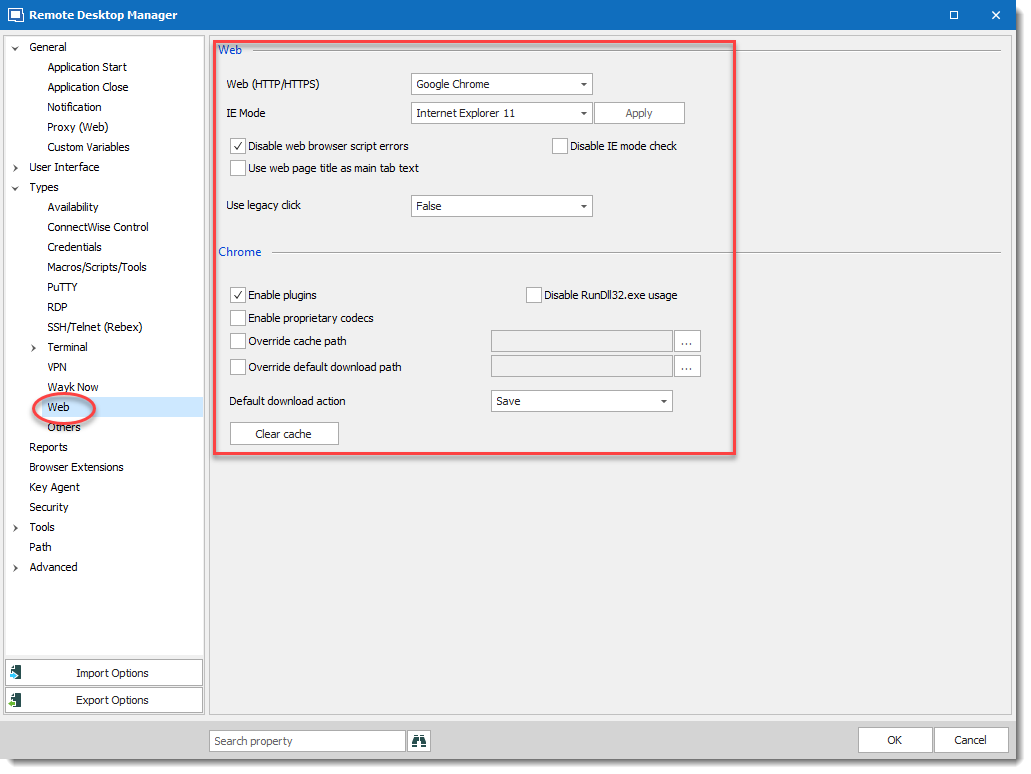
Regards,
David Grandolfo
Web_Browser.png
I have just checked these settings and there was a difference; "Disabled web browser script errors" wasnt checked on the non-functioning machine. However correcting this discrepency hasnt fixed the problem.
I then rechecked the RDM version and found that the upgrade installer HAD NOT been run on the functioning PC. Sorry. It was still on 2019.2.24.0. The non functioning PC is on 2020.1.20.0
I have now upgraded the working PC to 2020.1.20 and the connection item has stopped working, so it looks likes on of the upgrades since 2019.2.24.0 has caused the problem.
How do i find the problem with embedded chrome??
We will help you to find the issue, could you please send us a video of the issue? I will send you a private message with a secure link to send us the video.
Regards,
David Grandolfo