Webpage do not auto login with 'External' as display.

If I open the application, the username and password are auto filled and auto-logged in.
Where as if I use 'External' as display, the application opens but username and Password are not auto-filled.
Even if IE remembers the credentials, Auto-login does not happen.
See the attachment.
External Website IE.docx
All Comments (10)
Hello,
To send the credentials to a website in external mode, you would need to install one of our browser extension + enable the enable web browser extension link option located under the Advanced tab in the properties of your session.
Our browser extensions can be found here
https://devolutions.net/web-login
Best regards,
Jeff Dagenais
Hello,
Small precision, we do not support IE in external mode, so you would need to use another browser like Chrome or Firefox as example.
You would need to change the browser inside your session as well.
Best regards,
Jeff Dagenais
Hi Jeff,
Thanks for your response.
I have issues with extension, RDM is not detecting the installed Extensions. Please see the attached word doc and advise.
I restarted RDM and my laptop, It did not help.
Regards,
Mahendran M
Extensions not detected..zip
Hello,
Even with those messages, you should be able to use the Browser Extension.
In the properties of your web browser entry, have you checked this option? 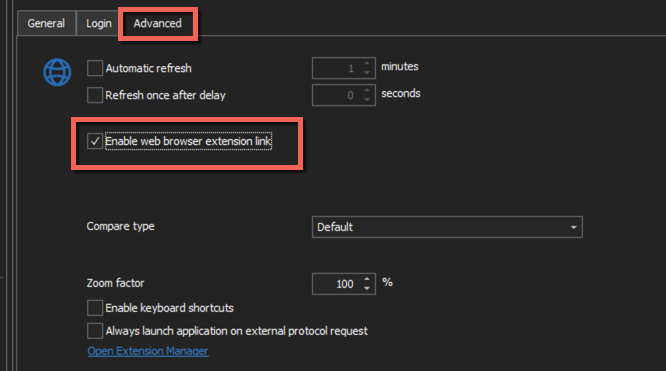
On a side note, what version of RDM are you running?
Best regards,
Jeff Dagenais
2020-05-04_20-47-21.png
Hi Jeff,
I am using 2020.1.3.0, I hope it is the latest version. Should I downgrade?
Also I checked that check box, still the username and Password is not copied to Edge.
In 'Extensions Manager' window if I click 'Install' in Edge Extension it redirects to below URL.
https://cdn.devolutions.net/download/BrowserExtension/DevolutionsWebLoginEdge.2020.1.3.0.zip
Please see snaps.
Regards,
Mahendran M
Desktop.zip
Hello,
Version 2020.1.3.0 is the latest version of the extension.
Are you able to make it work with Chrome or Firefox?
Is this a public URL? If yes, could you provide it to us so that we can test it?
Best regards,
Jeff Dagenais
Hi Jeff,
I still think it is related to RDM not able to find the Edge installed extension.
Chrome works perfectly fine in embedded, but in external it cannot pass the credentials.
I have sent snaps as PM to you. Kindly check up.
Regards,
Mahendran M
Hello,
I have been able to reproduce your issue with the URL provided.
A ticket has been opened to our engineering department.
The ticket number is DWL-542.
Best regards,
Jeff Dagenais
Hi Jeff,
Thanks for your kind help in this.
Also I have one more observation, today when I clicked 'Install' in Edge extension, it redirected the correct site.
https://microsoftedge.microsoft.com/addons/detail/ddloeodolhdfbohkokiflfbacbfpjahp
I installed the Edge Add on, still RDM is not recognizing the Edge extension installation. I hope the implementation in this sub part is not done.
kindly help checkup.
Thanks again.
Regards,
Mahendran M
Hi Jeff,
Also please see the PM's and advise.
Thank you.
Regards,
Mahendran M