Session recording
0 vote

I'm using the feature and i love it. BUT if i want to view a video from a specific session, i have to go through all the videos in the recording folder. I set the file name to "default" (Servername_Date_Time) so that makes it a little easier.
Is there a chance to get a link in the logs of the RDP session to the correct video?
And also, what would make the session recording folder look more organized, imo would be if the recordings would be saved in the customer folder.
For example, if the customers folder name is "ABC Teaching", the video should be saved in a specific folder named after the customer folder and after the Server or RDP session name.
Example:
- ABC Teaching, Server1 D:\Recordings\ABC Teaching\Server1
- ABC Teaching, Server2 D:\Recordings\ABC Teaching\Server2
- XYZ Teaching, Server1 D:\Recordings\XYZ Teaching\Server1
- XYZ Teaching, Server2 D:\Recordings\XYZ Teaching\Server2
And what i think would make the feature complete:
- If you should ever rename a customers folder, it should also rename the recordings folder or at least ask you if you want to
- If you should ever rename a Server name or RDP session, it should also rename the server name folder / RDP session folder or at least ask you if you want to
- If the customers folder or the Server or the RDP session name is changed, the links to the videos in the logs should also be adjusted
- Archiving feature: Move videos older than "X" to another destination and keeping the folder name structure
Thank you
Sasha
Regards, Sasha
All Comments (2)
Hello,
Thank you for contacting us on that matter!
In order to achieve something similar to what you are looking for, I would recommend to try this:
1- In the properties of your RDP entry, under "Session Recording" set the "Destination" to "Custom".
2- In the path, you can use a variable to create a custom path that will be different for each entries. In my case, I have used the "$HOST$" variable to create a folder that will have the host of my rdp entry has its name. In doing so, it is far easier for me to locate the recording tied to this RDP entry. If you wish to use a different variable, I would recommend that you consult this link: https://help.remotedesktopmanager.com/settings_variables.html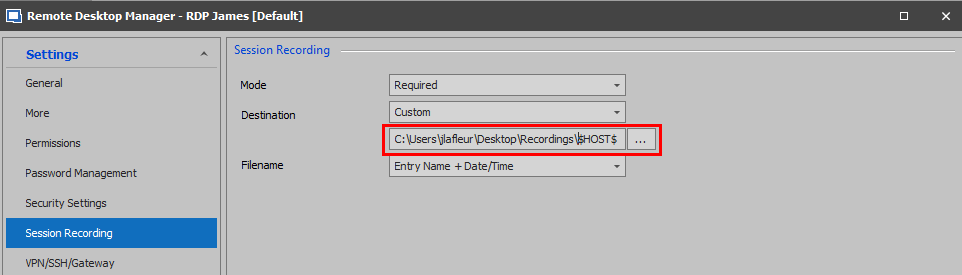
As for having an option that allow you to open this folder in RDM, I would recommend the use of a "Command line" entry. Once created, you will be able to right-click on your RDP entry select Macros/Script/Tools and select the name of your "Command Line" entry from the list. Upon doing so, the command line will open the file explorer path using the variable you have configured.
Best regards,
James Lafleur
SessionRecording.png
Hi James,
this is what i did so far:
D:\Z_Recordings_RDM\$CUSTOMER_NAME$\$DATE_TEXT_ISO$\$NAME$\ $TIME_TEXT_ISO$\
The "$TIME_TEXT_ISO$" matches with the session end time in the log. That will help me locate the recording.
I configured that path in the "Local_Datastore" and Configured "inherited" in all custerm folders and rdp connections.
Thank you, that really helped!
Regards, Sasha