Templates Uses Web Session - Moved/Name

Hi,
We have two problems using templates:
- When using the templates for web browsers, the name is always removed when using it.
- When using the templates for web browsers, the created new session based on templates is being moved to our template folder.
Thnx
Best regards,
Kaj Graficom
All Comments (19)
Hello,
What is your Remote Desktop Manager version and what type of datasource are you using? :)
Best Regards,
Etienne Lord
hi,
Version 2020.1.19.0
SQL
Best regards,
Kaj Graficom
Hello,
Thank you, we will look into it :)
Best Regards,
Etienne Lord
Hello,
Could you send a recording of both issues in order to make sure I can reproduce them correctly?
Simply use the link I sent you via Private Message to send in the video :)
Best Regards,
Etienne Lord
I have send it
Best regards,
Kaj Graficom
Hello,
Thank you, could you send a screenshot of your Web Template?
For your second issue, I believe you have a pre-set folder in the Template, you would need to manually set the "New" location before creating the entry or remove the default folder location.
Best Regards,
Etienne Lord
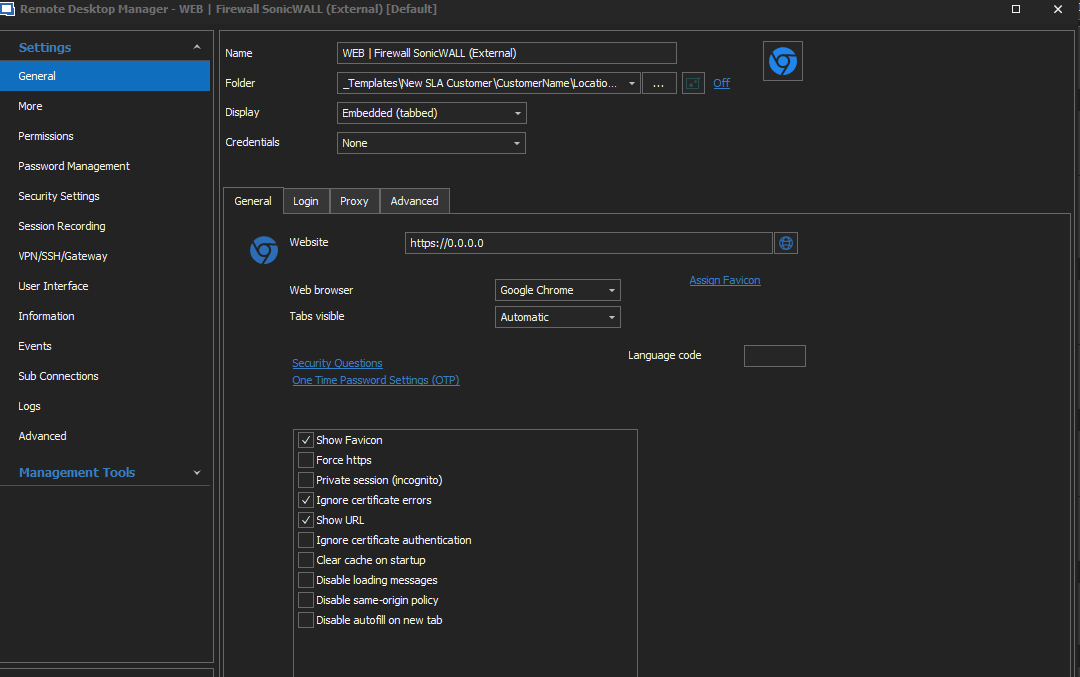 Screenshot see above.
Best regards,
Kaj Graficom
2020-05-01 10_15_32-Clipboard.png
Hello,
This seem like the normal behavior.
For issue number 1, the name provided in the Template, is simply the name of the Template. When you add a new entry based on the template, you will need to provide a new name.
Issue number 2, since you specified a folder in the Template, it will automatically pick up that folder when you want to create a new entry based off that template. I would recommend removing the Folder from the template.
Best Regards,
Etienne Lord
issue number 1:
Can this be an feature request? So that this is an option, because in template you what a pre-defined name.
issue number 2:
I changed the folder to nothing but it moves to the top of the vault.
Best regards,
Kaj Graficom
Hello,
I will check with the engineering department for both cases.
Best Regards,
Etienne Lord
Hello,
#1 : Could you edit your template, go to Template settings and check this option : 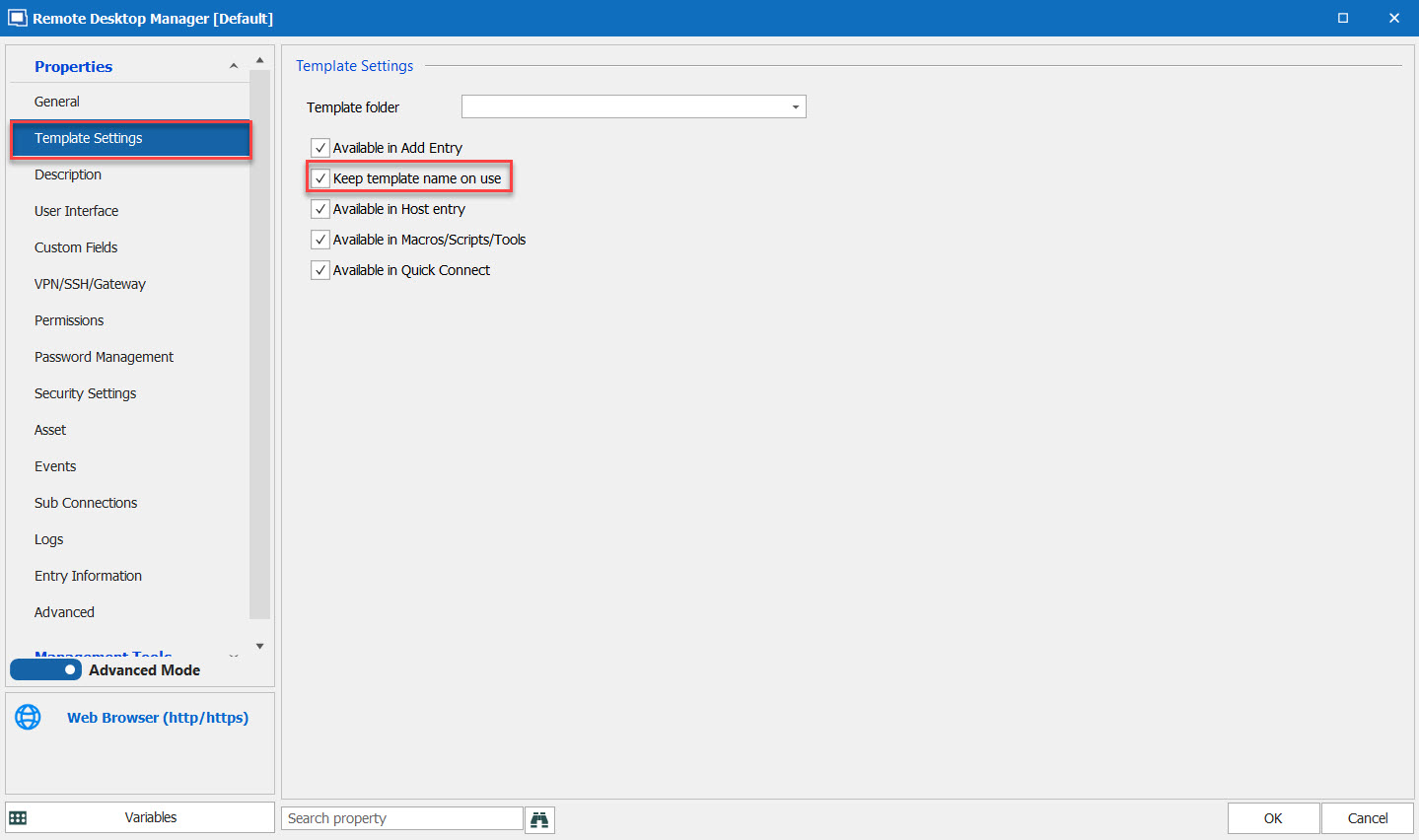
#2 : Could you, again, edit your template. Instead of choosing "Blank" in the Folder drop down list, could you use the "..." and then choose your Root. :  I was able to make it work that way!
Best Regards,
Etienne Lord
folder.jpg
setting.jpg
It looks like it is working, sometime the name disappears dunno why.
Best regards,
Kaj Graficom
Hi,
I found that the option "Keep template name on use" dissapears?
Best regards,
Kaj Graficom
Hello,
It indeed seems like after restarting Remote Desktop Manager, the option is unchecked, but it will still keep the name.
Best Regards,
Etienne Lord
That is the problem, on our site the unchecked option is unchecked then the name is not being keeped.
Best regards,
Kaj Graficom
Hello,
We will look into it!
Best Regards,
Etienne Lord
Hello,
Would you be able to confirm your datasource type? Is it SQL or DPS (or another)
Best Regards,
Etienne Lord
We use SQL
Best regards,
Kaj Graficom
Hello,
We've found the issue and we made a fix for the "keep template name on use" not saving properly. This will be available starting with RDM 2020.2.13.0.
Regards,
Hubert Mireault
