Unable to Connect to your Data Source

I have a 32bit client of Remote Desktop Manager Free, that I just upgrade to the latest version.
I now get the error:
Unable to Connect to your Data Source
Devolutions.RemoteDesktopManager.Business.TryGoOfflineException: Unable to connect to Devolutions account.
   at Devolutions.RemoteDesktopManager.RDMOProxy.RDMOWebApiClient.Login(String username, String datasourceID, Boolean forcePromptLucid, String source, String applicationPassword)
   at Devolutions.RemoteDesktopManager.Business.DataSources.DevolutionsOnlineDriveConnectionDataSource.c85b0933bdb8fa0d0832e34a63fb55ffa(Boolean cd008a94e48eab2f6b70411dccafc4d7d)
   at Devolutions.RemoteDesktopManager.Business.DataSources.DevolutionsOnlineDriveConnectionDataSource.Login()
   at Devolutions.RemoteDesktopManager.Business.DataSources.DevolutionsOnlineDriveConnectionDataSource.GetDataSourceSettings()
   at Devolutions.RemoteDesktopManager.Managers.ConnectionManager.c29fbd34504079a3525ca4c390d5d4074(BaseConnectionDataSource c7f28727fc7a5daa94ba08f688b2a5781)
   at Devolutions.RemoteDesktopManager.Managers.ConnectionManager.ca4799bebd8b706f34eea94a778843b55(BaseConnectionDataSource c7f28727fc7a5daa94ba08f688b2a5781, Boolean cfe205b02d73750f8fd14d199343fe545)
   at Devolutions.RemoteDesktopManager.Managers.ConnectionManager.LoadConnections(BaseConnectionDataSource dataSource, ConnectionEngine currentEngine)
My other client that is 64 bit has no problem connection to the same datasource.
I verified that the "Automatically sign-in at startup is NOT checked.
Thanks.
All Comments (10)
I'm encountering this issue as well. I've updated to the latest version of the software but the issue remains.
Hello,
We had an issue with our customer portal this morning, but it should now be resolved
Are you able to login on https://customer-portal.devolutions.com/ and https://account.devolutions.com/ via Internet Explorer (IE)?
Best regards,
Jeff Dagenais
I can't connect to either of those two sites via IE.
When I try connecting to: https://customer-portal.devolutions.com/
This page can’t be displayed


Turn on TLS 1.0, TLS 1.1, and TLS 1.2 in Advanced settings and try connecting to https://customer-portal.devolutions.com  again. If this error persists, it is possible that this site uses an unsupported protocol or cipher suite such as RC4 (link for the details), which is not considered secure. Please contact your site administrator.
Problem is still not resolved.
Thanks.
Hello,
Are you able to connect by using Chrome or Firefox?
In Internet Explorer, could you try to clear your browser cache please.
Best regards,
Jeff Dagenais
Works in Chrome but not in IE (version 11).
I deleted all browser cache (History/cookies, etc...)
I'm in the exact same situation. Well almost exact. I have the paid version. At this point RDM is useless, i can do nothing with it. I think i'll spend a little time today setting up Terminals as a backup. Hopefully this will be resolved soon. I use RDM, throughout my day.
Cleared cache
IE fails, Chrome works
FYI, Those TLS settings were already checked.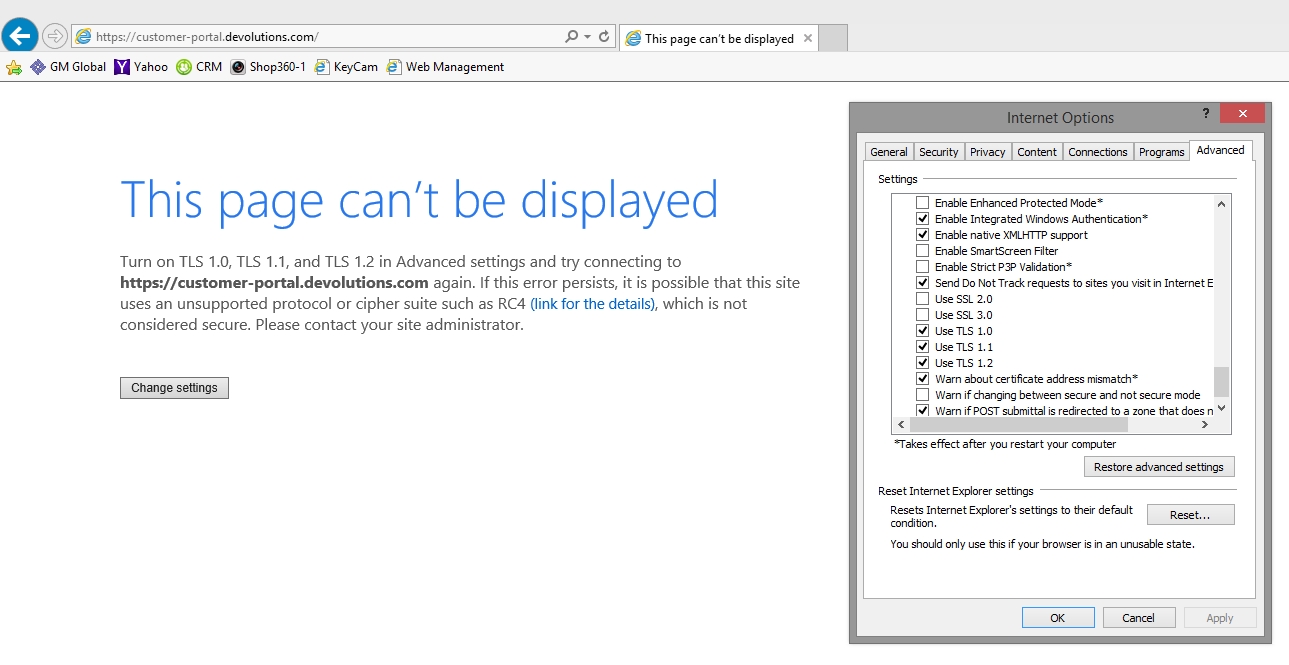
2020-04-27 09_18_05.jpg
Hello,
Our DevOPS team is currently working on a fix. I'll keep you post on the development.
Best regards,
Jeff Dagenais
Hello,
A fix has been deployed a few minutes ago. Are you now able to connect on your Online Database or Online Drive?
Best regards,
Jeff Dagenais
Works! thanks!
Fixed, Thanks.
