Secret Server: SSH ket authentication prompting for password

Hi,
We're currently evaluating RDM with Thycotic Secret Server and have come across an issue with RDM which isn't occurring with Thycotic Connection Manager.
When trying to SSH onto a Linux server and extracting the SSH key out of Secret Server, we're presented with a "Password" prompt. This happens whether the SSH secret has a passphrase or not. We're using SSH-RSA 4096-bit ssh keys generated by Secret Server using OpenSSH.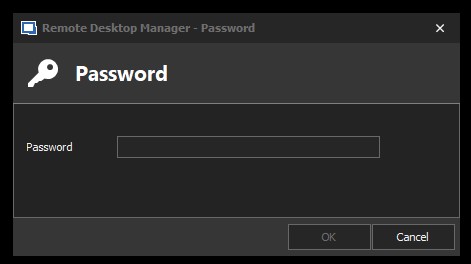
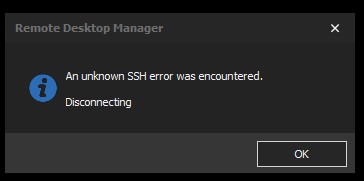 This is the log output:
[23/04/2020 2:34:41 PM] Starting SSH, verbose level: 2
[23/04/2020 2:34:41 PM] Setting up connection
[23/04/2020 2:34:44 PM] SSH banner: SSH-2.0-OpenSSH_8.0
[23/04/2020 2:34:44 PM] Sending kex init
[23/04/2020 2:34:44 PM] Received kex init
[23/04/2020 2:34:44 PM] Selected algorithms: curve25519-sha256, ssh-ed25519, chacha20-poly1305@openssh.com, chacha20-poly1305@openssh.com, implicit by cipher, implicit by cipher, none, none
[23/04/2020 2:34:44 PM] Sending Ed25519 kex init
[23/04/2020 2:34:44 PM] Received Ed25519 kex reply
[23/04/2020 2:34:44 PM] Successfully authentified server
[23/04/2020 2:34:44 PM] Sending new keys message
[23/04/2020 2:34:44 PM] Sending userauth service request
[23/04/2020 2:34:44 PM] Received new keys message
[23/04/2020 2:34:44 PM] Received service accepted message
[23/04/2020 2:34:44 PM] Sending userauth init request
[23/04/2020 2:34:44 PM] Received userauth banner:
**********************************************************************************************
[23/04/2020 2:34:44 PM] Received userauth failure: publickey,gssapi-keyex,gssapi-with-mic,password
[23/04/2020 2:34:44 PM] Starting password authentication
[23/04/2020 2:34:48 PM] Disconnection in progress
[23/04/2020 2:34:48 PM] Disconnecting
When doing the same through Thycotic Connection Manager the SSH key is passed correctly and I am logged into the server.
Can you please assist me with troubleshooting this issue?
We're currently running Thycotic Secret Server 10.8 and have the latest version of RDM installed (2020.1.20.0 64-bit)
SSH Password 2.jpg
SSH Password.jpg
All Comments (9)
Hello,
Could you show us how you've configured your SSH Shell entry in RDM? Do you link to a Secret Server entry in 'private key' mode, or does Secret Server act as an authentication agent?
If you'd like to use Secret Server as an "agent" you need to check the "use SSH authentication agent" in the SSH Shell settings: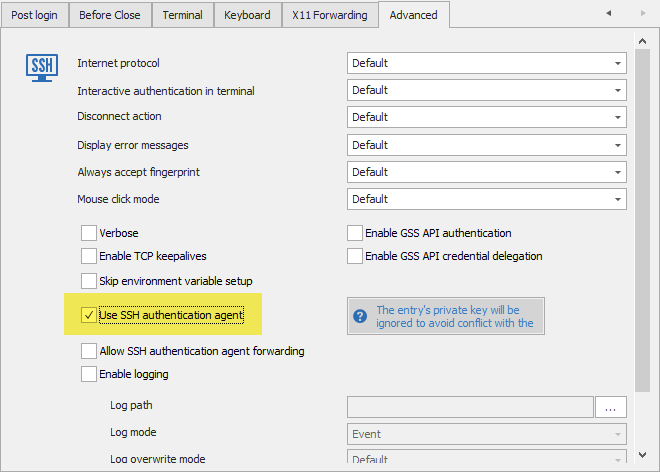
If this doesn't work, you would need to give us more information on your setup, it would be really helpful.
Regards,
Hubert Mireault
2020-04-23_10-41-45.png
Good
morning,
Unfortunately enabling "Use SSH authentication agent" does not make any difference and the SSH Shell has all the default settings enabled.
I'm not sure what further information you need, if there is anything specific, please let me know.
I've setup our Secret Server as a "Credential Entry" and can successfully connect to the Secret Server and access all my shared secrets/passwords: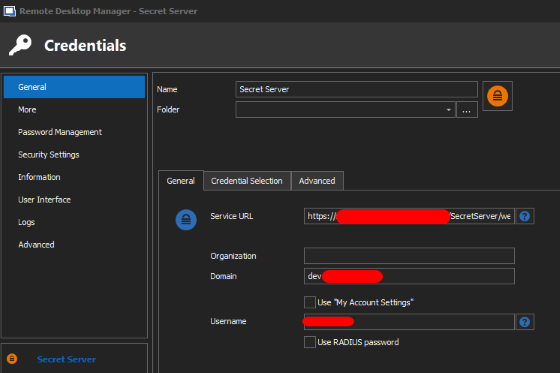
I have created a SSH Shell and linked the secret/password: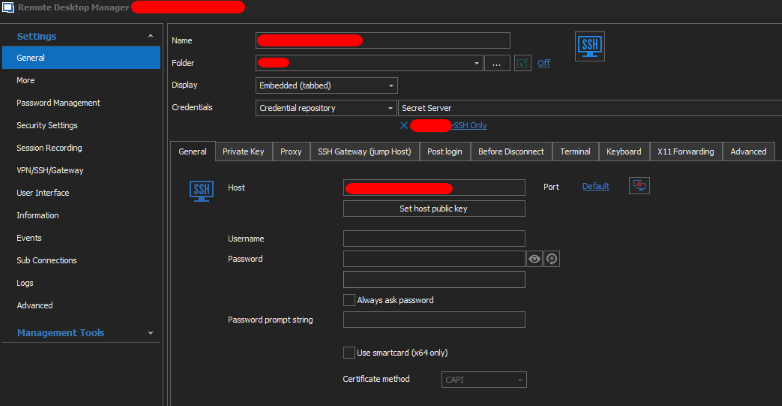
I've tried most settings on "Private Key" and "Advanced" tab but it makes no difference.
If I extract the SSH private keys from Secret Server, convert to a PPK file and add the key to "Private Key" tab, I can successfully authenticate to the server.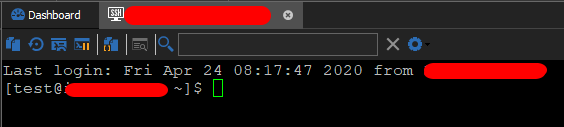
SSH2.png
SSH Shell1.png
SS Connection.png
Hi,
Running debug on SSHD shows that RDM is negotiating very different algorithms to Putty or Thycotic Connection Manager:
It appears that RDM tries to use "curve25519-sha256" where as Thycotic CM uses "diffie-hellman-group-exchange-sha256".This is where the deviation seems to occur:
RDM:
sshd[33995]: debug1: kex: algorithm: curve25519-sha256 [preauth]
sshd[33995]: debug1: kex: host key algorithm: ssh-ed25519 [preauth]
sshd[33995]: debug1: kex: client->server cipher: aes128-ctr MAC: hmac-sha2-512 compression: none [preauth]
sshd[33995]: debug1: kex: server->client cipher: aes128-ctr MAC: hmac-sha2-512 compression: none [preauth]
sshd[33995]: debug1: kex: curve25519-sha256 need=64 dh_need=64 [preauth]
Thycotic CM:
sshd[34403]: debug1: kex: algorithm: diffie-hellman-group-exchange-sha256 [preauth]
sshd[34403]: debug1: kex: host key algorithm: rsa-sha2-256 [preauth]
sshd[34403]: debug1: kex: client->server cipher: aes256-ctr MAC: hmac-sha2-256-etm@openssh.com compression: none [preauth]
sshd[34403]: debug1: kex: server->client cipher: aes256-ctr MAC: hmac-sha2-256-etm@openssh.com compression: none [preauth]
sshd[34403]: debug1: kex: diffie-hellman-group-exchange-sha256 need=32 dh_need=32 [preauth]
Ultimately Thyctic CM goes on to negotiate SSH authentication where as RDM does not:
sshd[34403]: debug2: input_userauth_request: try method publickey [preauth]
sshd[34403]: debug3: userauth_pubkey: have signature for RSA SHA256:KPWvTXXXXXXne/+XXXXXXDPswZXXXXXX/XXXXXXq9S4 [preauth]
sshd[34403]: debug3: mm_key_allowed entering [preauth]
sshd[34403]: debug3: mm_request_send entering: type 22 [preauth]
sshd[34403]: debug3: mm_key_allowed: waiting for MONITOR_ANS_KEYALLOWED [preauth]
sshd[34403]: debug3: mm_request_receive_expect entering: type 23 [preauth]
sshd[34403]: debug3: mm_request_receive entering [preauth]
sshd[34403]: debug3: mm_request_receive entering
sshd[34403]: debug3: monitor_read: checking request 22
sshd[34403]: debug3: mm_answer_keyallowed entering
sshd[34403]: debug3: mm_answer_keyallowed: key_from_blob: 0x55f13b8b6170
sshd[34403]: debug1: temporarily_use_uid: XXXX/XXXX (e=0/0)
sshd[34403]: debug1: trying public key file /home/test/.ssh/authorized_keys
sshd[34403]: debug1: fd 4 clearing O_NONBLOCK
sshd[34403]: debug1: matching key found: file /home/test/.ssh/authorized_keys, line 1 RSA SHA256:KPWvTXXXXXXne/+XXXXXXDPswZXXXXXX/XXXXXXq9S4
After more troubleshooting, it appears that I can authenticate to the server if I'm running pageant and have the Private Key loaded.
So it would appear that RDM isn't pulling the private key from Thycotic Secret Server.
Hello Steven,
For your Secret Server entry, did you make sure to configure it in 'private key' mode? If you don't, RDM will try to fetch a username/domain/password from it rather than a private key: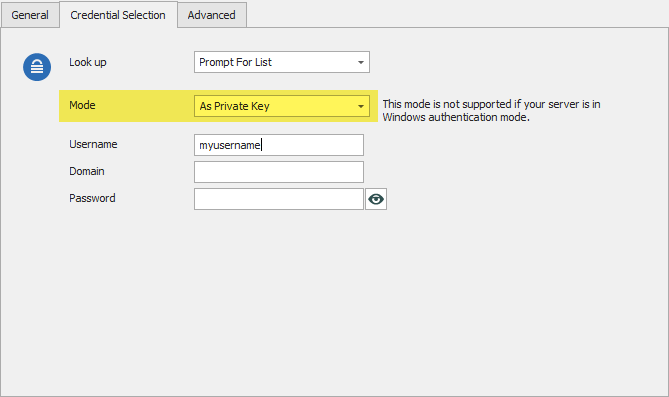
Regards,
Hubert Mireault
2020-04-24_7-10-15.png
Hi,
Thanks for that, it works now.
I've had to create a second "Credential Entry" to allow extracting passwords as changing the setting from "As Credential" to "As Private Key" seems to stop RDM from extracting passwords.
Is this what you'd expect to see?
To be sure which passwords are you talking about? Have you a password in the private key?
Or the Secret Server entry contains both, credentials and private key?
Regards,
David Grandolfo
Morning David,
Yes, that's correct, we have a number of different types of passwords/secrets in Thycotic Secret Server such as AD credentials, Azure, AWS, SSH keys with pass pahase, SSH keys without pass phrase...
When changing the setting to "As Private Key" we can't extract RDP credentials as an example.
This is expected when we configure an entry the Secret Server could be a Credential entry OR a Private Key. We can't retrieve both at the same entry.
David Grandolfo