Custom Reports

Hello,
I thought there was a way to build a custom report? However, I can't find any documentation on it.
For example, we created a contact for each one of customers. We'd like to run a report to just obtain their email address.
All Comments (5)
Hello,
I think the feature you are looking at is described below
https://help.remotedesktopmanager.com/export_reports.html
Best regards,
Jeff Dagenais
Hi Jeff,
Thank you for the details, but this looks like exporting a report to schedule it with powershell/task scheduler based on the built-in reports. I'm looking to create my own report with a specific set of details.
Hello,
I believe this is what you were looking for, we have a Custom Report that you can build using a script : 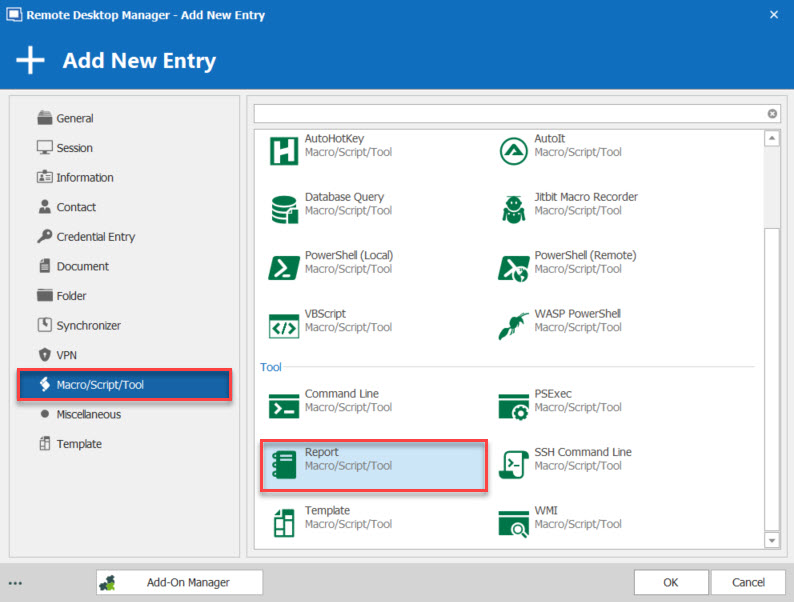
Best Regards,
Etienne Lord
report.jpg
This looks exactly to be what I'm looking for! Where can I find documentation on the various fields per entry type?
Hello,
We don't have documentation for the different field in the Entries, but you can find them by making a right-click on an entry type - Clipboard - Copy and then Paste in an Excel file.
I did that here with a Contact entry that includes an email : 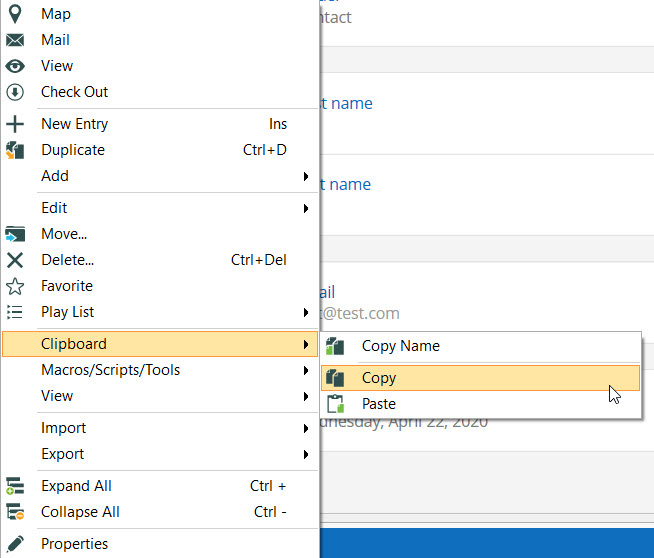
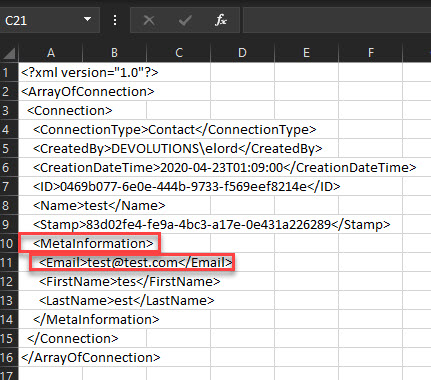
Best Regards,
Etienne Lord
fields.jpg
contact.jpg