Jump Host on CLI based devices

Hi,
we're using Remote Destop Manager Enterprise Version 2020.1.19.0 on a windows server 2016.
I wanted to use the Jump Host feature with two (or more) Cisco CLI-based devices.
Concept looks like this:
The Windows Server RDM is running on is able to connect to a router via SSH. Once logged in on the router, I can jump further to devices located behind it by just using Ciscos built in SSH client. (e.g. typing the command "ssh -l manager 1.1.1.1" will open a new shell on the router trying to connect to 1.1.1.1)
If I go to the tab "SSH Gatewy (Jump Host)" in the preferences of the Host I want to connect to, and enter the IP of a Linux (CLI based) server, the connection works as expected. But once I change the IP of the jump host to another cisco device I just get the error mesage
"Fatal error: Please make sure your connection settings are valid.
Disconnecting"
To workaround this issue I duplicated the router which plays jump server in this scenario and added a "after login" event macro, which just runs the command stated above once connected, which is working as intended. Only problem is that in this case I cannot set dynamic passwords - I have to hardscript the User and password inside of the macro field, which is not going to work in our case because we're either working with personallized Users or with Pleasant Password Server as authentication, which is working when using the Jump Host feature.
So this is kind off a mix between a "has anyone gotten this to work the way I'd like to" and a "wouldn't it be cool to have a mixture between the macro and the jump host feature"?
I'd like to either be able to use dynamic passwords in the macro feature (either personal credentials, or one of the other different ways RDM is able to use as authentications) or to have the Jump Host feature be able to change the way of SSHing into new devices (e.g. don't use unix' "ssh root@host" but use cisco's "ssh -l root host")
Also i'f there's a completely other method I didn't think off I'm open to learn :)
All Comments (5)
Hello,
I had this kind of issue with Cisco router months ago, we had a chat with Cisco engineers and they told me that Gateway (jump) feature has been disabled on Cisco routers for security purpose. Could you test the same scenario on a switch?
Then regarding the dynamic credentials, are you using the variable $PASSWORD$ in the after login command? If so you could use the $TOOL_PASSWORD$ which is another password that can be linked to a credentials repository or the "My personal credentials" which is unique per user.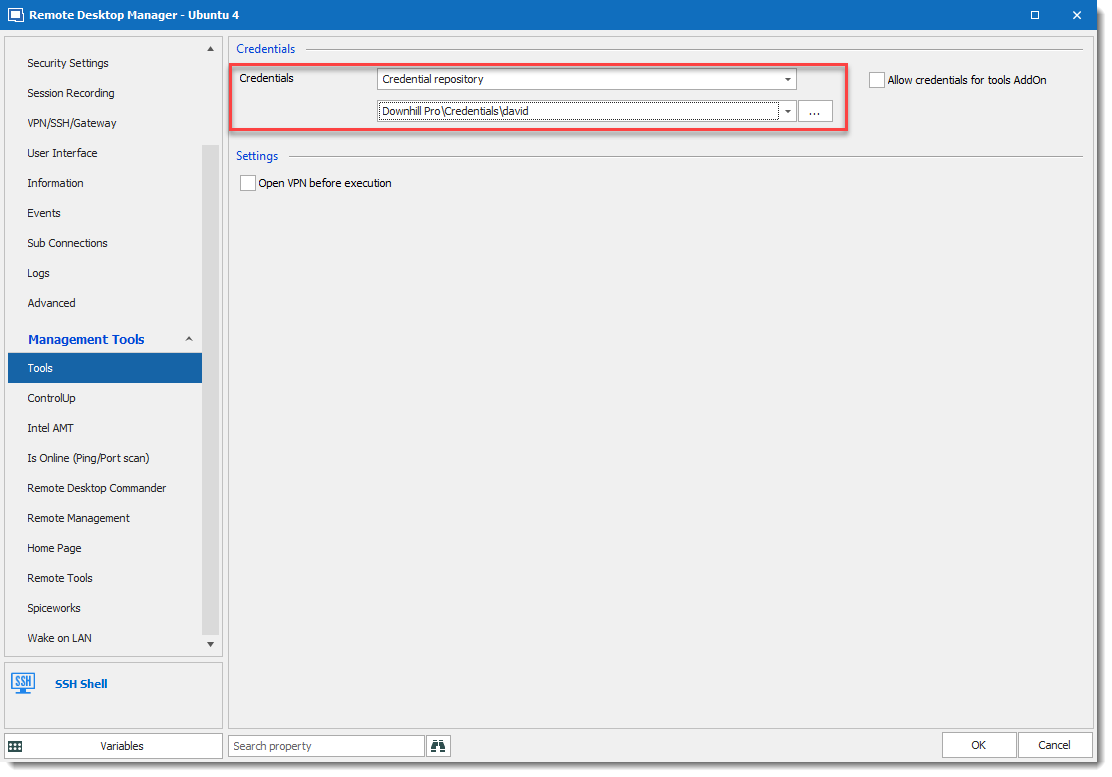
Regards,
David Grandolfo
tools_password.png
Hi David,
thanks for your answer. I tried using the jump host feature with an IOS switch and not a router, but still get the same error:
Config looks pretty simpe like this:

I can connect to both devices individually with my personal credentials, but jumping just doesnt work for me. If I just change the IP in the SSH Gateway section to a linux server (and don't change anything else) this works as intended.
Both switches are 2960 with 15.x Firmware.
I also tried the setting with the $TOOL_PASSWORD$, but this just writes "$TOOL_PASSWORD$" in my macro? Am I doing anything wrong?

just gives me this:
Any ideas?
Thanks
Hi,
Let's look at the jump issue before going to the password variable. SSH Gateway is not a simple ssh into ssh session. SSH Gateway (jump) is an SSH Jump command. Could you try the command below outside of RDM please?
ssh -J username@host1:port username@host2:port
This command will connect to the host 1 and then jump to the host 2.
Does it work?
Regards,
David Grandolfo
Hi,
the command fails, when executed with a linux machine which is able to connect to both hosts individually.
Error is:
[user@machine ~ ] # ssh -J user@10.x.x.140 user@10.x.x.229
Password:
channel 0: open failed: unknown channel type:
stdio forwarding failed
ssh_exchange_identification: Connection closed by remote host
[user@machine ~ ] #
If RDM only uses unix' openSSH -J option for Jump sessions then we can stop looking as this probably won't work on any cisco device in the near future. Don't you think?
Thanks!
Correct the Jump feature is the way of using OpenSSH n-J option.
That said, I will recommend you to look at the SSH Tunnel feature which could probably work.
The best information for what you need can be found at https://blog.devolutions.net/2018/10/how-to-setup-dynamic-port-forwarding-in-remote-desktop-manager
I hope it could be a good way to bypass Cisco limitation.
Regards,
David Grandolfo