Build/version of Windows 10 in Inventory
0 vote

Hi folks,
New to Devolutions and RDM, really like it so far. I have several questions, please help answer what you can.
Question 1, part one (1) has to do with Inventory and the build/version of Windows 10. As you will note in the attached screenshot, this information is pulled by Inventory, and shows Windows 10 build 18363. This version/build is technically correct, but most folks refer to it by the version number as is "1909"... just as previous ones were referred to as 1803, 1809, 1903, etc. Question is, can the version number be displayed or pulled? And more to my point, can the version number/field information be pushed to or imported into the hosts Information tab? Right now, the fields I see populated are "OS", "IP", "Domain", and "Architecture". However, there is a blank field for "Version".
Question 1, part two (2) has to do with organization and sorting based on version number/build. But that will only follow if Part one (1) is possible.
Question 2 has to do with organization and all that, but is more open-ended. Can the "primary user" of the host be documented and referenced? If you look under a "connection", there is an Information section, and in that section is a "Contact" tab. I don't know if this is where the information would be stored, but perhaps a variable in the connection name, similar to $HOST$, would be useful/helpful?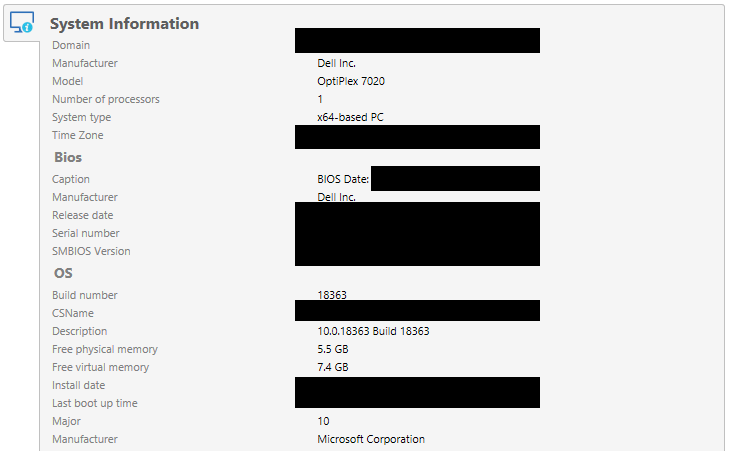
Windows 10.png
All Comments (4)
Hi,
We are using WMI request to get the information field. Technically we could get OS version and the build version. I will open a ticket with the engineering department to look to improve our OS documentation and look which field can be used for the ReleaseID (ex. 1909) and the CurrentBuild (ex. 18363).
Regarding the question 2, the contact tab is mainly to know which user is the "manager" or need to be contacted. As getting the information of the "primary user" I'm not sure how we can do this. Do you have any idea our we can get this information?
Regards,
David Grandolfo
David,
Thanks for the response.
As far as question 2, I don't have a great answer for the general masses or other users. That being said, if I knew what I was going on the backend, I would probably populate a "user" field with the most recent logged on user. The end goal (for me) would be to have collections of hosts, probably with some "auto sorting mechanism" so that the hosts "automatically" are placed in the appropriate folder, or if that won't work, all of them together in a folder BUT with a name variable that identifies the OS version.
Does any of that make sense?
It does make sense, we will populate the Windows version in the version field and keep the Windows OS (ex. Windows 10). But regarding the user I didn't find any WMI request that can help us for this.
If you find it please let me know and we could look with the engineering department if we can import it somewhere.
I will also move the thread in the feature requests section.
Regards,
David Grandolfo
I'm glad to inform you that in RDM 2020.2.2.0 and above we improve the inventory.
Here is a look at the modification.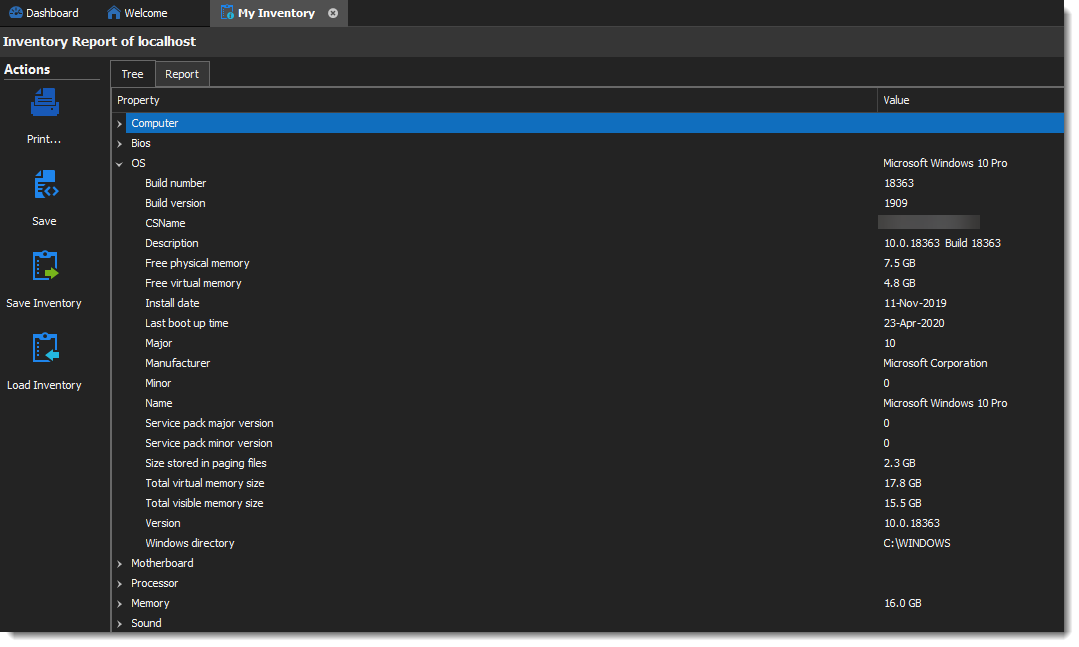
You can watch https://remotedesktopmanager.com/Home/Download to see when the beta will be available.
Regards,
David Grandolfo
Inventory_build.png