Custom Installer deployment with Azure SQL (Universal login)

Hi all,
I've been trying to build a working Custom Installer for the following scenario:
We host the RDM database in Azure SQL (single database). Our users are created from within the datasource settings so Contained Database Users using Azure AD are provisioned. I want to create a custom installer with the datasource preconfigured, where the user fills in their own username and authenticate to the datasource.
However, after deploying, I get an error that the username field is empty. (attached: rdm1.png) When I go and enter the username, click Test Database and successfully authenticate, it still gives an error. (attached: rdm2.png)
Furthermore, the checkbox for "Allow change username" is greyed out; I have a hunch the issue is around this option being unavailable (while it was before).
Please, I'd appreciate any help you can give.
Kind regards,
Patrick
rdm2.png
rdm1.png
All Comments (8)
Hello,
Which authentication method are you using to authenticate?
Have you been able to authenticate with this same user in the past or its the first time that you are trying to authenticate on the database using this user?
Best regards,
Jeff Dagenais
Hi Jean-Francois,
I'm using "Active Directory Interactive (with MFA support)" and have configured it using the Help guide.
I've been able to authenticate using this user and other users when I install the Enterprise Edition and configure the data source manually.
Kind regards,
Patrick
Hello,
I will contact our Engineering Department on that matter and see if the "Allow change username" could indeed be the cause of this issue.
I will be in touch shortly.
Best regards,
James Lafleur
Hi James,
Thank you for getting back to me. I think I have found a solution as well.
So, the problem is here twofold:
- The first that I create a Custom Installer with the datasource, without the datastore credentials (as these are user-specific). RDM is right to give an error message that the User ID value should not be null. In my opinion, this can be resolved by having the "Allow change username" option available, and RDM asking for the username on first run.
- The second is datastore errors I posted. It seems this was due to a change on the side of the Azure App Registration, and was a faulty configuration on my end.
In short, I managed the following workaround for the Intune deployment:
I deploy a PowerShell script in user context which sets a User Environment Variable %AzureADUPN% with the Azure AD UserPrincipalName as value.
([System.Environment]::SetEnvironmentVariable('AZUREADUPN', "$(whoami /upn)", [System.EnvironmentVariableTarget]::User))
I created a new data source where the username references the Environment Variable, and create the Installer File with the option "Include Data Source Credentials". A Custom Installer is created with this Installer File and deployed silently. As long as the environment variable is filled, this works like a charm!
So, in conclusion: I think the 'Allow change username' should be available for Microsoft Azure SQL datasource for environments where this workaround is not feasible.
Thanks again for looking into this!
Kind regards,
Patrick
Hello Patrick,
Thank you for your quick reply and for this workaround!
I will make sure to provide this information to our Engineering Department as well.
We will be in touch as soon as we will have an update on this.
Best regards,
James Lafleur
Hi Patrick,
Enabling "Allow change username" will not be simple, we will investigate.
The good news is you gave us a very good idea. We added the new variable called $USER_PRINCIPAL_NAME$, you can use it directly without having to the PowerShell script.
I will try to get this into the next minor release.
Best regards,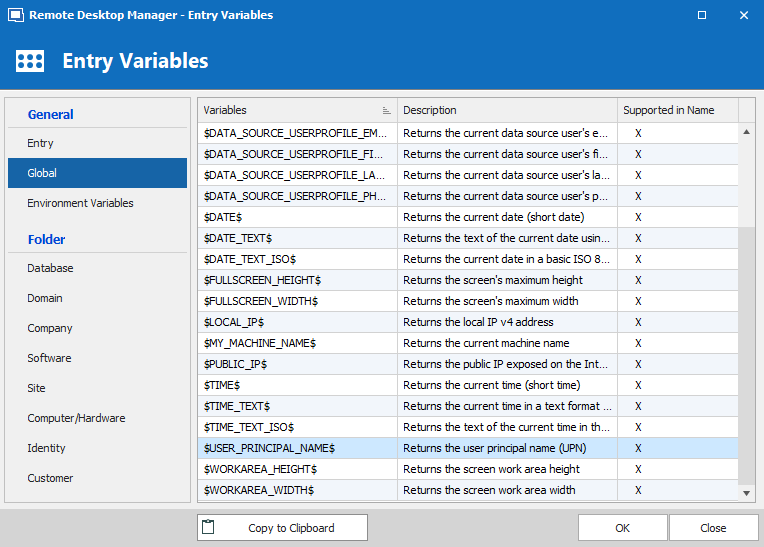

Stéfane Lavergne
2020-04-14_16-27-46.png
2020-04-14_16-28-08.png
Hi Stéfane,
Thank you for your reply. I think this is a very smart way to incorporate my workaround. Please give me a headsup when this change has made it into a release version.
Kind regards,
Patrick de Ritter
Hi Patrick,
The change to enable the "Allow change username" check box with Azure MFA has been implemented and will be available in the next release of RDM (v2020.2.16 or greater)
Best regards,
Stéfane Lavergne