Unable to paste content copied from RDP session to local destination. Also using ClipMate.
Unable to paste content copied from RDP session to local destination. Also using ClipMate.

Hi. Sorry for the length; I wanted to describe it all.
EDIT: Subject probably should be "Unable to record copied content to other clipboard tools when copied from remote session in RDM"
I use a program called ClipMate. It hasn't been updated in years. Think of it as a clipboard repository. Organize your clips, capture, edit, export etc, etc,... Works perfectly. Like I said, hasn't been updated in years. (No issues, so no need I guess)
Anyway. Somewhere along the way, one of the updates to RDM has broken the ability to use the clipboard as expected.
Normal process was simply copy, copy, copy, copy, and all things copied from remote source were seen and saved within ClipMate.
Now, this is being blocked somehow and ClipMate is unable to see the content copied from the remote session to the Windows clipboard. It does actually exist on the Windows clipboard; I can paste it locally, as long as I do that. In other words, I MUST paste it somewhere in order to save it prior to copying the next item.
This has become extremely disruptive and I have learned of this issue the hard way. Things that I have copied expecting to be stored within ClipMate (because that's just how it all worked fine before) have now been lost. SQL queries, Log tests. not saved because RDM appears to be interfering with the clipboard.
I have found the "Legacy" option. This has no effect. I also would like to turn off RDM's involvement completely in regards to clearing contents. A max of 300 seconds (5 minutes) before RDM clears the clipboard is a gross limitation.
ClipMate has a free 30 day trial if you'd like to test out what I'm talking about. It's easily found with a Google search. thornsoft.com
Attached is an image from ClipMate showing that data exists on the clipboard that ClipMate was not able to capture. The app profile mentioned is a way to filter certain types of clipboard content on a per application level, but RDM is not filtered at all.
Again, ClipMate hasn't been updated so nothing new from that end, but RDM has been updated, and this used to work fine; quite beautifully I might add. I can also still copy, copy, copy, copy from literally any other source than RDM and everything works fine.
Please help.
Clipboard Image.jpg
All Comments (10)
To rule out ClipMate since it lends to the whole "3rd party tool... unsupported..." conversation. It is worth mentioning that the WIndows Clipboard in WIndows 10 also does not see the content copied from the remote session.
Copy text from remote machine, shift focus back to local machine, press WIN + V to bring up the windows clipboard. Copied text is not shown. (Test this by copying text from another local source to compare how this behaves)
Hello Levi,
Thank you for this explanation and as you said, I think we had to have it to understand the context.
When using an embedded RDP session in Remote Desktop Manager, we use a Microsoft embedded tools to start it. This tool (active) could probably interfere with ClipMate.
To confirm could you download Microsoft RDCman which is exactly the same technology at https://devolutions.atlassian.net/servicedesk/customer/portal/1/article/957579322
And tell me if the issue is the same?
Base on this test we could continue the diagnostic or give you the best way to use it with ClipMate.
Best regards,
David Grandolfo
Yes. That tool does the same thing both with ClipMate as well as the Windows Clipboard.
Clipboard Image.jpg
Hi,
Thanks for the test, as the problem is Microsoft we could probably test a workaround. In the RDP session, under the advanced tab, change the RDP Version to Free RDP (Latest). Otherwise, you can also launch session in External display mode. This will launche mstsc.exe and inject the credentials, as RDM is doing.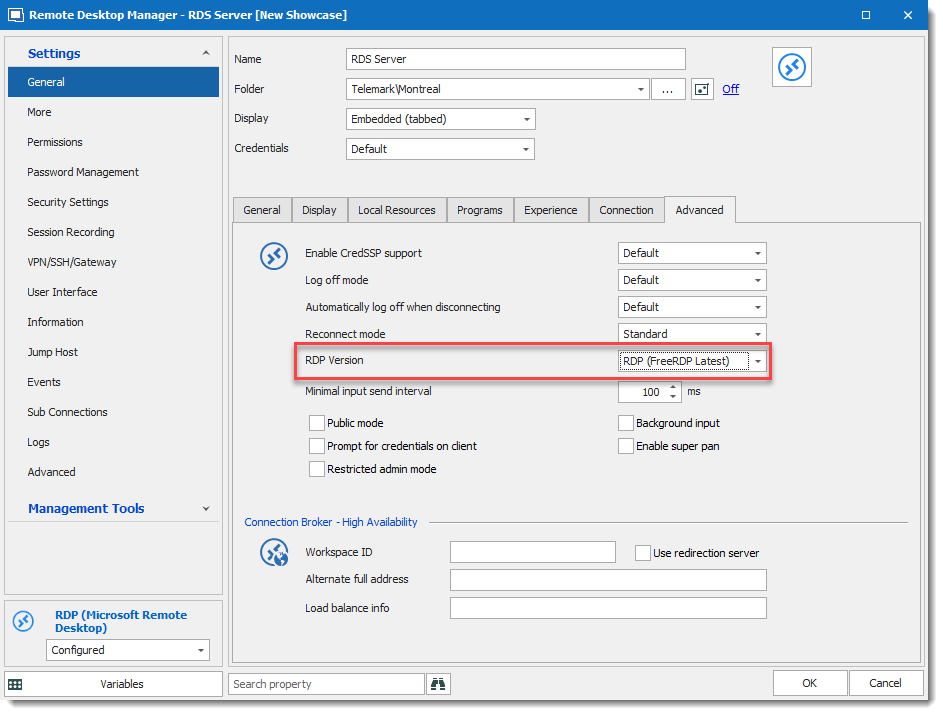
Regards,
David Grandolfo
RDP_FreeRDP.png
WOO HOO!!!! that worked!
So. Now the question is what are the benefits between the options in that drop down? I have 9 options to choose from. Is the changing to FreeRDP going to introduce different issues? (Is there a way to know?)
Either way, thank you for the workaround. I'll go edit all my RDP Sessions to follow suit.
Found a side effect. 10-key doesn't work when using the FreeRDP setup. Numbers typed on the 10-key do not send to the remote system. (Confirmed Num Lock is on.)
Using FreeRPD mean using another protocol than the normal RDP.
If you would like could you test it a bit and send me a ticket with the problem you find at ticket@devolutions.net ?
However, if you don't care using external mode, you can also change the display mode to External instead of embedded.
For the RDP engine, if it's only for you. You don't have to change it on each entry. Under File -- Options -- Type -- RDP you can change the RDP value for FreeRDP and the default will now be FreeRDP.
It's easier than editing each session.
Regards,
David Grandolfo
Thanks David.
I can send in a ticket regarding the issue in general. External kinda defeats one of the main purposes of using a 'manager' application for the purpose of RDP sessions, so I'd like to see what can be done about fixing this for embedded. At the moment either option has a problem; it's just which is one I want to live with for the moment. 10-key is a problem when using emulators on the remote server, so that's a pain. Clipboard loss is also destructive.
sigh.
Can I allude to this forum post for the ticket, or should I rephrase it for completeness in the ticket itself?
For completeness in this post, DEVO-21843 was opened Friday. Currently in "waiting for support" status.
Hello,
Thank you for opening this ticket. The agent in charge will consult its content and contact you once he have an update on that matter.
Best regards,
James Lafleur