RDM freeze when create/edit credential entry

Hello,
I have to edit some credential entries in my RDM, but when I select the entry and clic to edit or create a new one, RDM freeze and the only choice is ki it from windows task manager. The choosed entry window doesn't opens.
The other entry types are editable without any issue.
RDM 2020.1.19.0 with db datasource
Windows 10 10.0.18363
thank you
Best regads
Davide
All Comments (10)
Hello Davide,
Is the issue new after an RDM update? or is there any logs available under help -- application logs?
Could you also confirm you still use S3 for your database?
Regards,
David Grandolfo
Hello David,
I'm not sure, but it seems to me that it happened after the update.The application log is empty.
About the database, I'm using a local on my pc SQL-Lite db (S3 storage was used only to try the feature in my company lab. Now I'm in smartworking and have stopped all lab tests and experiments).
Thank you
Best regards
Davide
Hi,
Could you look at the Microsoft Event viewer if you have any application events that could help?
Moreover, as a test under File -- Data source, could you create a new SQLlite database (a second one) and create a credentials in. Then try to edit it. Does it have the same freezin issue?
David Grandolfo
Hi,
the event viewer reports this message (original is in italian, I've tid to translate)
Il programma RemoteDesktopManager64.exe versione 2020.1.19.0 non interagisce più con Windows ed è stato chiuso. Per vedere se sono disponibili ulteriori informazioni sul problema, verificare la cronologia del problema in Sicurezza e manutenzione nel Pannello di controllo.
ID processo: 32e0.
TRANSLATION:
The RemoteDesktopManager64.exe version 2020.1.19.0 program no longer interacts with Windows and has been closed. To see if more information about the problem is available, check the history of the problem in Security and Maintenance in Control Panel.
Process ID: 32e0.
On Windows Security and Maintenace is reported following message:
ll programma RemoteDesktopManager64.exe versione 2020.1.19.0 non interagisce più con Windows ed è stato chiuso. Per vedere se sono disponibili ulteriori informazioni sul problema, verificare la cronologia del problema in Sicurezza e manutenzione nel Pannello di controllo.
ID processo: 27cc
Ora di avvio: 01d60e36193ba038
Ora di chiusura: 4294967295
Percorso applicazione: C:\Program Files (x86)\Devolutions\Remote Desktop Manager\RemoteDesktopManager64.exe
ID segnalazione: e076e1d1-2808-4a71-9eb9-7bb2ae42111a
Nome completo pacchetto che ha generato l'errore:
ID applicazione relativo al pacchetto che ha generato l'errore:
Tipo interruzione: Top level window is idle
TRANSLATION:
The RemoteDesktopManager64.exe program version 2020.1.19.0 no longer interacts with Windows and has been closed. To see if more information about the problem is available, check the history of the problem in Security and Maintenance in Control Panel.
Process ID: 27cc
Start time: 01d60e36193ba038
Closing time: 4294967295
Application path: C: \ Program Files (x86) \ Devolutions \ Remote Desktop Manager \ RemoteDesktopManager64.exe
Alert ID: e076e1d1-2808-4a71-9eb9-7bb2ae42111a
Full package name that generated the error:
Application ID for the package that generated the error:
Break type: Top level window is idle
Also with a new SLQ Lite or XML datasource RDM freeze. And the same using 32bit executable.
Thank you
regards
Davide
UPDATED:
Just for my curiosity, have tried the same datasource with latest RDM Free (zip file) and the entry edit is working without any problem.
Buongiorno Davide,
Could you look under Administration -- Vault Setting what is the setting for Pwned check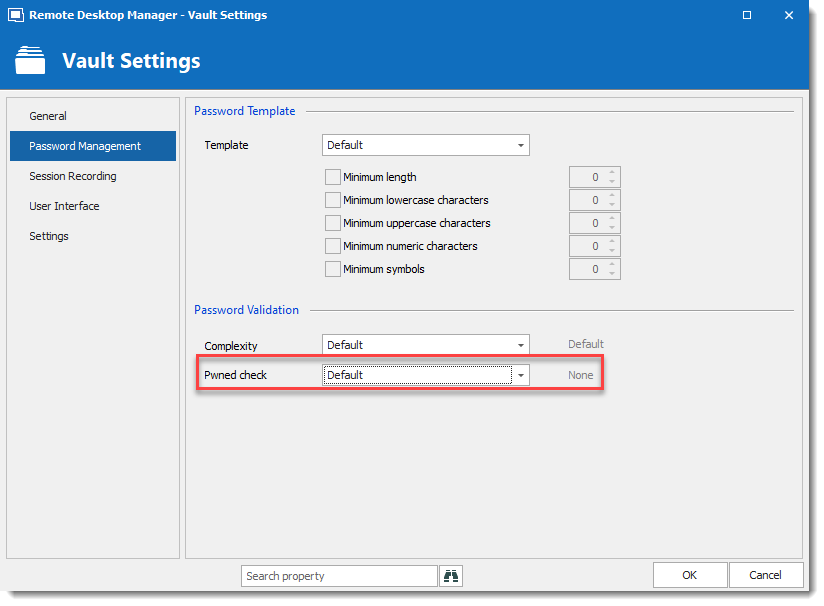
Also, we just release RDM Enterprise 2020.1.20.0 at https://remotedesktopmanager.com/home/download could you test it?
Regards,
David Grandolfo
Pwnedcheck.png
Hi,
my Vault setting is configured the same as your screenshot (default / none).
I have installed the 2020.1.20.0 release, but the issue is still there. If you want I have recorded a short video of the behavior.
I will try to uninstall the program, do a deep windows cleaning and reinstall RDM.
You can find the video here https://app.box.com/s/018wu3nmmeuzkv01g0s9xszrigtizzw0
Thank you
Best regards and Happy Easter.
Davide
Hi,
Thanks for the test, sadly the link is no more valid. I will send you a secure link in your private message to share the video.
Regards,
David Grandolfo
Hi Davide,
I don't know what happens but the link works now. The issue is strange and I think it will be easier to do a remote session to look at it.
I will open a ticket number and contact you through the ticketing system for a remote session.
Regards,
David Grandolfo
Hi David,
as I told, I have uninstalled RDM, deep cleaned my o.s. and reinstalled RDM. Now all it's working without any issue. I think the problem was related to some massive windows update recently performed.
The remote session is no longer needed and you can close the ticket.
Thank you for your time.
Best regards,
Davide
Good news, thanks for the follow-up
David Grandolfo