Help Connecting to Azure AD joined laptop

Hello!
I've searched the forums and tried some solutions pertaining to connecting to an AzureAD laptop using RDP. However, none of the solutions I've come across and tried worked.
That said, there are a few blogs that have worked using an MSTSC .rdp profile. These solutions require editing the configuration file by adding the following to the end of the file:
enablecredsspsupport:i:0
authentication level:i:2
So, using MSTSC with that configuration WORKS. However, I cannot get it to work in Remote Desktop Manager [RDM]. No matter what settings I've tried (EnableCred = False; Disable NLA; change RDP Type to 'Azure Cloud Services'; or any combination thereof, it just doesn't work.
I can import the rdp file into RDM - that 'works' except all it does it launch mstsc . However, I haven't gotten it to work natively in RDM. What am I missing? I am new to RDM as I'm transition from mRemoteNG. Thank you!
All Comments (3)
Hi,
Just a suggestion, can you try using the following format (AzureAD\<username@domain.com>) for the username as described here:
https://www.niallbrady.com/2017/08/23/how-can-i-rdp-to-an-azure-ad-joined-windows-10-device/
Best regards,
Marc-André Moreau
Thanks for this - I had read and followed it, however, it doesn't solve the problem. As I explained earlier, all this does is open MSTSC from RDM. I want to open it IN RDM in a tabbed window. How do I get this to function? I'm ok with - 'you can't do tabbed browsing with a azure ad connected device, use MSTSC'. Thanks!
Hello,
After importing the .rdp inside RDM, if you change the display setting to Embedded at the top middle. If you change this to embedded, is it working? 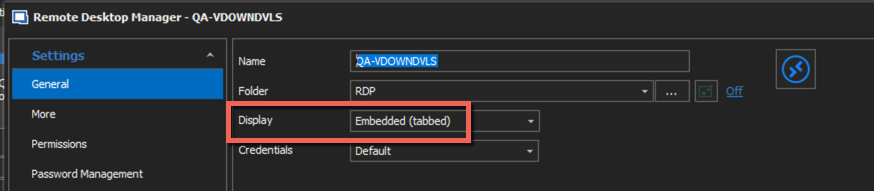
Best regards,
Jeff Dagenais
2020-03-31_09-22-33.png