License retrieval from database issues

Hi,
We have a site license for Remote Desktop Manager Enteprise Edition with more than 50 users.
The license is stored in the database (MS SQL Server) and retrieved automatically after configuring the datasource and database. This works just fine for almost all users.
However recently 3 users are experiencing license problems. In the Navigation panel the message "The enterprise license cannot be found" is shown. All other entries are missing, so RDM is not usable.
These users were able to use RDM for while (i guess during the trial period) which proves the database connection is working properly. Also test "Host" and "Test Database" are still successful, but for some reason RDM refuses to retrieve the license from the database.
I've checked their RemoteDesktopManager.cfg file and it indeed does not contain license information.
So far we have tried the following without success:
- installing latest version (2020.1.17.0)- uninstalling RDM and removing all files in %localappdata%\Devolutions\RemoteDesktopManager (is any information stored anywhere else, maybe the registry?)
- running RDM with admin rights
- creating a new RDM user and configure that user on the laptop
As a workaround i have added the license serial in the RemoteDesktopManager.cfg for these users, which works, but is not an ideal solution.
Do you know a proper solution for this issue?
Thanks and regards,
Mark
All Comments (4)
Hello,
Thank you for contacting us on that matter!
Using the latest version of RDM, I would recommend that you enter your serial under Administration -> Licenses -> Add License and that you assign it to all of your users: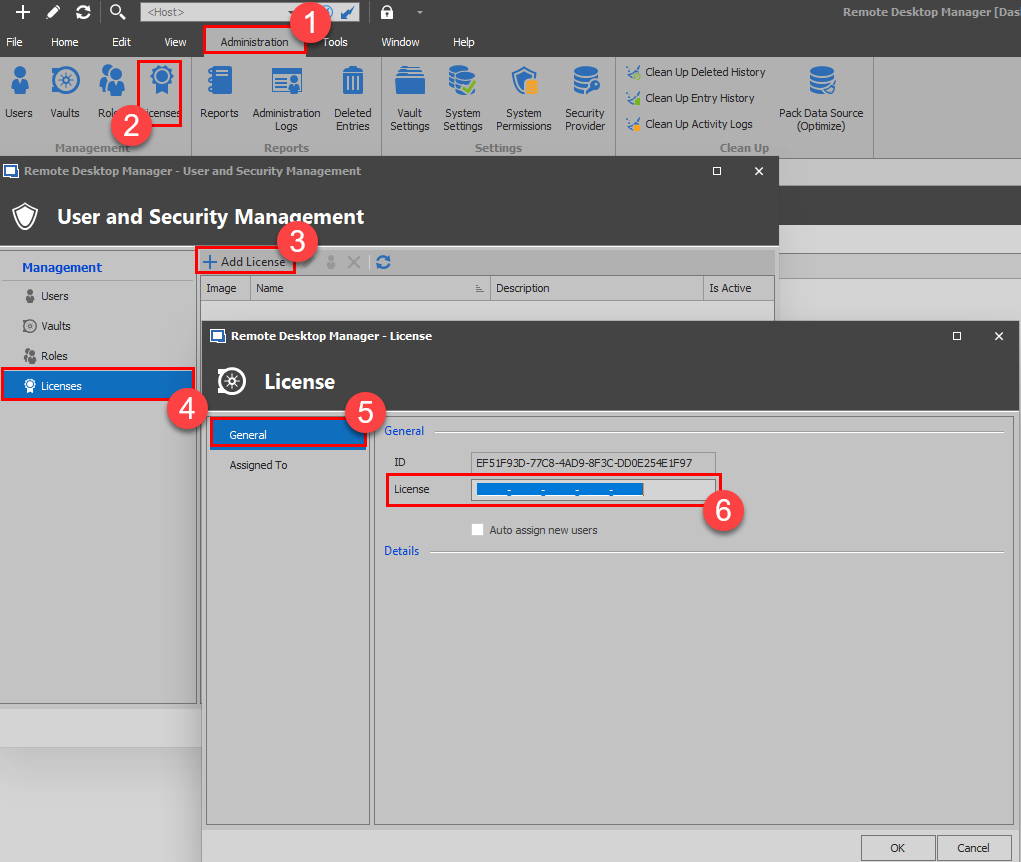 In doing so, your users will be automatically registered upon connecting to your Data Source. That said, you will need to make sure that they are all using RDM 2020.1.17.
Best regards,
James Lafleur
License.png
Hi James,
Thanks for your reply.
Until recently the license was automatically working for all users, although in the Admin License window "Auto assign to new uses" was unchecked, and none of the users had a license assigned.
So i wonder why it worked until recently. Was this functionality changed in new versions of RDM?
Just now, i've checked "Auto assign to new users and i've assigned the license to all users. Hopefully it will resolve the issue. I have to wait for a user to confirm. I'll let know.
Yes, the functionality was changed recently. The transition should have been transparent. Not sure what or why it wasn't in your case. Now that you've manually transferred to the new system with "Auto assign" all should be good from now on.
I will investigate further on my side to try to understand what went wrong.
Best regards,
Stéfane Lavergne
Hi James en Stefane,
A user confirmed that it works after I changed those settings, so the issue is resolved.
Thanks again and regards,
Mark