Issue with date sorting in SCP and FTP

The date sort is based on numbers/chars rather than actual date,
See below
All Comments (10)
Hello,
Thank you for the report, we will open a ticket to take a look at this issue.
Regards,
Hubert Mireault
Thanks Hubert,
Is there any way I can follow on the status of this issue?
Regards
Hello,
We will update this thread as soon as we have a fix for this issue.
Regards,
Hubert Mireault
Hello,
This issue should be fixed starting from the next version of RDM.
Regards,
Michaël Beaudin
Hello guys,
I don't think it's resolved. Please have a look. Version 2024.2.16.0.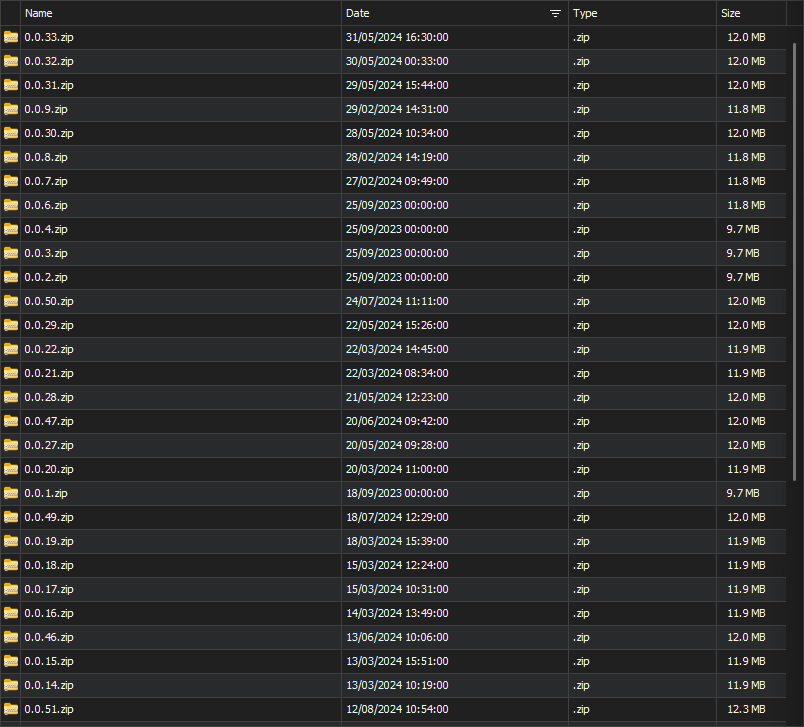
5267a726-d4ab-46bb-abaf-66751343c429.png
Hello,
I can see from your screenshot that it seems to not be sorting properly again.
We will open a ticket to fix this and keep you updated on the progress.
Best Regards,
Michaël Beaudin
Hello Michael,
Sure, thank you very much!
Hello piotrmajewski.
We've tested on our side and haven't been able to replicate the issue yet. Could you please share with us your Date Time format (the one your OS is using), as well as the exact entry type where this replicates. It would likely help us pinpoint the problem.
Regards,
Jafran Majeau
Hello Jafran,
Your comment give me thinking a little and I searched for some date settings in the app. Turns out, checking the option to "Use system date time format" solves the problem. Not sure why as the displayed date is still in the same format, but maybe that gives you a hint.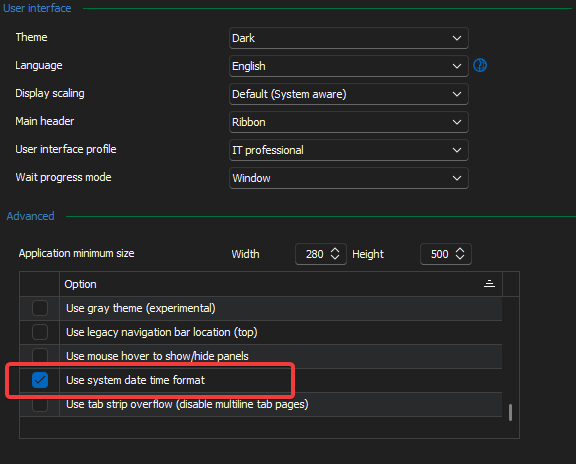
86e5feaa-e36e-4387-9714-e89fc024f960.png
Hello,
I'm glad the option works for you. We will consider this post resolved, but we've nonetheless opened a ticket to investigate why the sorting does not work when this option isn't enabled
Regards,
Jafran Majeau